
Feature: Batch & variant management
In a recall, only one question counts.
Where is batch 7621456 – and who received something from it? In Scanwiz every batch carries its own number, its own expiry date and its own purchase price. Down to the storage location, and down to the person it was issued to.
Batch number · Expiry date · Price per batch · Traceability · Variants
In short
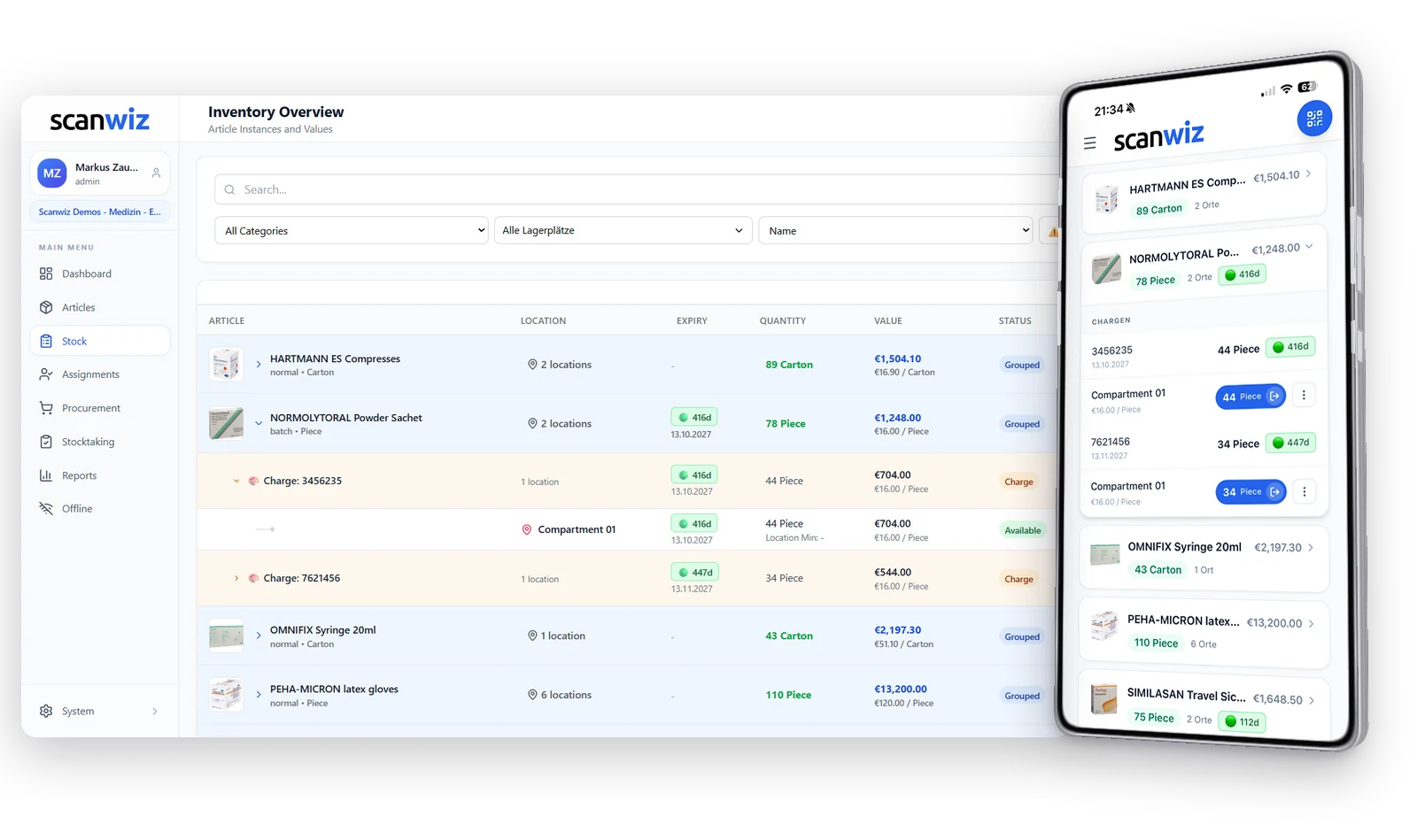
Batch management tracks not just the article, but every single delivery of it as a unit of its own – with batch number, expiry date, quantity, supplier and purchase price. Every withdrawal and every assignment is booked against exactly one batch, so that when it matters you can answer backwards where a given batch is and who received something from it. Scanwiz adds variants to that: the same structure for sizes, colours and versions of one article.
Three article types
Not every article needs to be tracked that closely.
Screws don’t need a batch number, a vaccine does. Gloves don’t need a batch, but they do need six sizes. In Scanwiz you decide that per article – and you see the type everywhere the article shows up.
Normal
One quantity, one price, done. For everything nobody will ever ask which delivery it came from.
Batches
Every delivery becomes a batch of its own, with a number, an expiry date and its own purchase price. From there on, stock, withdrawal and assignment run per batch.
Variants
One article, several versions. Every size, colour or configuration carries its own stock – without turning into six separate articles.
In the article list
The type is on every row
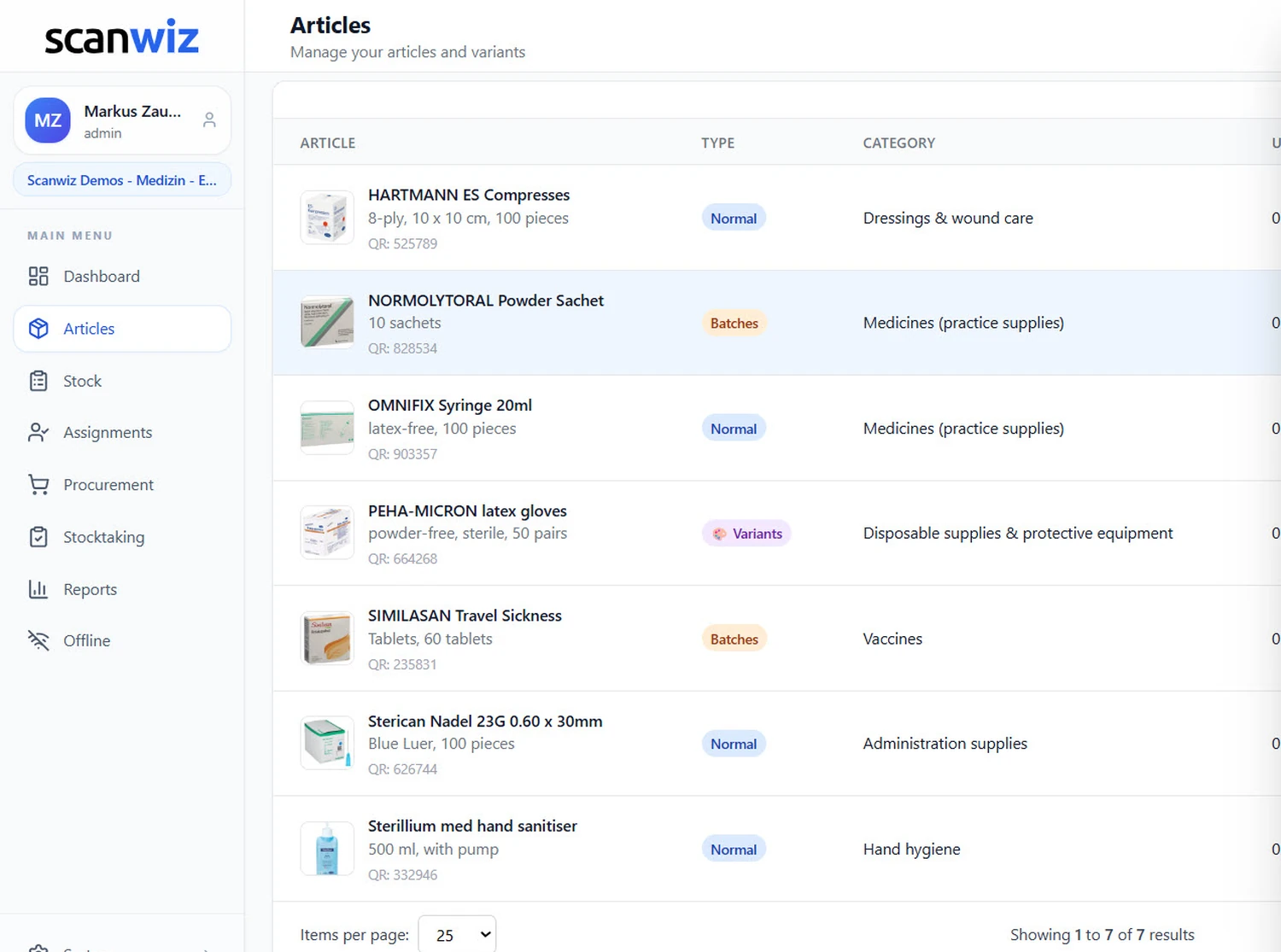
Whether an article is tracked in batches is visible at a glance – on the desktop in the “Type” column, in the app as a coloured chip right below the name. And because the list can be filtered by type, every batch article is one tap away.
- Filter “All · Normal · Batches · Variants” in the app
- The type can be changed later, without recreating the article
- Every article keeps its QR code, whatever the type
- Categories and storage locations work the same for all three types
The process
Five steps, from delivery to proof.
The effort happens once, when goods are booked in. Everything after that – withdrawal, assignment, reporting, traceability – follows from it on its own.
-
01
Set the type
Create the article as a batch article. From that moment on, every goods receipt requires a batch number.
-
02
Book in the batch
Number, expiry date, quantity, supplier and price per unit. Typed off the delivery note or scanned.
-
03
Put it away
The batch is spread across storage locations. The same batch may sit in several compartments.
-
04
Withdraw & assign
Every booking names the batch. Issuing to a person carries the batch number along too.
-
05
Monitor & prove
Days remaining in view, alerts before expiry – and, when it matters, full traceability.
When it matters
The supplier calls. What happens now?
One batch number, one question: where is the stuff, and who received something from it? Tap one of the three batch numbers below – you see exactly the answer Scanwiz gives you in that moment.
Pick a batch number above. The analysis appears here.
Interactive example · in Scanwiz, batches, storage locations and assignments come from your own stock
What’s inside a batch
An expiry date is not a property of the article.
It belongs to the delivery. Just like the price you paid for it and the supplier it came from. That is why those three things live on the batch in Scanwiz – not on the article.
Days remaining
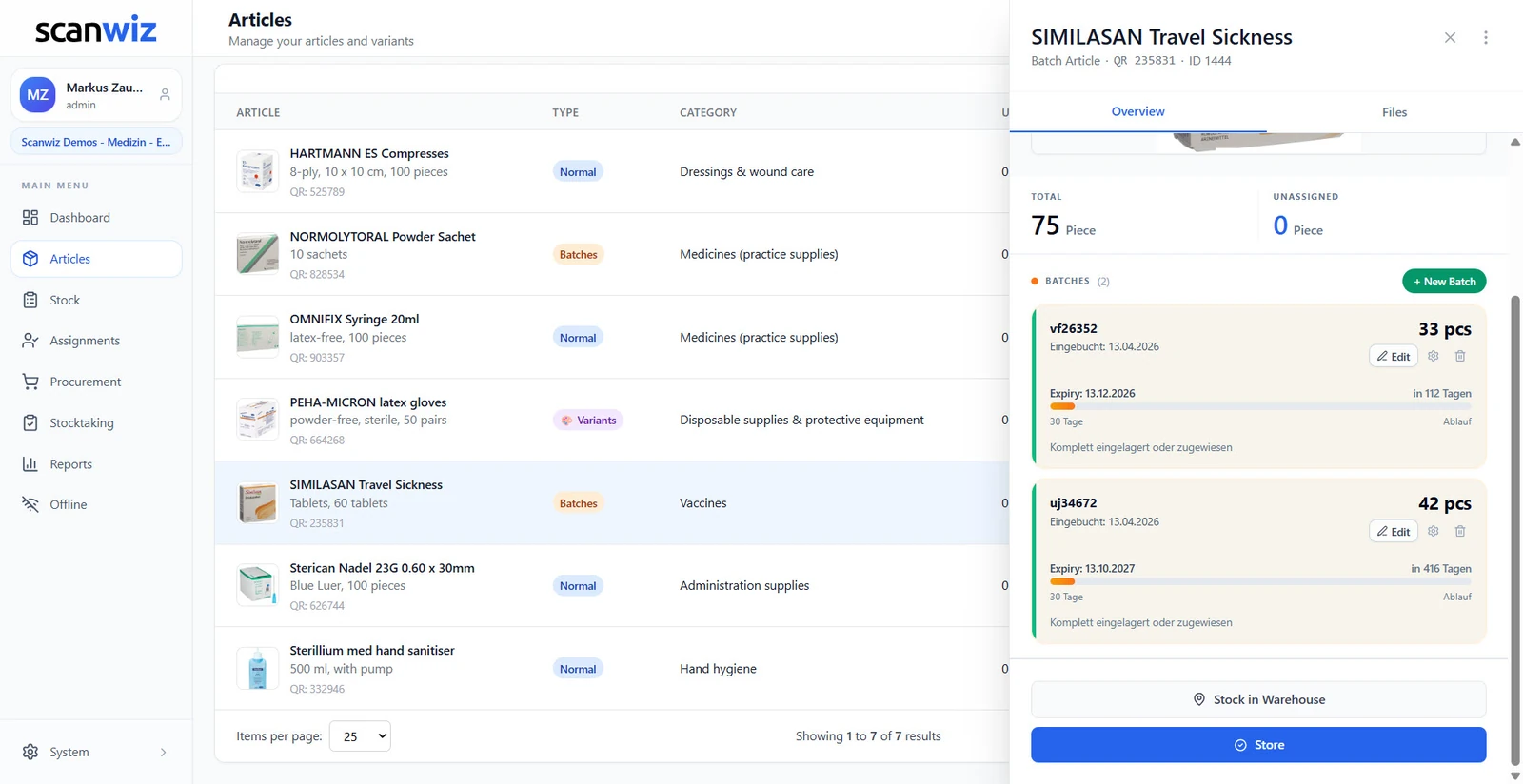
“Expires in 112 days” instead of a date
A date has to be converted in your head, a number doesn’t. So every batch shows how many days it has left – with a bar that fills up and a traffic light that runs from green through orange to red. The article always shows the batch that expires next.
- Warning threshold configurable per batch, 30 days in the example
- Expiry warnings appear on the dashboard, not only in a report
- Minimum quantity per batch across all storage locations
- Issue the older batch first – the date is right there next to it
Price per batch
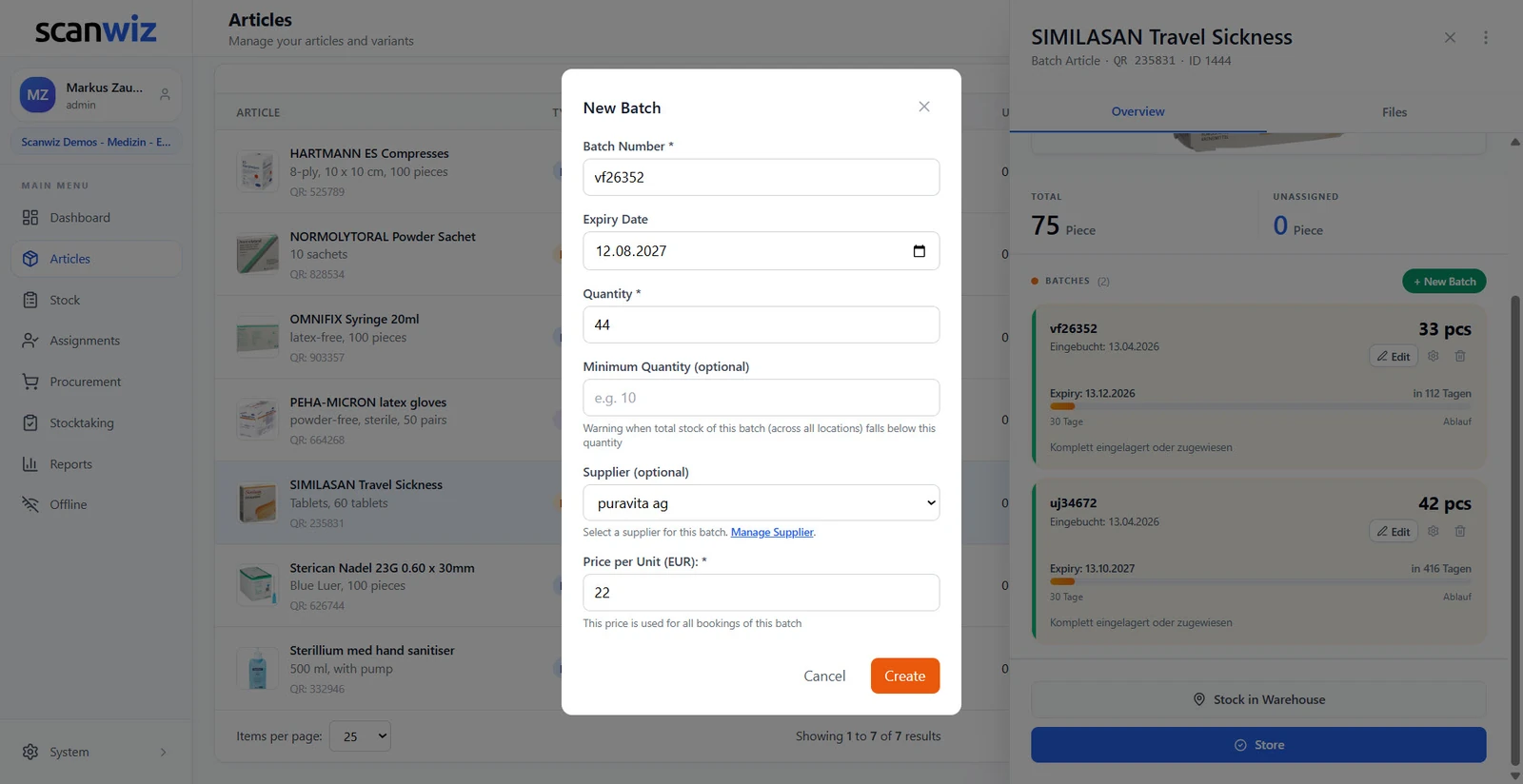
Two deliveries, two prices, one stock value
The purchase price belongs to the delivery, not to the article. Scanwiz stores it when the batch is booked in and uses it for every booking out of that batch. The article then shows the blended value – EUR 21.98 per piece in the example, even though not a single batch ever had that price.
- Supplier per batch, not just per article
- Stock value per batch, per storage location and in total
- Price increases become visible instead of blending away
- The basis for stocktaking valuation and insured sums
At the shelf
Traceability is created at the withdrawal, not afterwards.
If nobody records which batch something was taken from, the finest batch list in the world won’t help. So when you book, Scanwiz doesn’t ask for the article – it asks for the batch.
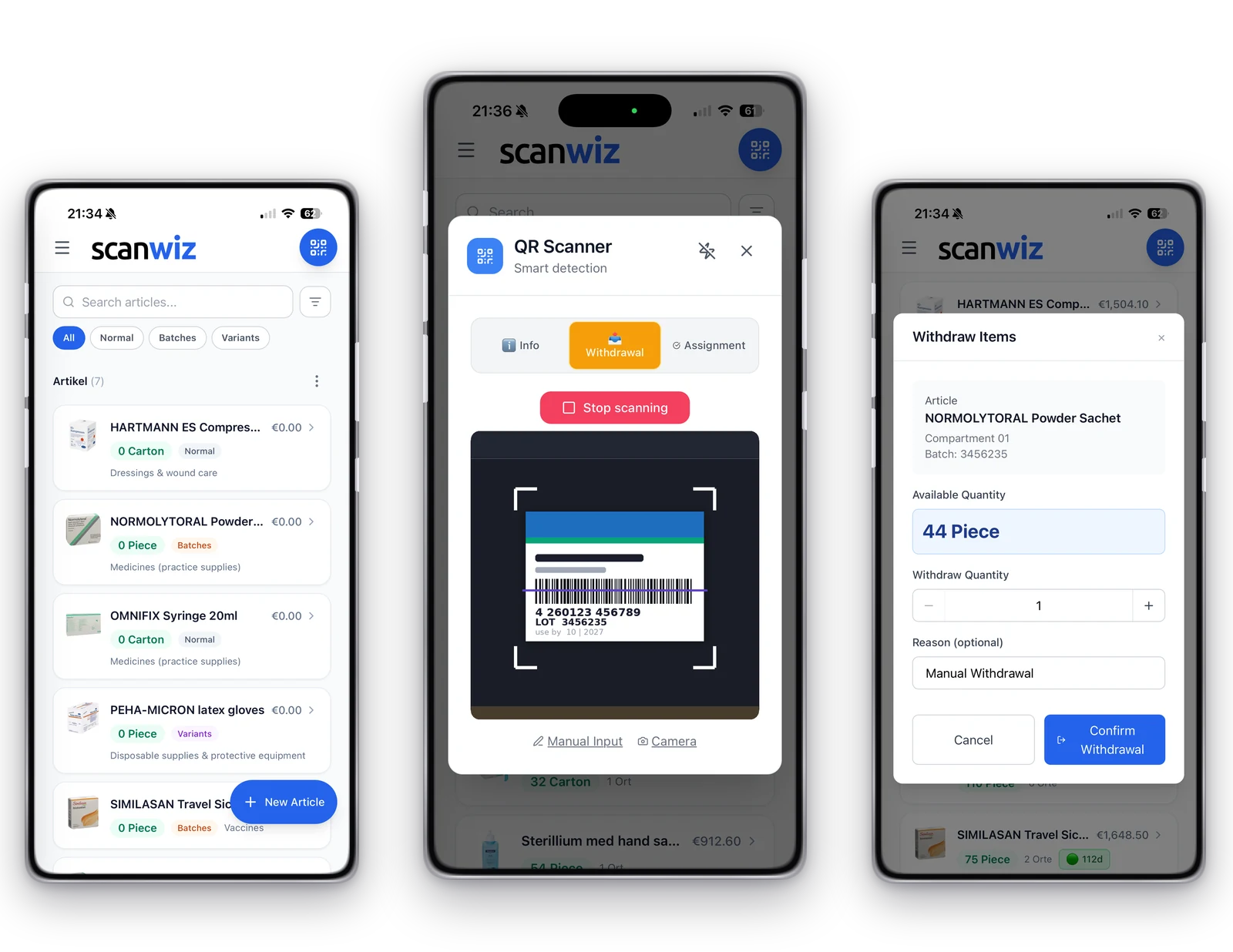
Scan
The QR scanner knows three modes: Info, Withdrawal and Assignment. You choose up front what should happen.
Pick the batch
If several batches sit in one compartment, you decide on screen – with the expiry date right next to it.
Book the quantity
Quantity, an optional reason, confirm. The stock of that batch goes down, not of some batch.
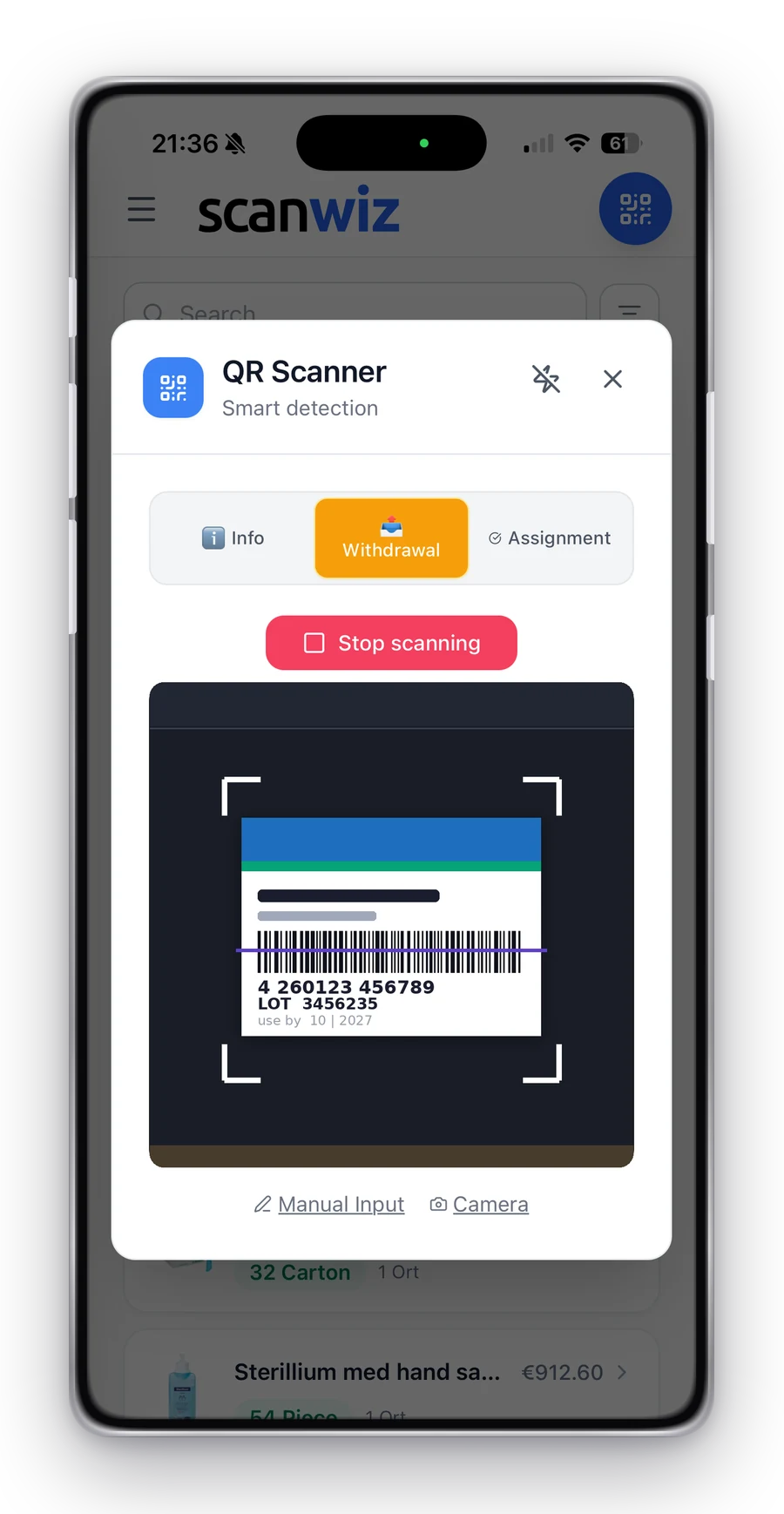
Scanner modes
Decide first, then scan
Info, Withdrawal or Assignment – the mode sits at the top of the scanner. After that one scan per pack is enough: the dialog opens with the right article, the right compartment and the right batch. And if a label is unreadable, manual input is right beside it.
- The same batch may sit in several compartments, each with its own quantity
- Record a reason for the withdrawal if you want, e.g. “Manual Withdrawal”
- With no signal it books locally and syncs automatically later
- Works with a phone camera, a tablet and an external scanner
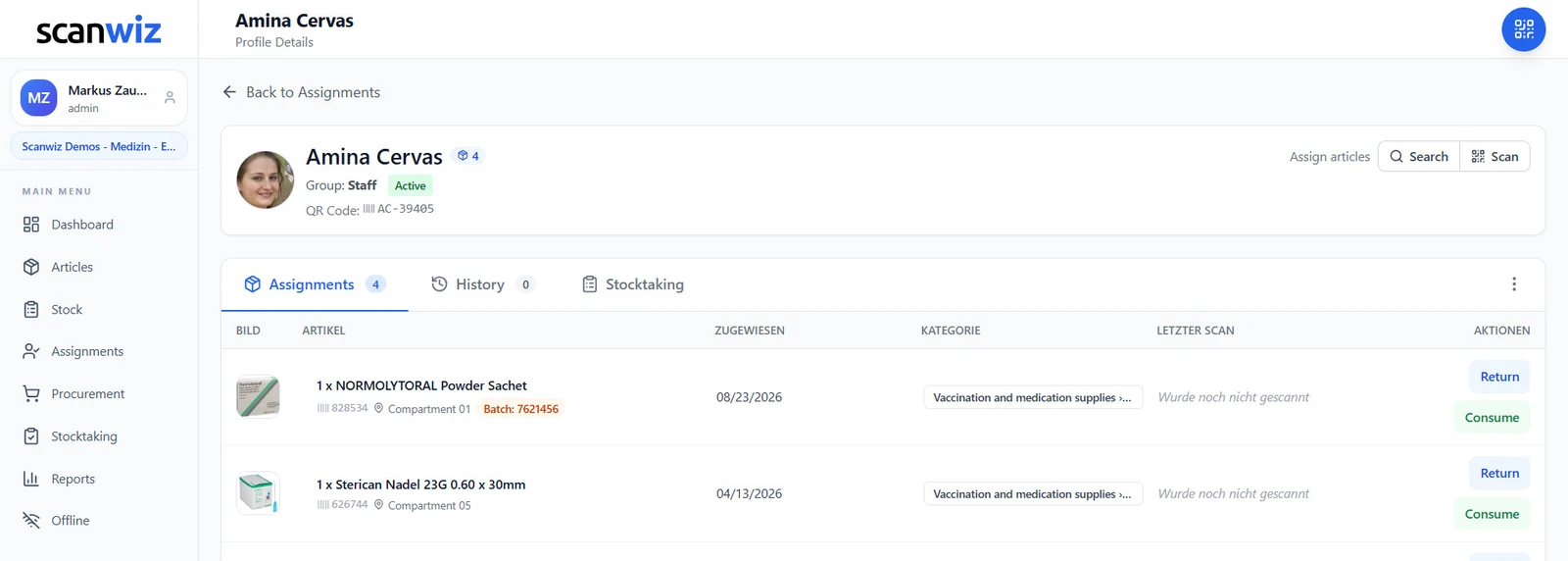
The decisive link
The batch number travels with the person
When something is issued to a person, a department or a practice, the batch number stays attached to that assignment. This is exactly where the difference is made between “somewhere in the building” and a defensible answer to the question of who received which batch.
- Batch number visible on the profile, with the date of issue
- Returns and consumption stay traceable down to the batch
- Works for sites, vehicles and departments as well
- The history is kept, even after the item comes back
Who has what, batches aside? Assignments to people, vehicles and sites are a topic of their own.
to equipment managementReporting
Eight reports that only exist with batches.
Without batches you can count stock. With batches you can answer questions: which goods expire first, how the purchase price developed, where a particular number ended up.
Batch Overview
All active batches with quantity, unit price, total value and expiry in one table.
Expiry Monitoring
All batches sorted by days remaining – whatever expires first is at the top.
Expiry Alerts
Only the batches that are getting tight. The list for Monday morning.
Batch Value Analysis
What’s tied up in the warehouse – broken down by batch and price.
Batch Status
Status and movements of all batches at a glance, active and closed alike.
Batch Movements
Entries and exits per batch, in chronological order and with quantities.
Batch Traceability
Every transaction of a batch: location, time, quantity, person involved.
Batch Value Development
How prices and tied-up value have changed from batch to batch.
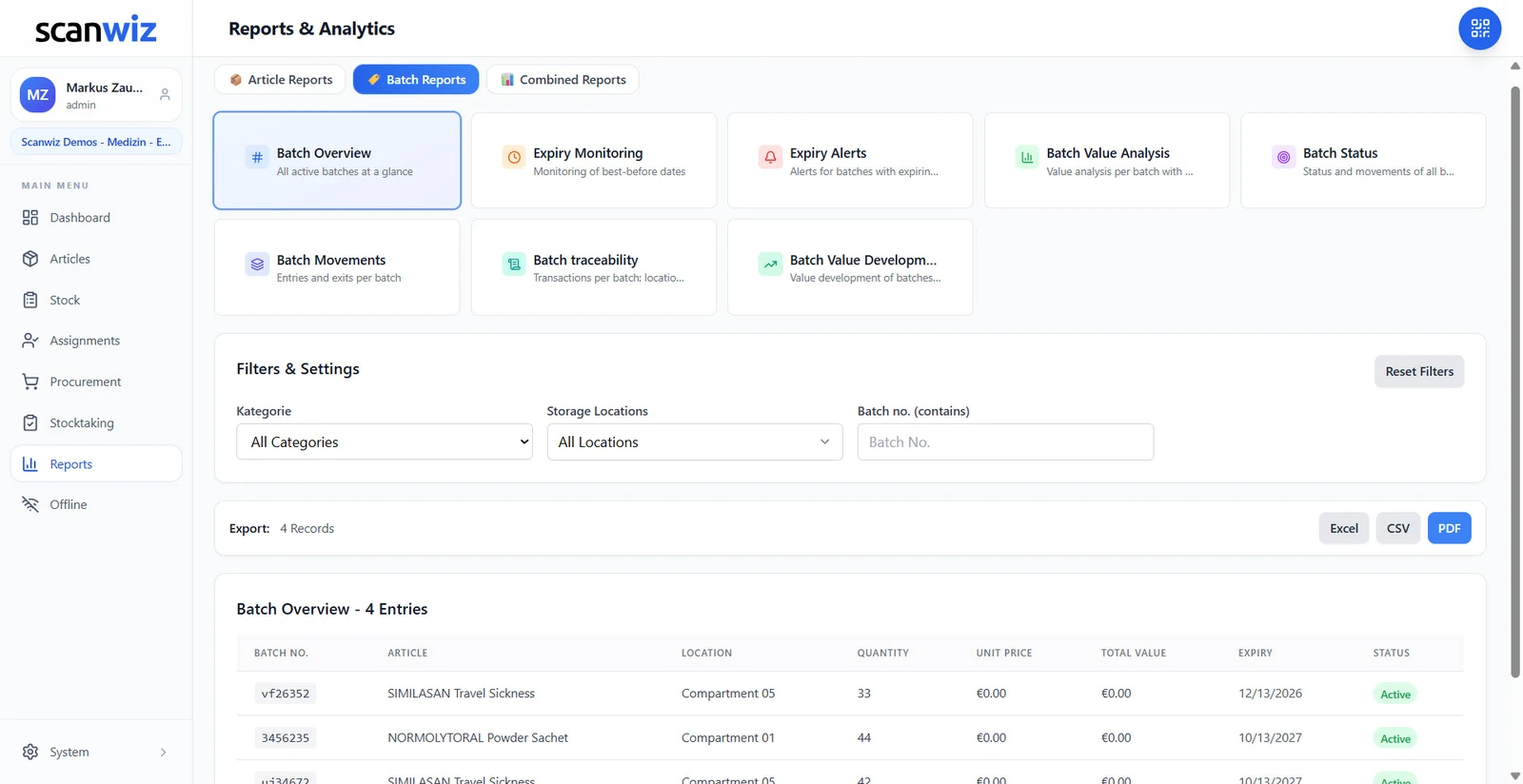
Filter and hand on
Three filters, three export formats
Every report can be narrowed down by category, storage location and batch number – and the number search works on partial matches, so a fragment from the delivery note is enough. Whatever is left goes out as Excel, CSV or PDF to accounting, your tax advisor or an auditor.
- Batch number searchable by partial match
- The number of records is shown before you export
- Critical expiry dates are colour-coded in the table
- If you’d rather automate your reporting, there’s the REST API
Prefer asking over filtering? “Which batches expire next quarter?” – with AI Connect your assistant answers that in plain language.
to scanwiz ai connectVariants
Six sizes are not six articles.
Set up gloves in six sizes as six articles and you have six master records to maintain – and still no answer to the question of how many gloves there are in total. Variants solve exactly that.
Batch
When did it arrive, how long does it last?
- Distinguishes deliveries of the same article
- Carries expiry date, supplier and purchase price
- Is assigned at goods receipt, not when the article is created
- Answers: “Which delivery did this come from?”
- Typical: medicines, sterile goods, reagents, food
Variant
Which version is it?
- Distinguishes versions of the same article
- Carries size, colour, packaging or configuration
- Is defined once on the article and stays
- Answers: “Which size is still in stock?”
- Typical: gloves, workwear, catheters, screws
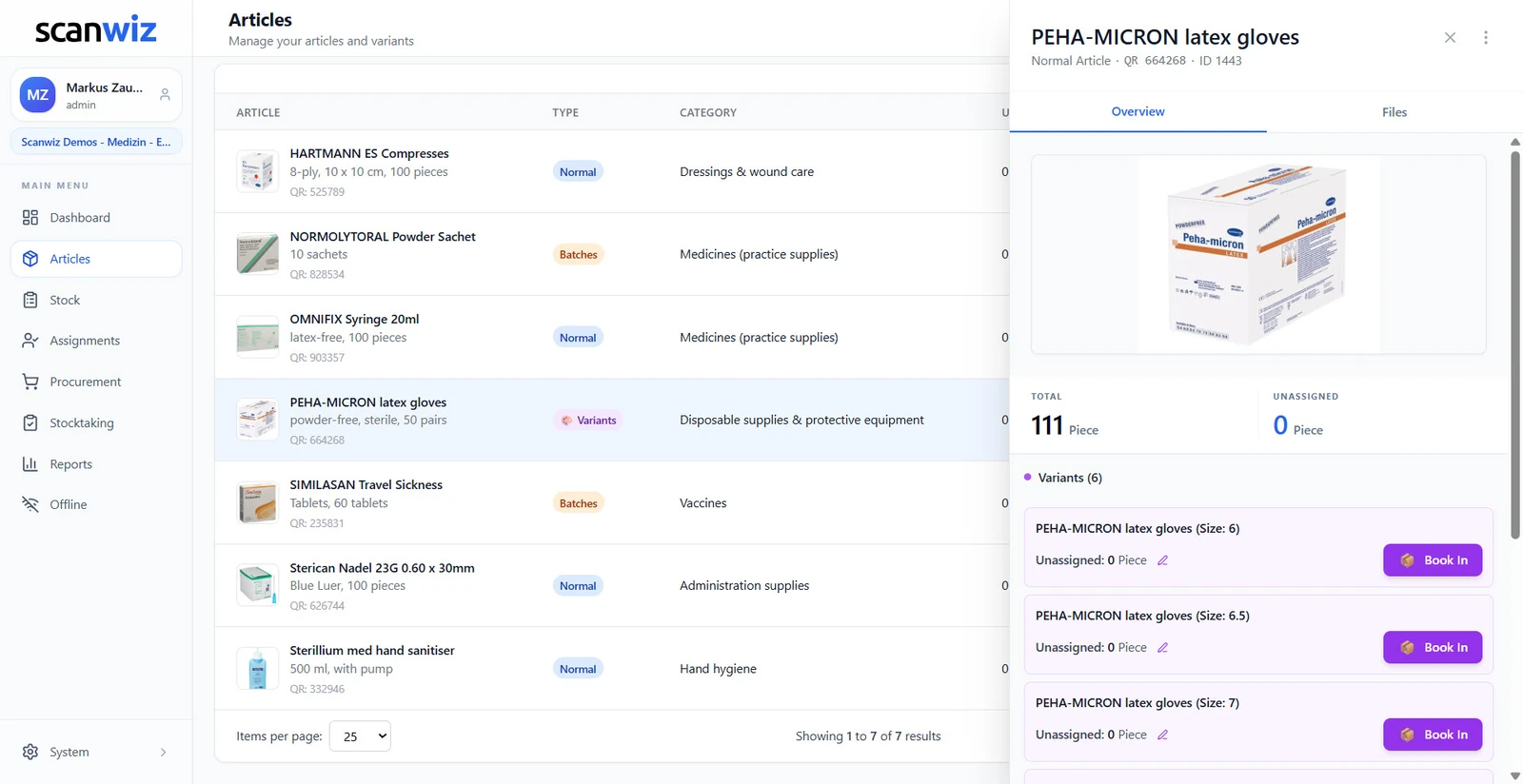
On the article
One master record, six stock levels
The article keeps its name, its category and its QR code. Below it, every variant carries its own stock, its own minimum quantity and its own book-in. The total sits on top – which answers both questions at once: how many in total, and how many in size 7.
- Total stock and stock per variant side by side
- Minimum quantity per variant – the warning names the size
- The shopping list shows the variant, not just the article
- Add new sizes without recreating the article
What changes
Six situations where the batch makes the difference.
Batches are a nuisance as long as nothing happens. And priceless in exactly the moment something does.
The recall
Type in one number and see what’s still on the shelf and what has already been issued. Instead of opening every compartment one by one.
The expiry
Whatever runs out in 30 days speaks up beforehand. Expired goods cost twice: once in purchasing, once in disposal.
The audit
An auditor asks where a delivery went. The answer is an export, not a reconstruction from delivery notes.
The valuation
Two deliveries, two prices. The stock value stays correct instead of running on one averaged wishful number.
The follow-up question
“Which batch did the patient receive?” The assignment carries the number along, months later too.
The record
Hosted in certified data centres in Germany, GDPR-compliant – including assignments to named people.
Medical practice, lab or care? How batches, expiry dates and practice supplies work together day to day is on the industry page.
inventory management for medical practicesFrequently asked
Answered briefly.
What is batch management?
Batch management tracks not just the article, but every single delivery of it as a unit of its own – with batch number, expiry date, quantity, supplier and purchase price. Every withdrawal and every assignment is booked against exactly one batch. That makes it possible to answer backwards where a given batch is and who received something from it. Without that link, a recall leaves you with only one option: block the entire stock.
What is the difference between a batch and a variant?
A batch distinguishes deliveries of the same article and carries the expiry date, the supplier and the purchase price – it comes into being at goods receipt. A variant distinguishes versions of the same article, such as size or colour, and is defined once on the article. The batch answers “which delivery did this come from?”, the variant answers “which size is still in stock?”. In Scanwiz you decide per article whether it is tracked as a normal article, as a batch article or with variants.
How does tracing a batch work?
You enter the batch number – part of it is enough – and see how the batch is distributed: what quantity is still at which storage location, what has been withdrawn, and which people, departments or sites something has been assigned to. The “Batch Traceability” report lists every transaction with location, time, quantity and the person involved, and can be exported as Excel, CSV or PDF.
Are expiry dates monitored automatically?
Yes. Every batch shows its days remaining with a bar and a traffic light, and the article always shows the batch that expires next. Once the configured warning threshold is crossed, the batch appears in the expiry warnings on the dashboard and in the “Expiry Alerts” report. The threshold can be set per batch.
Can one batch sit in several storage locations?
Yes. The stock of a batch can be spread across any number of storage locations, each with its own quantity. In the stock overview you expand from the article via the batch down to the individual location. The other way round, one compartment can hold several batches of the same article – when you withdraw, you decide which one it is booked from.
Does every batch have its own purchase price?
Yes, and that is one of the most important points. The price per unit is stored when the batch is booked in and used for every booking out of it. The article then shows the blended value across all batches. If purchase prices rise, that becomes visible instead of dissolving into a single average price.
Does the batch number survive when an item is issued to a person?
Yes. When an article is assigned to a person, a department, a vehicle or a site, the batch number stays attached to that assignment and is visible on the profile. Returns and consumption stay traceable down to the batch as well. There is more on assignments on the page about equipment management.
Can I book batches from my phone?
Yes. The scanner in the app knows three modes: Info, Withdrawal and Assignment. You choose the mode, scan the code on the pack or on the compartment, and the matching dialog opens with article, storage location and batch. Enter the quantity, optionally give a reason, confirm. With no signal it books locally and syncs automatically later.
Which reports are available for batches?
Eight: Batch Overview, Expiry Monitoring, Expiry Alerts, Batch Value Analysis, Batch Status, Batch Movements, Batch Traceability and Batch Value Development. Each can be filtered by category, storage location and batch number and exported as Excel, CSV or PDF.
Can I switch an existing article to batches later on?
Yes, the type of an article can be changed without recreating it. It makes sense to tie the switch to the next goods receipt: from then on every delivery gets its batch number, while the old stock stays recognisable as such. The article’s QR code, category and storage locations stay untouched.
Are batches taken into account during stocktaking?
Yes. Counting happens at the level at which stock is tracked – for batch articles that means per batch and per storage location. So once the count is closed, not only the total quantity is right, but the split across the individual batches too. How a stocktake runs in Scanwiz is described on the page about stocktaking software.
Does this meet traceability requirements?
Scanwiz provides the technical basis: batch-specific bookings, a complete transaction history, exports for audits and accounting, and hosting in certified data centres in Germany. Whether that is sufficient for your specific case depends on the regulation involved – MDR, GMP, HACCP or industry-specific rules, for example. Get in touch and we’ll look at your requirements together.
More than 250 customers already rely on Scanwiz
The call comes eventually. The answer should already be there.
Create one batch article and book in two deliveries. After that you’ll know whether it fits – free of charge, no credit card.
4.9 out of 5 stars from more than 120 verified customer reviews



