
AI inventory management · Scanwiz AI Connect
Ask instead of click.
Connect Scanwiz to ChatGPT, Claude or Cursor and ask about your stock and assets in plain language. And if you want, your assistant can carry out tasks too – after you confirm them.
MCP · OAuth · read-only by default · writing optional
Live examples
Ask your warehouse. It answers.
These are questions from everyday work – phrased the way you would ask a colleague. Pick one and see what your assistant returns.
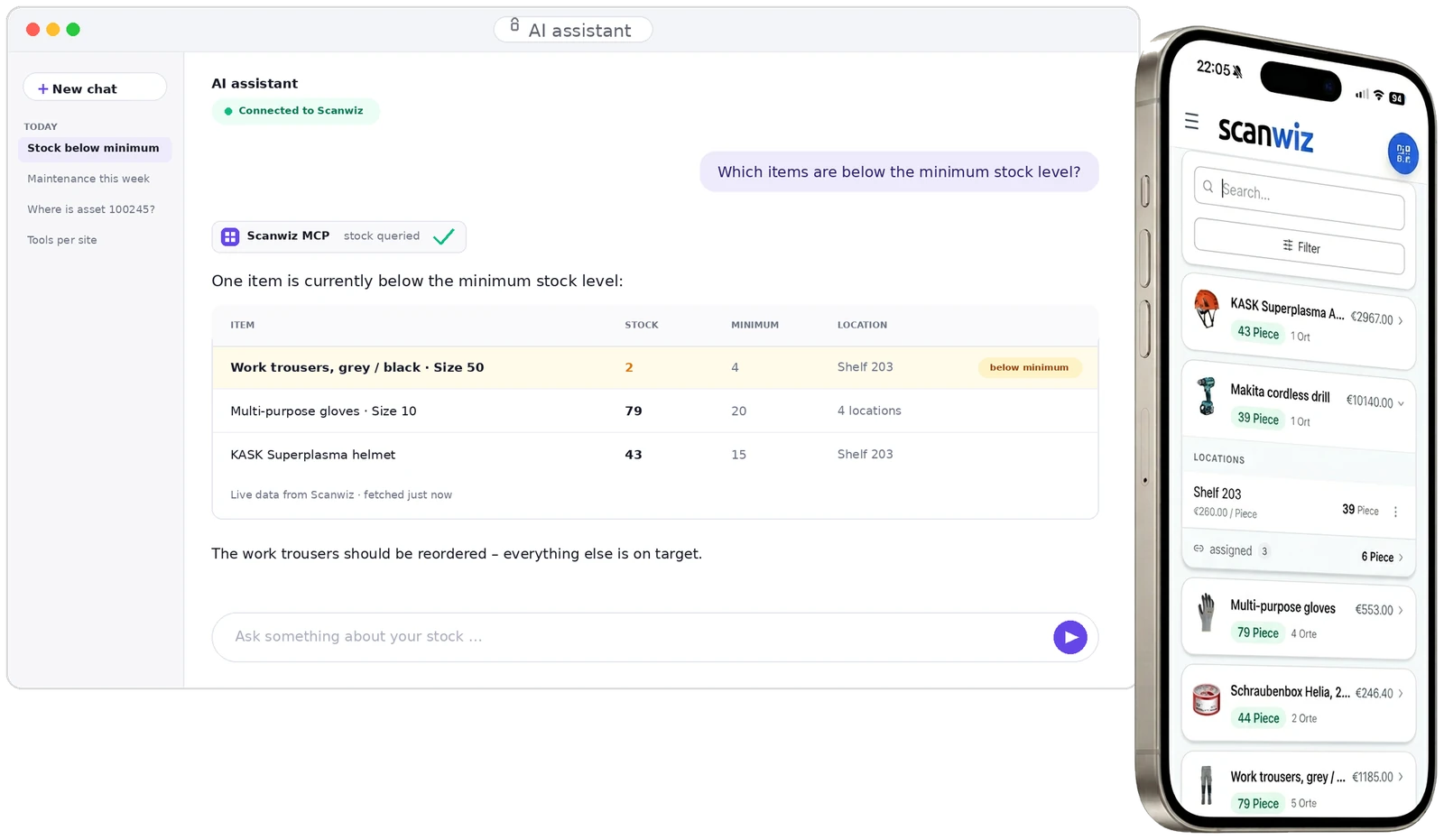
One item is currently below the minimum stock level:
| Item | Stock | Minimum | Location | |
|---|---|---|---|---|
| Work trousers, grey / black · Size 50 | 2 | 4 | Shelf 203 | below minimum |
| Multi-purpose gloves · Size 10 | 79 | 20 | 4 locations | on target |
| KASK Superplasma helmet | 43 | 15 | Shelf 203 | on target |
The work trousers should be reordered – everything else is on target.
Example answer · in your account the figures come live from Scanwiz
There are 11 locations. The five holding the most stock:
| Location | Items | Instances |
|---|---|---|
| Shelf 203 | 6 | 142 |
| Section A | 4 | 57 |
| Workshop | 4 | 38 |
| North site | 3 | 21 |
| Vehicle 1 | 2 | 9 |
Example answer · in your account the figures come live from Scanwiz
Four items are stored there:
| Item | Stock | Status |
|---|---|---|
| Work trousers, grey / black · Size 50 | 2 pcs | below minimum |
| KASK Superplasma helmet | 43 pcs | on target |
| Multi-purpose gloves · Size 10 | 79 pcs | on target |
| Screw box Helia, 25 mm | 44 pcs | on target |
Example answer · in your account the figures come live from Scanwiz
Three assets are currently assigned to Emilian:
| Asset | QR code | Assigned since | Status |
|---|---|---|---|
| Dell laptop | 121234 | 17 Jun 2026 | OK |
| Step ladder, 8 steps | 100245 | 2 Jul 2026 | OK |
| Makita cordless drill | 118902 | 28 Jul 2026 | OK |
Example answer · in your account the figures come live from Scanwiz
Three checks are due within the next 14 days:
| Asset | Check | Due | Responsible |
|---|---|---|---|
| Step ladder, 8 steps | Visual check | Tue, 4 Aug | Emilian |
| Makita cordless drill | Electrical test | Thu, 6 Aug | Workshop |
| KASK Superplasma helmet | Expiry date | Wed, 12 Aug | Store |
Example answer · in your account the figures come live from Scanwiz
One check is overdue:
| Asset | Check | Was due | |
|---|---|---|---|
| Forklift H 16 | Annual inspection | 28 Jul 2026 | 6 days overdue |
All other checks are on schedule.
Example answer · in your account the figures come live from Scanwiz
The last recorded reading:
- Asset
- Forklift H 16
- Counter
- 4,812 operating hours
- Recorded on
- 1 Aug 2026
- Next service at
- 5,000 h
188 operating hours remain until the next service.
Example answer · in your account the figures come live from Scanwiz
Found – here are the details:
- Object
- Step ladder, 8 steps
- QR code
- 100245
- Location
- North site
- Assigned to
- Emilian
- Status
- OK
Assigned on 2 July. The next visual check is scheduled for Tuesday.
Example answer · in your account the figures come live from Scanwiz
Sounds like your day? Connect Scanwiz to your assistant in minutes – without a line of code.
start free trialSetup
Connected in three steps.
Between “never done this” and your first answer there are a few clicks – no integration, no project, no developer.
Enable MCP
In Scanwiz go to Settings → Integrations, open the “Scanwiz MCP” card and switch on “MCP active” and “OAuth for connectors”. The endpoint sits right below it.
Connect your assistant
Add Scanwiz as a connector in your assistant and paste the endpoint. For ChatGPT the step-by-step guide is right there in Scanwiz.
Confirm access
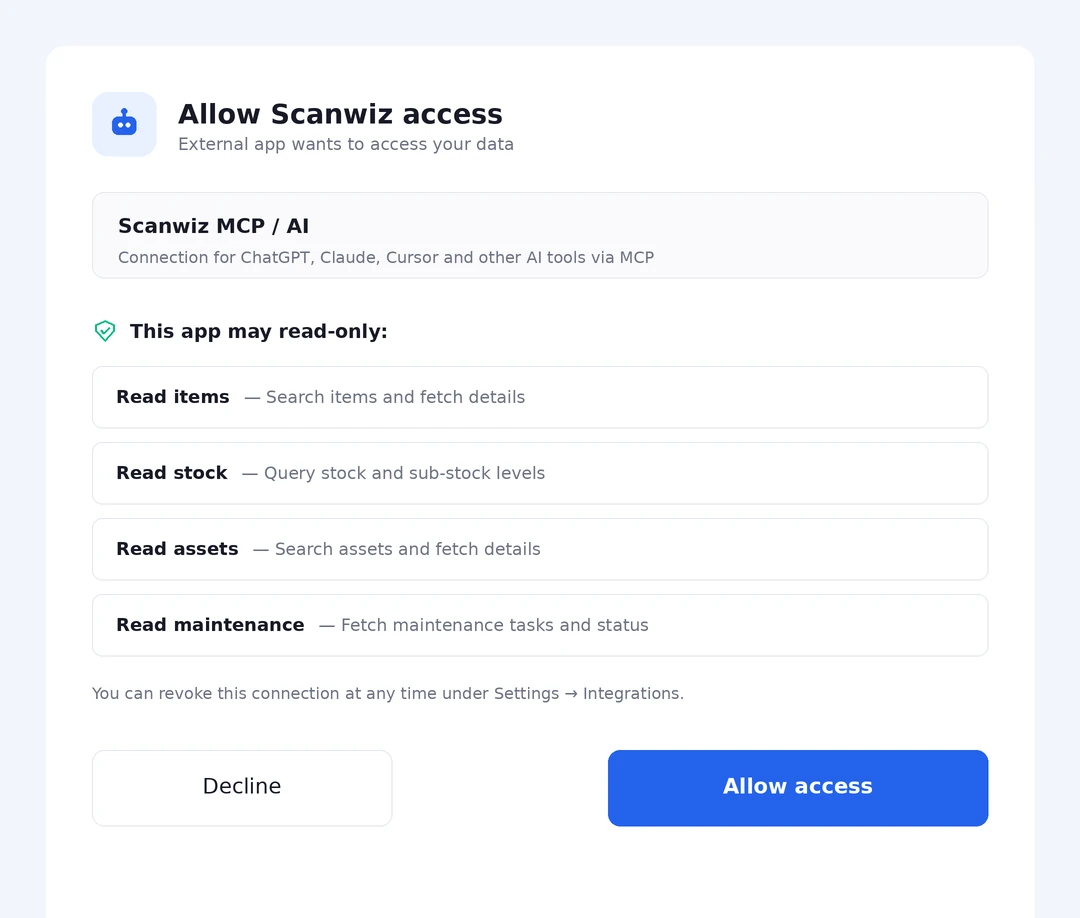
Sign in once via OAuth and confirm the read permissions – from then on your assistant answers from your real data.
Step 3 in detail
Confirm once – and know exactly what you grant
When connecting, Scanwiz spells out what the assistant may access. No bundled consent, no fine print: you see every single permission before you agree.
- Sign in via OAuth – no keys to copy around
- Four read permissions by default, no write permissions
- Revoke any time under Settings → Integrations
And if you change your mind? The connection can be revoked at any time – in the assistant or under Settings → Integrations.
see securityThe difference
Others deliver data. Scanwiz delivers answers.
An interface returns records that somebody has to evaluate afterwards. Scanwiz knows how stock, assets, maintenance and assignments relate – and answers the question outright.
Raw data from an API
Only the start of the work
GET /api/articles?stock=min
→ 247 records as JSON
- Know the endpoints and read the documentation
- Filter and evaluate the records yourself
- Establish the links between modules yourself
- Heavy prompt engineering so the AI understands it
Answer from Scanwiz
The result, not the raw material
“Which items need reordering?”One item is below the minimum stock level: Work trousers size 50 – 2 of 4 pieces, Shelf 203.
- Knows the link between stock, minimum and location
- Delivers the result instead of hundreds of records
- No prompt engineering needed
- The same rules apply as inside Scanwiz
Domain knowledge, not raw data
Scanwiz knows the connections.
The REST API of course remains. It is still the right way for your own integrations – AI Connect is the way for everyday work.
start free trialOptional add-on
From asking questions to getting things done.
Switch on the write permissions and your assistant does more than answer – it carries out tasks after you confirm them. Out of the box this is switched off.
I will make the following changes:
- Asset
- Makita cordless drill · 118902
- New status
- defective
- Follow-up
- Maintenance task “Check repair”
- Assignment
- stays with Emilian
Example · nothing runs until you confirm
What your assistant can take over
As soon as the matching write permissions are active.
- Report defects on assets
- Create maintenance tasks
- Record counter readings
- Hand out assets
- Take assets back
- Edit maintenance tasks
And this always applies
Four rules that cannot be switched off.
- You see what will happen and confirm it
- Duplicate requests are detected – no double bookings
- Never more rights than the signed-in user has
- Every change is logged: who, when, what
Nearly all of this revolves around equipment. Defects, maintenance, meter readings, issue and return – how Scanwiz tracks tools and devices as individual objects is covered on the feature page.
to equipment managementPermissions & security
You decide what the assistant may do.
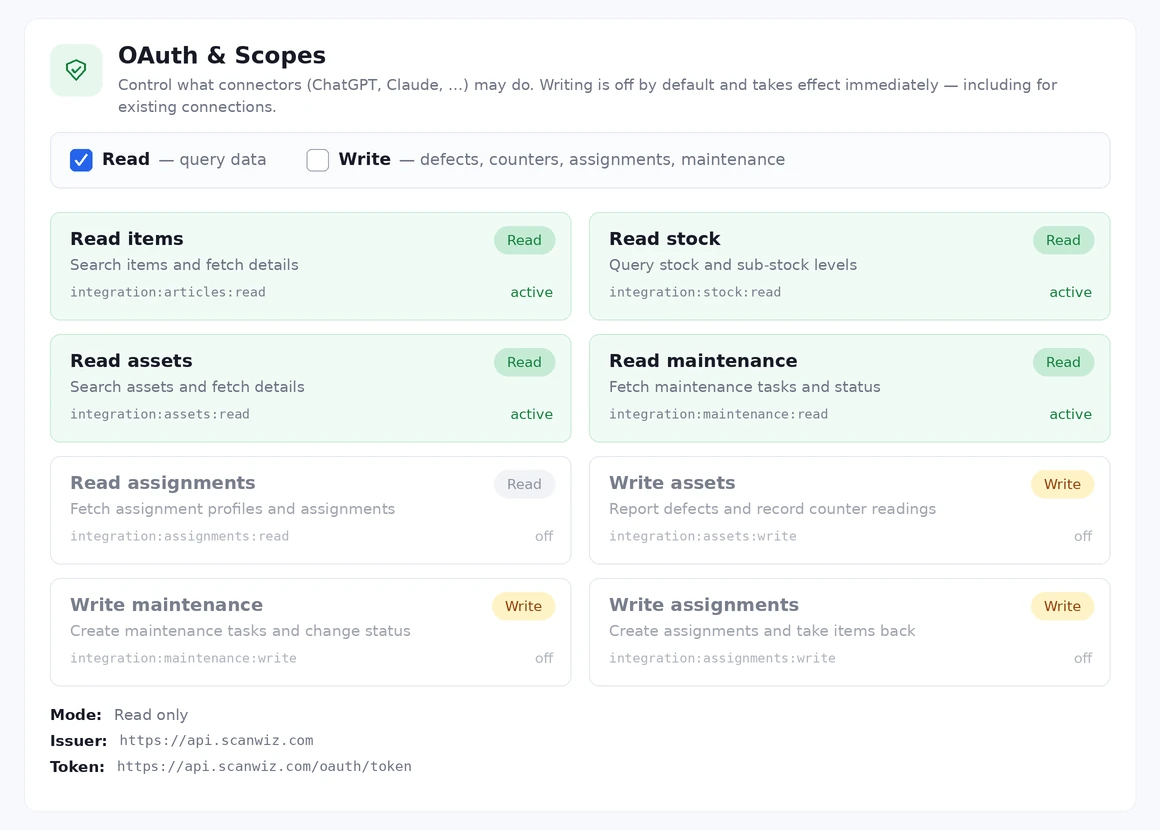
Every permission can be switched individually – five for reading, three for writing. A change takes effect immediately, even on connections that already exist.
Settings → Integrations
Eight permissions, individually switchable
One page shows what a connected assistant may do – and what it may not. No hidden fine print, no bundled consent.
- Mode “Read only” is the default
- Writing covers
assets:write,maintenance:writeandassignments:write - Changes apply immediately, including to existing connections
- Fully revocable at any time
OAuth sign-in
You sign in as usual. No passwords or keys are copied or stored.
Reading is the default
Out of the box the connection runs in “read only” mode. You enable write access deliberately – or never.
Confirmation before every action
The assistant first shows what it would change. Only your click triggers it.
No double actions
If a request arrives twice due to network issues, Scanwiz detects it – no duplicate bookings.
Never more than you
Your user permissions and your tenant apply. What you may not do, the assistant may not do either.
Logged and revocable
Every query and every change is recorded. Access ends the moment you disconnect.
In use
AI inventory management that runs on real stock.
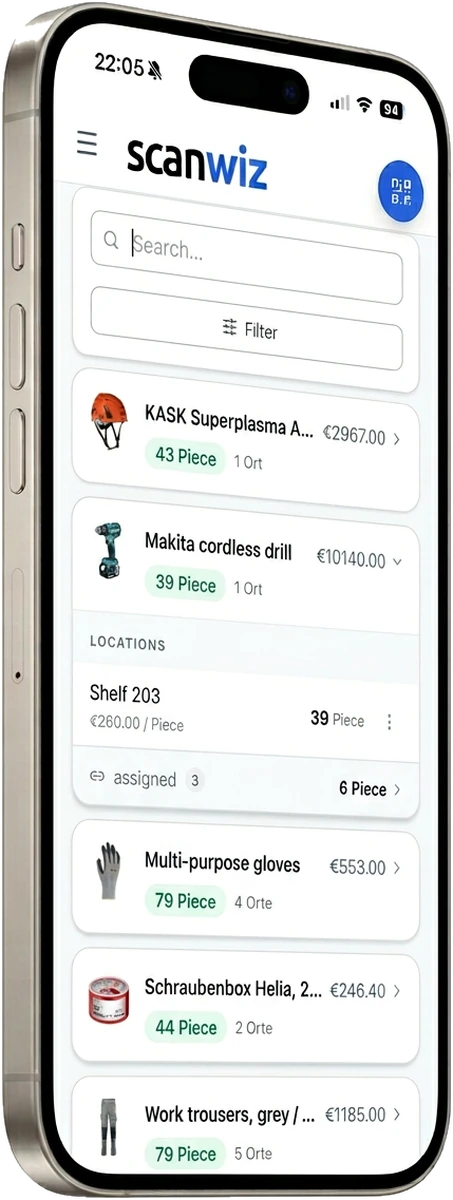
AI Connect is not a second system. It reads exactly the stock your team maintains every day with the app and the scanner.
Workshop & site
“Where is the cordless drill right now?”
The same data – typed once, asked once
Your team creates the data by scanning: stock, locations, assignments. That is exactly what the assistant answers from – no second data set, no export in between.
- Stock and locations in seconds
- Trace assignments to people and projects
- Works wherever your assistant runs
Where does all that data come from? From the scan at the rack. Every withdrawal, every assignment and every stocktake count lands exactly where your assistant finds it later.
to the barcode scannerFrequent questions
Answered briefly.
What exactly is Scanwiz AI Connect?
A connection between your Scanwiz account and AI assistants such as ChatGPT, Claude or Cursor. Technically it is built on the open Model Context Protocol (MCP). For you it means: the assistant can read your stock and asset data and answer questions about it – without exports and without detours.
Which assistants can I connect?
All of them that support MCP. Currently these include ChatGPT, Claude and Cursor. Because MCP is an open standard, future assistants will usually work as well without you changing anything.
Do I need programming skills?
No. You sign in via OAuth, the same way you sign in to other services. There are no endpoints to research, no keys to manage and no integration to maintain.
Does the AI really see all my data?
No. The same user permissions apply as with your normal sign-in, and the connection is limited to one tenant. What your account may not see, the assistant does not see either.
Can the AI change or book anything?
Not by default – the connection starts in “read only” mode. If you enable the write permissions, your assistant can report defects, record counter readings, create and edit maintenance tasks and hand out or take back assets. Before every change it shows what it will do and waits for your confirmation.
What happens if a request arrives twice?
Scanwiz detects duplicate actions – after a network drop, for example – and carries them out only once. Duplicate bookings or maintenance tasks created twice do not occur.
Can I switch write permissions off again later?
Yes, at any time under Settings → Integrations. The change takes effect immediately – including on connections that already exist.
Where do I find the feature in Scanwiz?
Under Settings → Integrations. There it is called “Scanwiz MCP” – the technical name of the same feature we call AI Connect here. On the same page you will find the endpoint https://mcp.scanwiz.com/mcp, the switches and a guide for ChatGPT.
What happens to my data at the AI provider?
Scanwiz hands data only to the assistant you connected yourself. What that provider then does with it is governed by its own terms – with the business and team plans of the large providers, use for training is usually excluded. Check your provider’s contract before querying sensitive data.
Where does my Scanwiz data stay?
Unchanged in certified data centres in Germany. AI Connect does not change that – it is an access route, not an additional storage location.
How do I end the connection?
In the assistant or directly in Scanwiz under Settings → Integrations. After revoking, access ends immediately; future requests go nowhere.
Is AI Connect included in my plan?
Read access is part of the core of Scanwiz. Which additional functions – reporting or the ordering module, for example – sit in your plan is shown in the pricing overview; if in doubt we will tell you in two minutes on the phone. We are happy to set the connection up with you.
More than 250 customers already rely on Scanwiz
The first answer is just one question away.
Start with Scanwiz for free and connect your assistant. 14 days without obligation, no credit card.
4.9 out of 5 stars from more than 120 verified customer reviews



