
Comparison · Scanwiz or an Excel list
Scanwiz vs. Excel: stock that updates as you work, not when someone catches up.
Excel is a great tool for calculating, and almost every inventory list starts there. Once several people take material, tools move between sites and inspection dates pile up, the list is only as accurate as the last person who updated it. Here is where the limit lies – with sources from Microsoft and published research.
Data as of 6 October 2026 · Sources & method · All comparisons
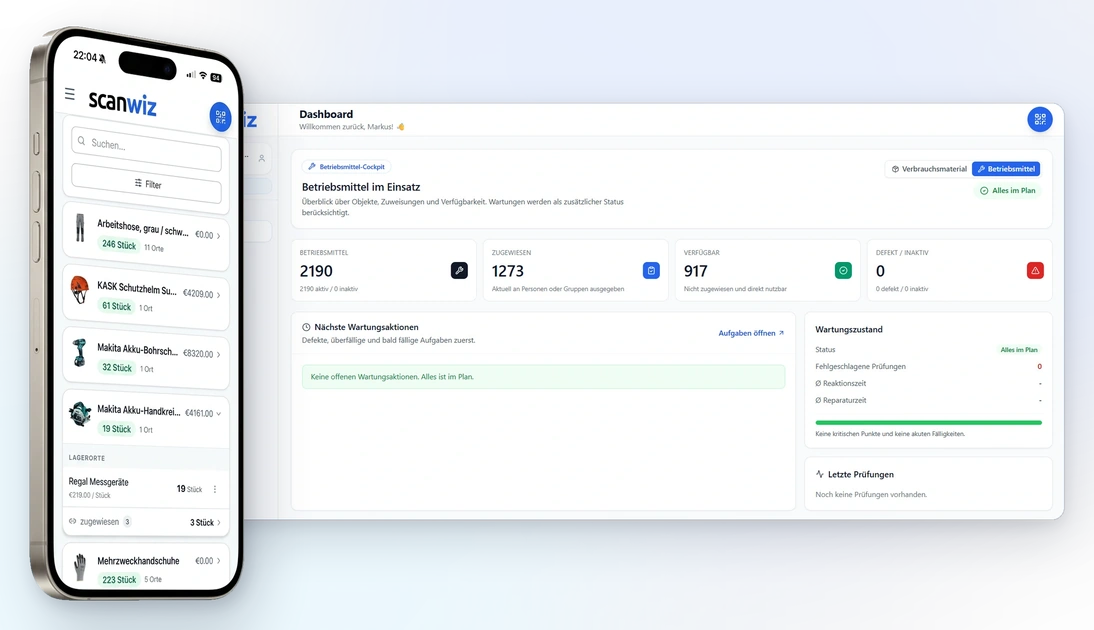
At a glance
Six places where the list hits its limits.
Both record items, quantities and locations. The difference is how the numbers get in – and who notices when they are wrong.
How stock levels come about
Every withdrawal and every delivery is a scan. Stock updates itself along the way.
Someone catches up – in the evening, on Friday or when something looks off. Until then, the number is wrong.
Who has what
Tools are assigned to people, vehicles or sites, with a digital signature as proof if you want one.
A column called “issued to”. Whether it is right depends on whether the return was entered too.
When to reorder
A reorder point per item and location. Anything that drops below it lands on the order list.
A formula or a red cell can warn you – but only if someone opens the file and the quantity was right to begin with.
When an inspection is due
Inspection and maintenance intervals on the asset, with reminders and a documented result.
A date column. The sheet can only send reminders with add-on tools such as Power Automate.[1]
Who works at the same time
What you can prove later
Every transaction with time, user, quantity and destination – still traceable years later.
According to Microsoft, “Show Changes” goes back up to 60 days.[3] Anything older lives in file versions, if at all.
Cost calculator
What does your list really cost?
Excel is usually paid for already. The expensive part is the time around it: catching up, typing up notes, searching, recounting. Enter your own figures – we don’t assume a blanket saving, we show when Scanwiz pays for itself.
Everything that has a row in your list today – material, tools, PPE.
Everyone who takes material, issues tools or updates the list.
Estimated for the whole team: updating, typing up notes, searching, recounting, asking around.
What an hour of work costs your business, including overheads.
Scanwiz
Starter
–in the first year
Excel list
Maintained by hand
–in the first year
Scanwiz: list prices from our pricing page, 10% discount for annual payment not included. Excel: Microsoft 365 Business Basic at €6.07 per user per month, billed annually, excl. VAT.[1] Hours and hourly rate are your estimate; we deliberately don’t assume how much time Scanwiz saves you. As of 6 October 2026.
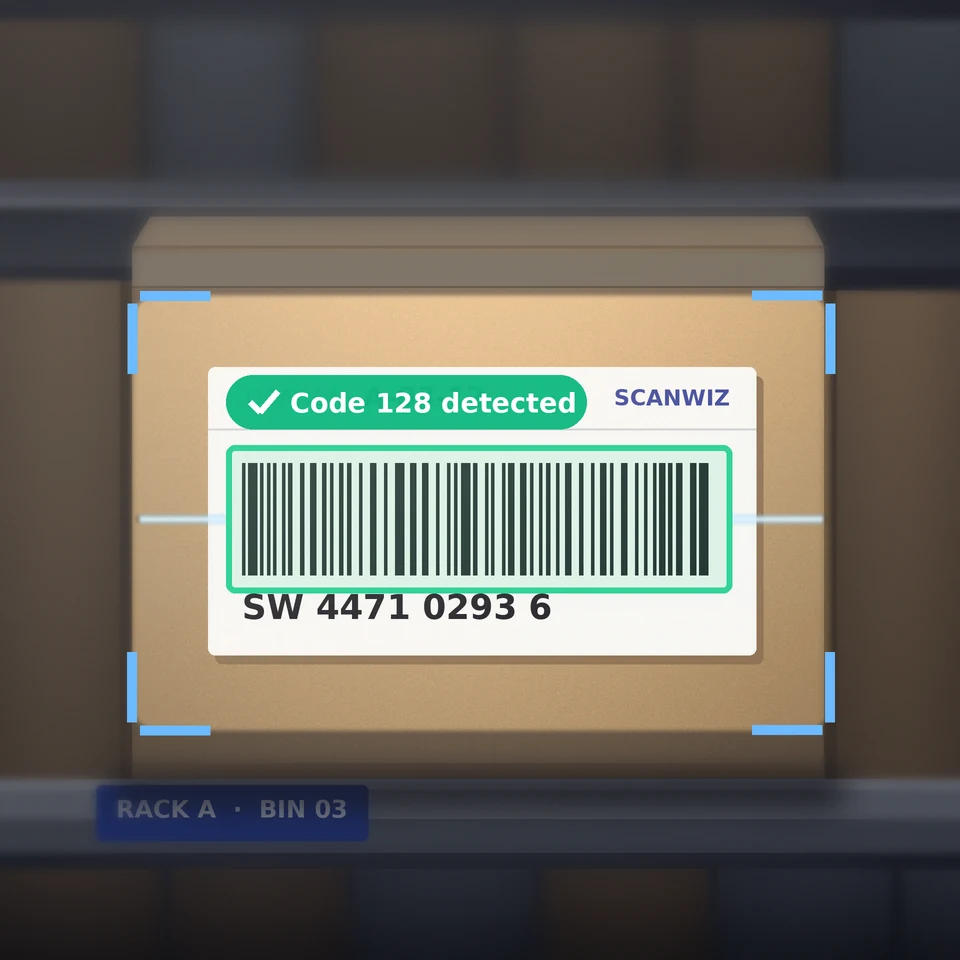
At the shelf
The list only knows what someone typed in.
A spreadsheet is patient: it accepts any number, including the wrong one, and it says nothing when a withdrawal is missing. Nobody standing at the shelf wants to scroll through 400 rows on a phone to find the right one – so it gets done later. Or not at all.
Scanwiz moves the booking to where it happens: scan the manufacturer barcode or QR label, confirm the quantity, done. New team members find items and storage locations by scanning, without a briefing on the list.
- Any smartphone or tablet, plus USB and Bluetooth scanners
- Book offline, synced automatically once you’re back in signal
- User roles and permissions, the same in the web app and mobile app
Feature comparison
Nineteen criteria in detail.
To be fair: with formulas, macros and add-on tools you can rebuild a lot in Excel. Marked “with limitations” is anything that’s possible but has to be built, maintained and fed by hand.
| Criterion | Scanwiz | Excel list |
|---|---|---|
| Capture & stock | ||
| Booking at the shelf | Scan with phone camera, manufacturer barcode or QR label | Find the row, type the quantity; a barcode scanner only types into the active cell |
| Current stock | Created with every transaction | As current as the last entry |
| Reorder point & reordering | Reorder point per item and location, order list | Via formula or conditional formatting – visible only when someone opens the file |
| Batches & expiry dates | From Growth: stock per batch, remaining shelf life, expiry alerts | Possible as extra columns; remaining quantities per batch worked out by hand |
| Locations & transfers | Locations with QR code, transfer by scan | “Location” column; transferring means editing rows |
| Tools & inspections | ||
| Who has what | Assigned to person, vehicle or site – with return | “Issued to” column, maintained by hand |
| Handover with signature | Digital signature, PDF receipt on the profile | Not built in – separate paper receipt |
| Maintenance & inspection dates | Intervals by calendar or operating hours, reminders, records | Date column; reminders only with an add-on such as Power Automate[1] |
| Stocktaking | By scan, blind and offline too; several people count in parallel | Print a count sheet, count, type it up, hunt for differences |
| Material requests from the team | Catalogue, reservation, pick-up with signature Business | Not built in – handled by calling out, email or notes |
| Team & access | ||
| Several people at once | Unlimited users in every plan | Only with the file in OneDrive or SharePoint and a modern file format[2] |
| Roles & permissions | User roles, the same in web app, mobile app, API and AI access | Sharing per file, plus sheet and cell protection |
| On the phone | App for iOS and Android, built for scanning | Excel for web and mobile[1] – a spreadsheet on a small screen |
| Working offline | Captured offline, synced automatically once connected | Desktop Excel offline with a local file; co-authoring needs OneDrive or SharePoint[2] |
| Records & data | ||
| History | Every transaction with time, user, quantity and destination – permanently | “Show Changes” up to 60 days back[3] |
| Catching input errors | Item and location come straight from the code by scan | Data validation and drop-downs are possible; it’s still typed[4] |
| Reports & export | Reports as Excel, CSV or PDF | Pivot tables and charts – Excel’s strength |
| Getting started & cost | ||
| Price | €45 / €145 per month, unlimited users | Usually already in place; Microsoft 365 Business Basic €6.07 per user per month[1] |
| Setup | Excel import, 14-day trial without a credit card | Build columns, formulas, drop-downs and protection yourself – and maintain them |
On parTake your data along as an Excel file · reports and export · no mandatory hardware · your data belongs to you

“Since introducing Scanwiz, we have a much better handle on material management: stock levels are traceable at any time, and withdrawals and deliveries are documented properly.”
A day in the stockroom
Five tasks, two ways of working.
What happens at each step – and who still has to update something afterwards.
- 01
Withdrawal
Screws, anchors, PPE from the shelf.
Scanwiz
Scan the item, confirm the quantity. Stock is up to date immediately – even without signal.
SmartphoneExcel list
Remember it or write it on a note. Later, find the row and subtract the quantity.
NotePC - 02
Issuing tools
The hammer drill goes to the site.
Scanwiz
Scan the tool, choose a person or site, get a signature. The receipt is stored on the profile.
SmartphoneSignatureExcel list
Enter the name in the “issued to” column – if someone happens to be at the computer.
PC - 03
Reordering
The box is running empty.
Scanwiz
When stock drops below the reorder point, the item appears on the order list.
automaticExcel list
Someone notices the empty bin or the red cell – if the quantity was entered correctly beforehand.
Check by eye - 04
Inspection
The ladder is due for inspection.
Scanwiz
The interval sits on the asset, the reminder arrives in time, and the result is documented on the asset.
ReminderExcel list
Sort the date column – and hope someone looks regularly.
Manual calendar - 05
Stocktaking
Once a year – or more often.
Scanwiz
Count at the shelf by scan, several people in parallel, check deviations against tolerances. Stock value is available as Excel, CSV or PDF.
SmartphoneExcel list
Print a count sheet, count, type it up and hunt for differences.
PrinterCount sheetPC
ScanwizNobody extra. It’s created with every scan, and everyone sees the same figures.
Excel listUsually one person who updates the file and understands it – and who is missing when they’re on holiday.
Typos are normal. A list doesn’t catch them.
In lab studies by spreadsheet researcher Raymond Panko, between 24% and 86% of the spreadsheets built contained at least one error, depending on the group; highly experienced users did no measurably better than beginners.[4] Errors are also hard to find, and whoever built a spreadsheet overestimates how correct it is.[5] A scan takes item and location straight from the code instead of typing them. What isn’t typed can’t be mistyped.
Decision guide
When is Excel enough – and when not anymore?
For some businesses, a good list is exactly right. That’s part of an honest answer.
Scanwiz fits if …
- several people take material or issue tools – not just one person in the office.
- tools move between people, vehicles and sites and you want to know who has what.
- reorder points, batches or inspection dates must not be forgotten.
- you need to prove who received or inspected what and when – for audits, insurers or safety inspections.
- only one person really understands the list today.
Excel is enough if …
- a single person books every movement.
- you have few items and stock rarely changes.
- there is no tool lending and there are no inspection dates.
- you only need stock figures for the annual stocktake.
- it’s mainly about calculating and analysing, not booking.
Excel stays – just not as your stockroom.
Scanwiz exports stock, movements and stock values as Excel, CSV or PDF. If you like analysing with pivot tables, keep doing it – the figures just come from transactions instead of catch-up entries.
From the list to Scanwiz
Your Excel list is the starting point, not wasted effort.
Whatever went into the list comes with you. On the Growth plan, we set up categories, locations and the first profiles together with you in a personal onboarding.
- 01
Tidy up
One row per item, with columns for name, category, location, quantity and value.
- 02
Import
Bring in items, categories, locations, quantities and values via Excel import.
- 03
Scan
Manufacturer barcodes work straight away. Where there isn’t one, print QR labels for items or locations.
- 04
Count
The first stocktake by scan checks the imported figures and becomes your opening stock.
FAQ
Scanwiz or Excel – quick answers.
Isn’t Excel free?
Usually Excel is already paid for, for example through Microsoft 365. Anyone who should co-edit the list in the company OneDrive or SharePoint usually needs their own account; according to Microsoft, Business Basic costs €6.07 per user per month billed annually, excluding VAT. The bigger cost is usually the time spent updating, searching and recounting – you can work it out with your own figures in the calculator above.
Can I bring over my existing Excel list?
Yes. You import items, categories, locations, quantities and values via Excel import, so you don’t start from zero. Existing manufacturer barcodes stay in use, and your first stocktake in Scanwiz becomes the opening stock. On the Growth plan, we set this up with you in a personal onboarding.
Do I need barcode scanners or new labels?
No. Scanwiz reads manufacturer barcodes and QR codes with the camera of any smartphone or tablet. Existing USB or Bluetooth scanners work too. You only print QR labels where there is no code, for example for storage locations or your own tools.
Can I keep analysing in Excel?
Yes. Stock, movements, stock values and batch reports can be exported as Excel, CSV or PDF. If you like pivot tables, keep using them – the figures simply come from transactions instead of catch-up entries.
When is it worth switching from Excel?
It’s less about the number of items than about movements and people. As soon as several people take material, tools are issued or inspection dates come into play, the list becomes a side job someone has to do. The Starter plan costs €45 a month for up to 500 items with unlimited users; at an hourly rate of €45 it pays off once it saves your team one hour a month.
Does this also apply to Google Sheets?
Essentially, yes. In Google Sheets, stock is still created by typing, and reorder points, handovers with signatures or inspection reminders have to be built yourself. The Microsoft 365 details on this page don’t apply there.
How current is this information?
As of 6 October 2026. Details on Excel and Microsoft 365 come from Microsoft’s pricing and support pages, statements on spreadsheet errors from published research; the sources are listed at the end of the page. If you spot a mistake, let us know.
Sources & method
Details on Excel and Microsoft 365 come from Microsoft’s pricing and support pages, retrieved on 6 October 2026; statements on spreadsheet errors come from published research. Details on Scanwiz come from our pricing page and feature pages, such as asset management, stocktaking and the barcode scanner.
Anything that can be rebuilt in Excel with formulas, macros or Power Automate is marked “with limitations”: possible, but built and maintained by you. The calculator assumes no time saving; it only shows when Scanwiz pays for itself. Microsoft, Excel and Microsoft 365 are trademarks of Microsoft Corporation; this page is not affiliated with Microsoft. If you spot a mistake, let us know – we’ll correct it.
- Microsoft – Microsoft 365 for business: plans and pricing – Business Basic €6.07 per user per month, billed annually, excl. VAT; Excel in Business Basic on web and mobile only; Power Automate in Business Basic with cloud flows only.
- Microsoft Support – Document collaboration and co-authoring – Co-authoring only for files stored in OneDrive or SharePoint, and only in modern file formats such as XLSX.
- Microsoft Support – Show changes that were made in a workbook – Who changed what and when, visible for up to 60 days.
- Raymond R. Panko – Spreadsheet Errors: What We Know. What We Think We Can Do (arXiv) – Lab experiments: depending on the group, 24% to 86% of spreadsheets with at least one error; no significant difference between beginners and experienced users.
- Raymond R. Panko – What We Don’t Know About Spreadsheet Errors Today (arXiv) – Errors are hard to detect; developers and companies overestimate the accuracy of their spreadsheets.
More than 250 customers already trust Scanwiz
No more catching up. Start scanning today.
14 days free – with your Excel list as the starting point, your stockroom and your whole team, no credit card. Or let us show you Scanwiz in a personal demo.
4.9 out of 5 stars from more than 120 verified customer reviews



