
Comparison · Scanwiz or HOPPE Wartungsplaner
Scanwiz vs. Wartungsplaner: stock, tools and inspections in one app.
HOPPE Wartungsplaner is Windows software for inspection dates and maintenance – bought once, but licensed per PC, with the mobile app sold as an extra module. Scanwiz is the Wartungsplaner alternative for businesses that want inspection dates, materials and tools in one place: in the browser and in the app, with unlimited users. Every claim about Wartungsplaner is sourced.
Data as of 10 October 2026 · Sources & method · All comparisons
At a glance
Scanwiz as a Wartungsplaner alternative: six differences.
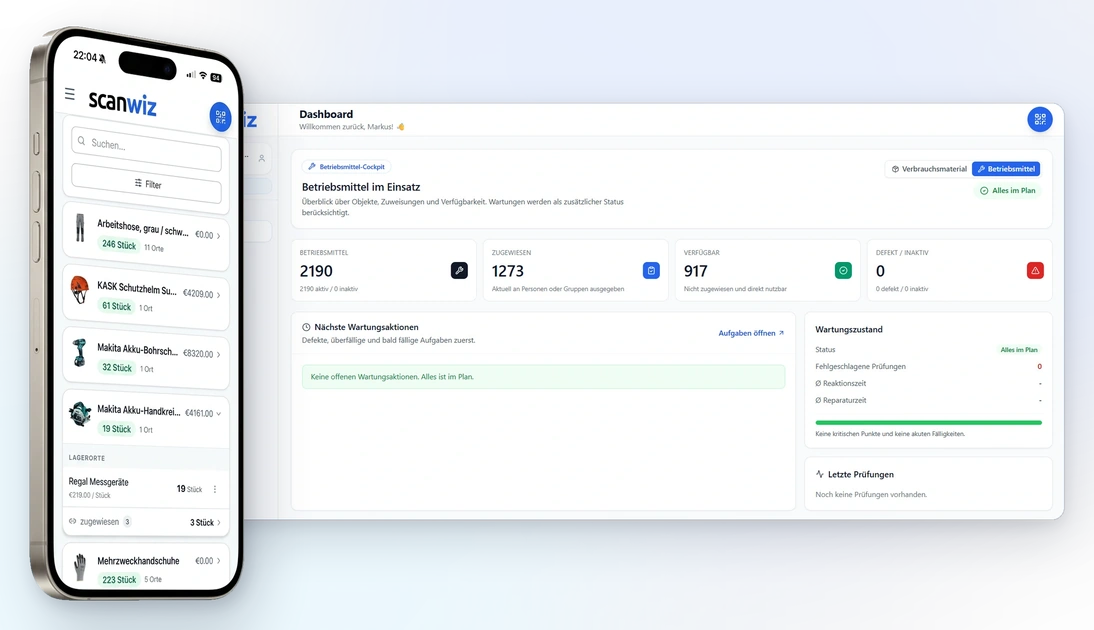
Both remind you of recurring inspections, document inspection reports and scan barcodes with the phone camera. The difference: Wartungsplaner is Windows software for inspection and maintenance dates. Scanwiz runs in the browser and in the app and manages stock, materials and tool issuing alongside inspection dates.
What you manage
Stock, materials, PPE and tools – with inspection dates on the same item.
Inspection and maintenance dates with inspection reports, for example for ladders, shelving, fire protection and electrical equipment. Stock levels and minimum stock are not documented.[2]
Where it runs
Mobile & scanning
How you pay
Monthly from €45, cancel monthly, all users included.
€195 one-time for one PC, each additional network licence €395. Update prices are not published.[1]
Issuing tools
Issue to people, vehicles and sites with a signature and a PDF receipt.
A responsible person per inspection date. Issuing and returning tools to employees is not documented.[2]
Electrical testing
Cost calculator
What do stock and inspections cost in the first year?
What does the Wartungsplaner alternative cost by comparison? Set how many items and devices you manage, how many people book and how many Windows PCs are in use. With Wartungsplaner you pay once per PC and per module.
Determines your Scanwiz plan. Wartungsplaner has no quantity limit.
Everyone with their own login – in the stockroom, the workshop or on site.
Wartungsplaner needs a licence per PC: the first costs €195, each additional network licence €395.
Scanwiz
Starter
–in the first year
HOPPE Wartungsplaner
–
–in the first year
List prices as published on wartungsplaner.de and by Scanwiz, as of 10 October 2026, excluding VAT in euros. Wartungsplaner is a one-time purchase; prices for updates and the maintenance contract are not published and not included.[1] Not included: volume licences from 20 seats, test-device interfaces, labels, the app store fee of around €4.50 per device, hardware and taxes.
Day to day
Inspection dates, materials and tools in one app.
Wartungsplaner is strong when it comes to inspection duties: recurring inspections are created automatically, inspection reports are documented, and electrical tests can be imported from Gossen Metrawatt and Fluke devices.[2] Work happens on a Windows PC; the app is an extra module that syncs inspection reports via email, Dropbox or FTP.[3]
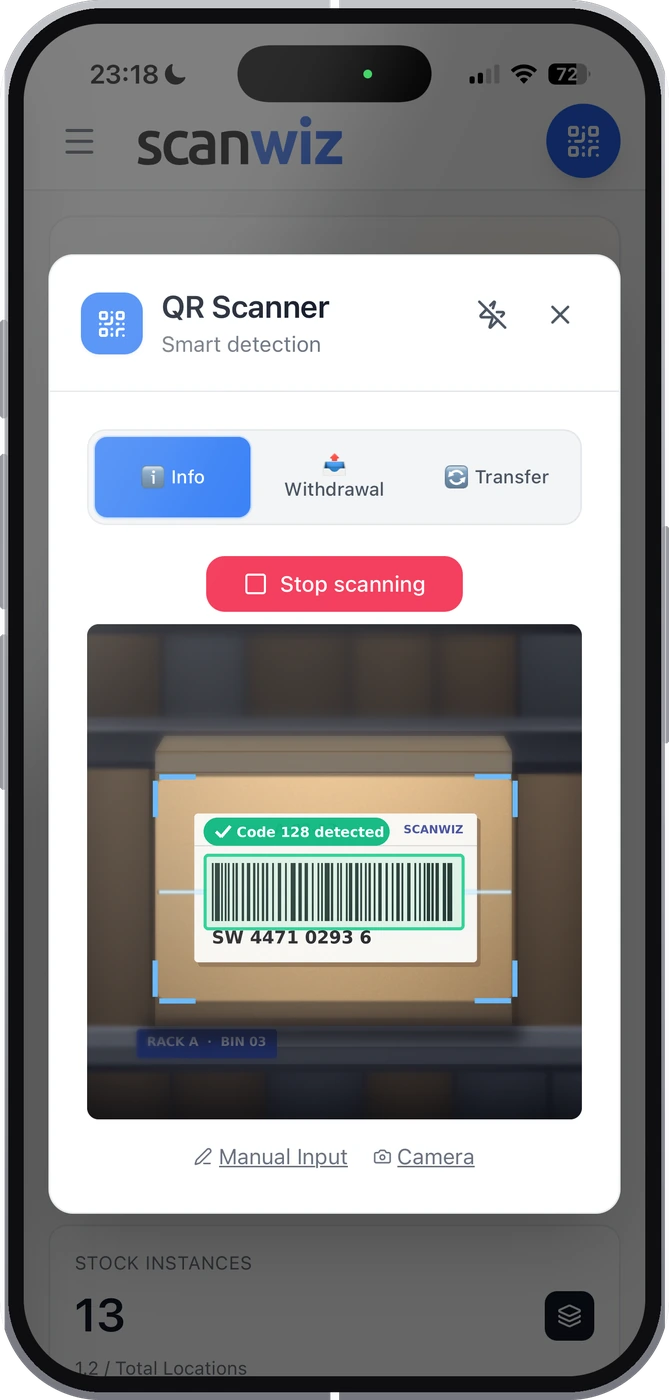
As a Wartungsplaner alternative, Scanwiz focuses on where materials and tools move around your business: taking items by scan, issuing to people and sites with a signature, PPE in every size, inspection dates on the device, stocktaking at the shelf – even in a basement without signal. And because users cost nothing extra, everyone who takes something books with their own login.
- Any smartphone or tablet, plus USB and Bluetooth scanners
- Book offline, sync automatically once there is signal again
- Set up yourself via Excel import, cancel monthly
Feature comparison
Wartungsplaner alternative: twenty criteria in detail.
Based on the order, product and module pages of wartungsplaner.de. Anything not stated there is marked “not documented” – not as missing.
| Criterion | Scanwiz | HOPPE Wartungsplaner |
|---|---|---|
| Getting started & cost | ||
| Price | €45 / €145 a month, everything included | €195 one-time for one PC, no monthly fee[1] |
| Users | Unlimited on every plan | Single seat; each additional network licence €395[1] |
| Extra modules | App, scanning and reminders included | App €1,950, eMail-Center €1,950, barcode scanner €1,100[1] |
| Trial | 14 days, no credit card | 3-week trial, demo with sample data[2] |
| Stock & materials | ||
| Scanning | Smartphone, tablet, USB and Bluetooth scanners | Camera scanning (Code 39, QR) in the app, with the app module[3] |
| Locations | Unlimited: shelf, vehicle, site box | Not documented |
| Minimum stock | Per item, variant and location, with order list | Not documented |
| Variants (e.g. PPE sizes) | Separate stock per size and version | Not documented |
| Batches & expiry dates | From Growth: stock per batch, expiry alerts | Not documented |
| Stocktaking | Four types by scan, including blind and offline | Barcode asset labels available; counting not documented[2] |
| Material requests by the team | Catalogue, reservation, pickup with signature Business | Not documented |
| Tools & inspections | ||
| Issuing to people | Assign to person, vehicle, site – with return | Not documented |
| Handover with signature | Digital signature, PDF receipt on the profile | Not documented |
| Inspections & maintenance | Intervals per device, reminder, checklist, record | Recurring inspections created automatically, reminders, inspection reports[2] |
| Electrical testing with test devices | No interface to test devices | Interfaces to Gossen Metrawatt and Fluke, €1,950 each[1] |
| Technology & data | ||
| Platform | Browser, iOS and Android | |
| Working offline | Captured offline, synced automatically | App with offline mode; sync via email, Dropbox or FTP[3] |
| Data processing | Data centres in Germany | Installed on your own Windows PCs or network[1] |
| Updates | Ongoing, included | New versions as a paid update; price not published[1] |
| AI & integrations | AI Connect (MCP); REST API on Business | Test-device interfaces; API and MCP not documented[1] |
On parRecurring inspections with reminders · Inspection reports as records · Barcode scanning with the phone camera · Free trial[1][2][3]

“Since introducing Scanwiz, we have a much better handle on material management: stock levels are traceable at any time, and withdrawals and deliveries are documented properly.”
Decision guide
Which solution fits your business?
When Scanwiz is the right Wartungsplaner alternative – and when Wartungsplaner is the better choice. That’s part of an honest comparison.
Scanwiz fits if …
- you manage stock, materials and PPE as well as inspection dates.
- tools are issued to people and sites with returns and a signature.
- everyone should work on any device – no Windows installation, no licence per PC.
- the app with scanning and offline mode should come without an extra module.
- you’d rather pay monthly than invest in modules upfront.
Wartungsplaner fits if …
- you prefer to buy software once rather than pay a subscription.
- your focus is inspection and maintenance dates, not stock.
- electrical tests should be imported directly from Gossen Metrawatt or Fluke.
- your data should stay on your own Windows PCs in the company network.
- only a few people plan and document at a PC.
Electrical tests in Wartungsplaner, stock in Scanwiz?
If you run electrical tests with a test-device interface in Wartungsplaner, you can still manage materials, PPE and tool issuing in Scanwiz. Both systems run separately; you bring your asset list over once via Excel import.
Getting started with Scanwiz
Set up your stock in an afternoon.
Switching to a Wartungsplaner alternative doesn’t have to be a project: your asset list – from Wartungsplaner, from Excel or from your supplier – becomes the template for Scanwiz. On the Growth plan, we set up categories, locations and the first profiles with you during a personal onboarding.
- 01
Prepare your list
Put your items with name, category, barcode and quantity together in an Excel sheet.
- 02
Import
Bring in items, categories, locations, quantities and values via Excel import.
- 03
Scan
Existing barcodes work straight away. Where there isn’t one, print QR labels for items or locations.
- 04
Count
The first stocktake by scan checks the imported figures and becomes your opening stock.
FAQ
Scanwiz as a Wartungsplaner alternative – quick answers.
How much does HOPPE Wartungsplaner cost?
The single-seat licence costs €195 excluding VAT as a one-time payment, with no monthly or annual fee. Each additional network licence costs €395, and volume packs start at 20 licences. Extra modules are bought separately: the app interface and the eMail-Center at €1,950 each, the mobile barcode scanner at €1,100. Updates are paid; the order page doesn’t give a price.
Does Wartungsplaner run in the browser?
No. Wartungsplaner is a Windows program, and each licence is tied to a PC name and a Windows login. An app for iOS and Android is available as an extra module. Scanwiz runs in the browser on any device and in the app, with nothing to install.
How much does Scanwiz cost by comparison?
Scanwiz costs €45 a month for up to 500 items and €145 for up to 2,000 items, each with unlimited users and a 10% discount for annual payment. Batches and expiry dates are included from Growth. You can test it free for 14 days, without a credit card, and cancel monthly.
Can Wartungsplaner manage stock levels?
Minimum stock, consumables and issuing tools to employees are not documented on the Wartungsplaner pages; the focus is on inspection and maintenance dates. Scanwiz manages stock, minimum stock, batches and tool issuing in the same system as inspection dates.
Does the Wartungsplaner app work offline?
Yes, the app has an offline mode. Inspection reports are synced with the Windows program via email, Dropbox, iTunes or FTP. Scanwiz captures data offline and syncs it automatically as soon as there is a connection again.
Is Scanwiz a Wartungsplaner alternative for inspections?
For inspection dates with reminders, checklists and records on the device: yes. Scanwiz has no interface to test devices – if you import electrical tests directly from Gossen Metrawatt or Fluke, Wartungsplaner is the better fit.
How up to date is this information?
As of 10 October 2026. The information on Wartungsplaner comes from its order, product and module pages; the sources are listed at the end of the page. If you spot a mistake, let us know.
Sources & method
We only compare what HOPPE Unternehmensberatung publishes itself, accessed on 10 October 2026. All prices exclude VAT. Information on Scanwiz comes from our pricing overview and feature pages, such as equipment management, batch management and stocktaking.
Wartungsplaner is a product of HOPPE Unternehmensberatung GmbH; this page is not affiliated with HOPPE Unternehmensberatung. If you spot a mistake, let us know – we’ll correct it.
- Wartungsplaner – Order page – Single-seat licence €195 one-time, additional network licence €395, volume licences; licence tied to PC name and Windows login; modules: app interface, eMail-Center and test-device interfaces €1,950 each, barcode scanner €1,100; paid updates.
- Wartungsplaner – Home page – HOPPE Unternehmensberatung GmbH, Heusenstamm, Germany; Windows software for inspection and maintenance dates, recurring inspections, inspection reports, DGUV V3; 3-week trial.
- Wartungsplaner – App interface – App for iOS and Android with camera scanner and offline mode; sync via email, Dropbox, iTunes or FTP; module €1,950.
More than 250 customers already trust Scanwiz
Inspections, stock and tools under control. On any device.
Test the Wartungsplaner alternative free for 14 days with your materials, your tools and your whole team – no credit card. Or let us show you Scanwiz in a personal demo.
4.9 out of 5 stars from more than 120 verified customer reviews



