
Industry · Hospitality & restaurants
Restaurant inventory management for kitchens, bars and hotels – from the cold room to the guest floor.
Book food, beverages, linen and cleaning supplies by scan – in the kitchen, at the bar and in housekeeping. Expiry dates in view, minimum stock per store, and a stocktake that no longer eats half the night.
F&B · Housekeeping · Expiry · Minimum stock · Stocktaking
In short
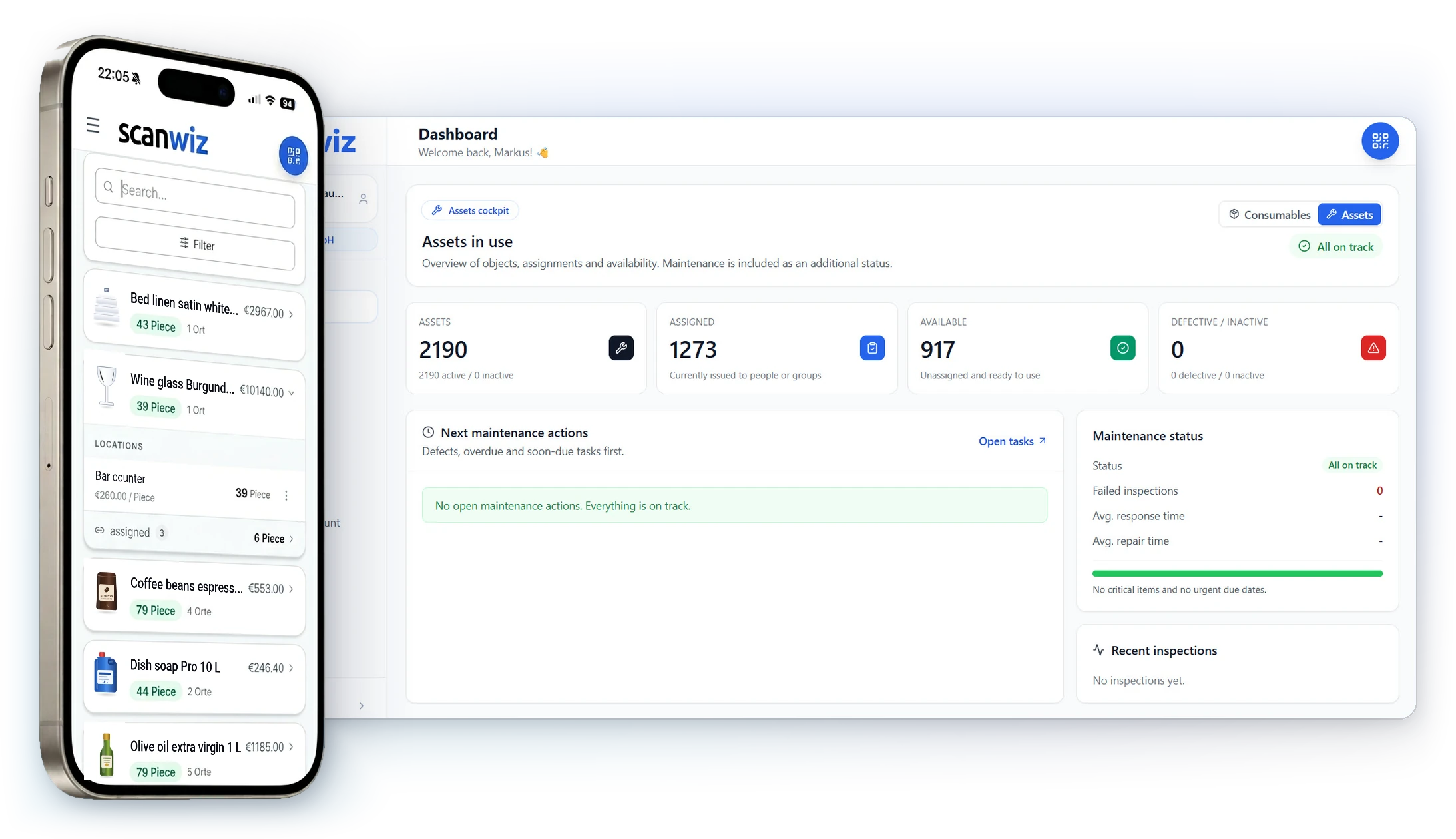
Restaurant inventory management means every item has a barcode, a storage location and a current stock level – food and beverages also carry a batch with an expiry date. With Scanwiz your team books goods receipt, withdrawals and transfers by scan in the cold room, at the bar or on the housekeeping cart. The stock is created while people work, instead of being maintained in a spreadsheet after the shift – and the monthly stocktake becomes a walk-through with a phone instead of a night shift.
The difference
An end to the stocktake that eats half the night.
Less counting, searching and reordering by shout: the same tasks that cost time after the shift today happen along the way with digital inventory management – in the kitchen, at the bar and in housekeeping, documented and traceable.
Month-end stocktake means counting kitchen, bar and store with a clipboard – late into the night.
Counting happens in the app in the cold room and at the bar, several people in parallel – the report is ready in the morning.
The expiry date only shows up when the pack is opened – by then the goods are already in the bin.
Batches with expiry date and days remaining: whatever expires first gets used first.
Housekeeping calls: no towels left on floor 3, and the wholesaler only delivers on Thursday.
Minimum stock per floor cart and store – the order list fills up by supplier before anything runs out.
Every new team member starts with a briefing on the spreadsheet.
Anyone can scan from day one – unlimited users, no per-head surcharge.
In everyday use
Restaurant inventory management: this is what it looks like in Scanwiz.
Six views from the real application – from stock across kitchen, bar and floors to expiry dates, replenishment and the month-end count.
Stock & locations
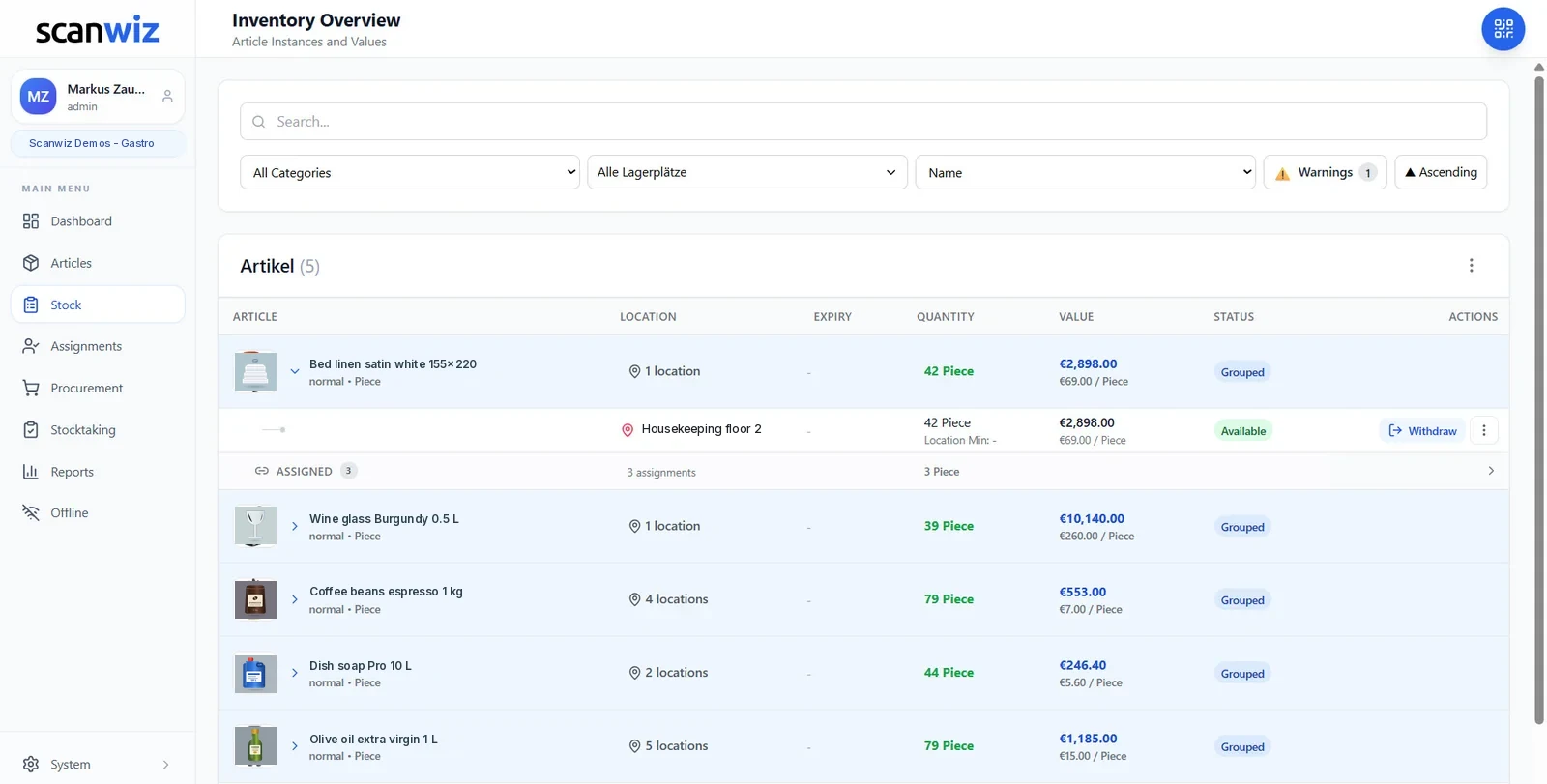
What is in the cold room, what is at the bar, what is on floor 3?
Every row shows the item with its location, quantity and value. Expand it and you see the spread across cold room, dry store, bar and floor carts. Head chef, head housekeeper and purchasing look at the same stock – instead of each at their own list.
- Cold room, dry store, wine cellar, bar and floor carts as locations
- Filter by category and area, expiry warnings as their own toggle
- Stock value at the cut-off date – the basis for your cost of goods
Structure across the property
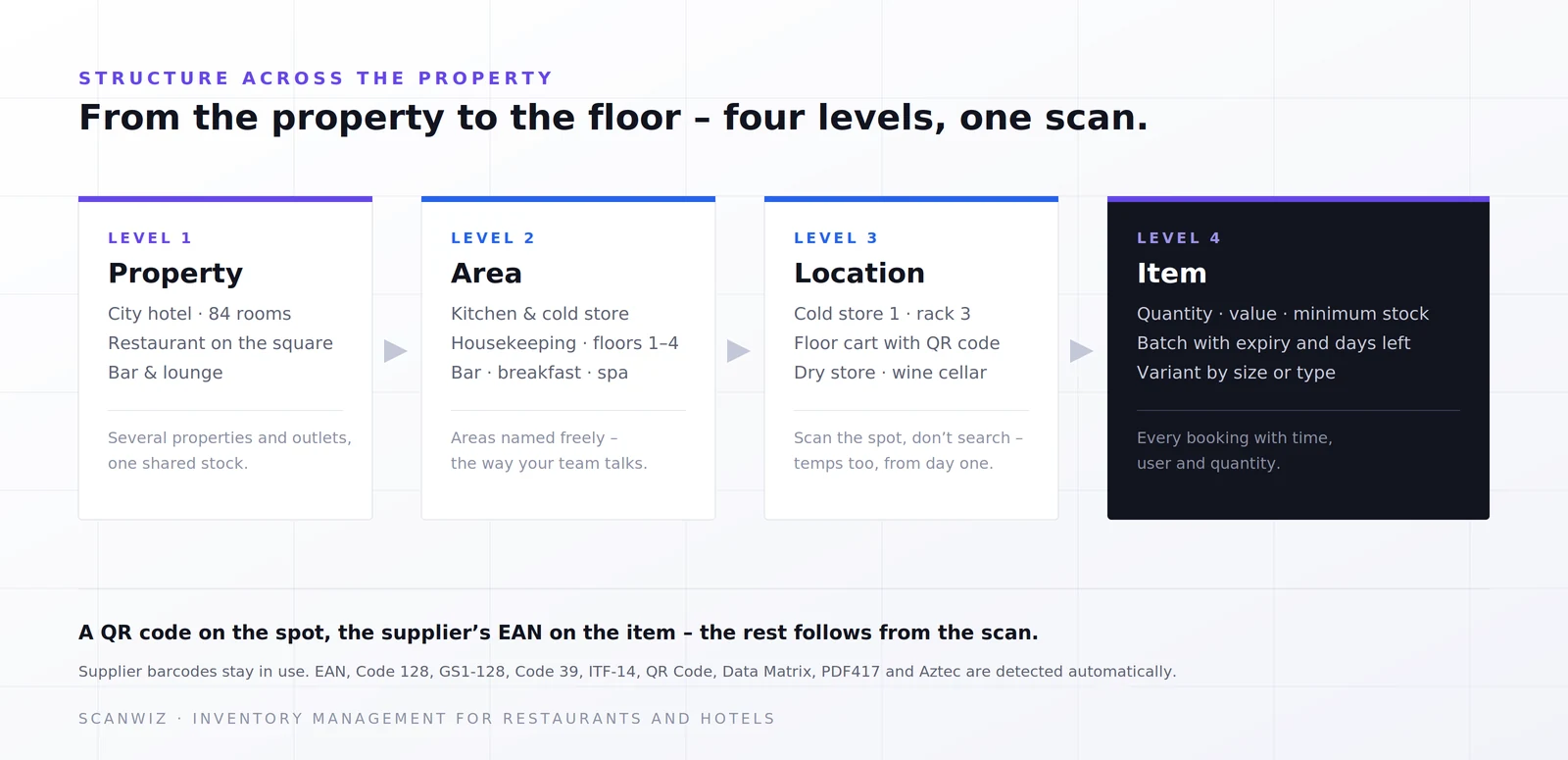
Property, area, location, item – the way your team actually talks
Kitchen, bar, housekeeping, spa: Scanwiz mirrors your areas instead of imposing a foreign structure. The floor cart gets a QR code, the item keeps the supplier’s EAN. Whoever is new on the team finds the spot by scanning – without a briefing on the spreadsheet.
- Several properties, outlets and areas in one structure
- Areas named freely – kitchen, bar, breakfast, floors 1 to 4
- Transfer from store to floor cart by scan, not by shouting
In the kitchen and on the floor
Booked where things are taken out
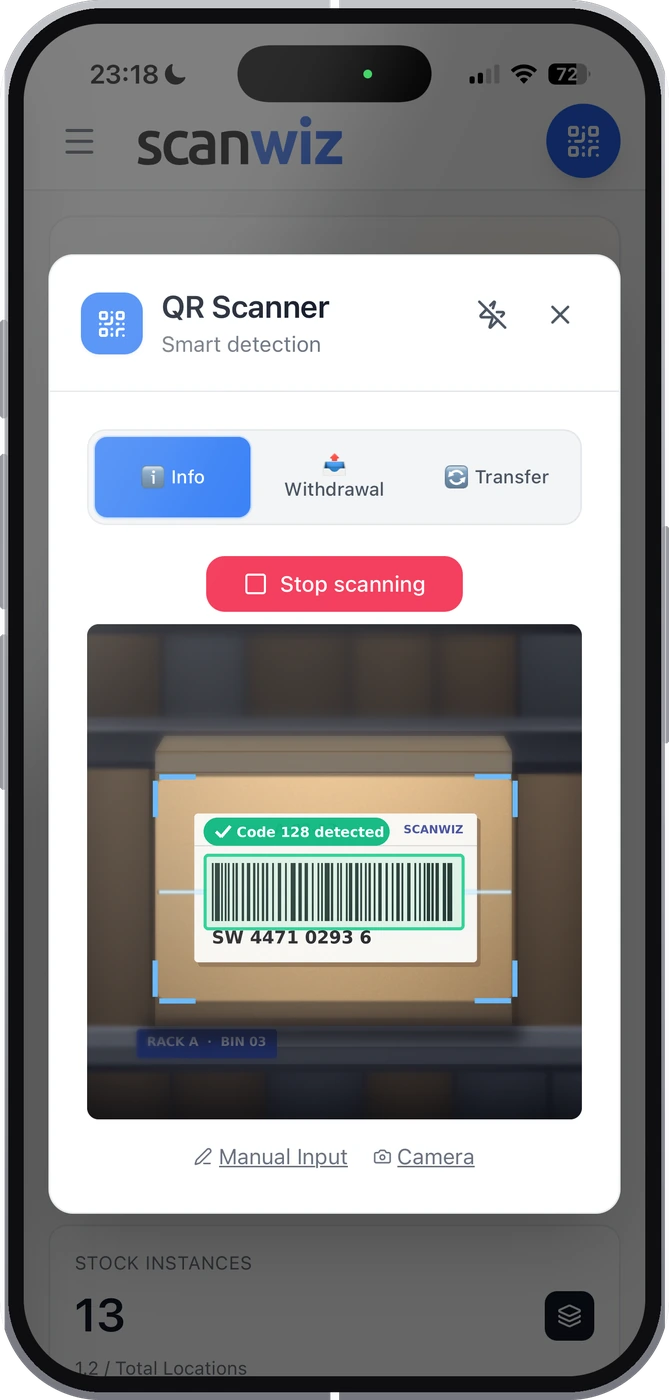
Open the app, choose a mode, scan: Info shows stock and location, Withdrawal books it out, Transfer moves it. Without a connection everything is captured locally and synced later – cold rooms and basement stores without reception are the normal case, not the exception. And whoever has two minutes between services needs no training for it.


Minimum stock & replenishment
What runs low is on the order list – sorted by supplier
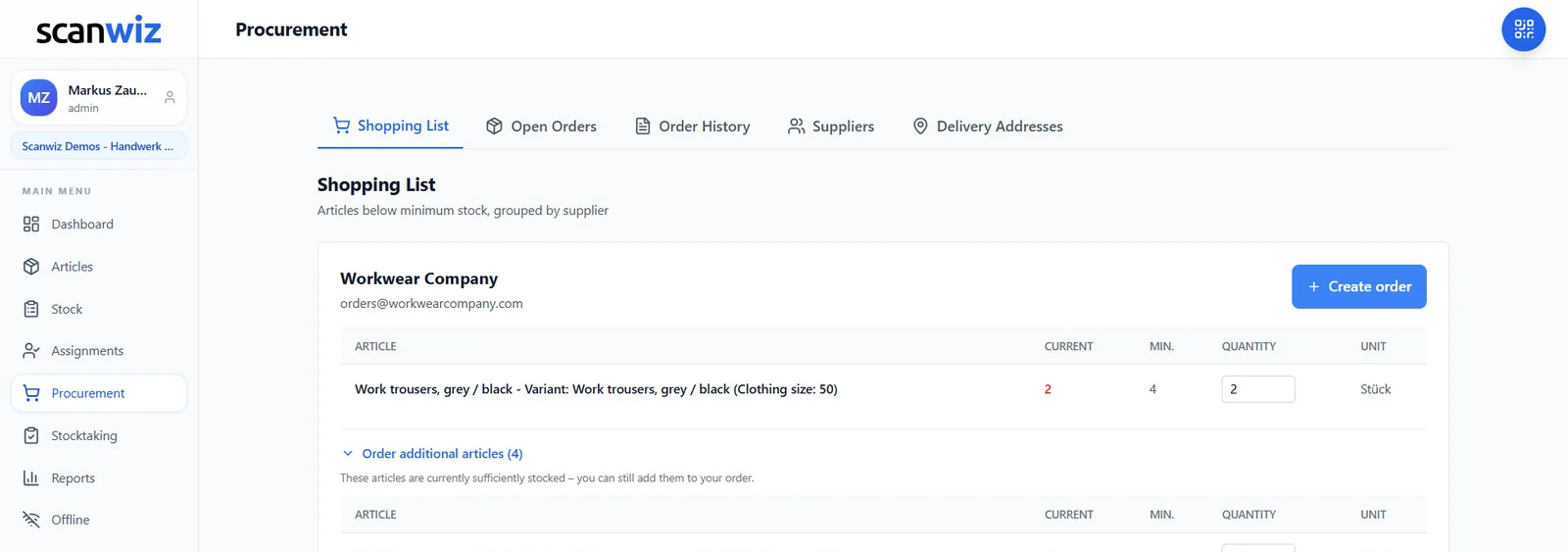
Every withdrawal lowers the stock – and as soon as an item falls below its minimum it appears on the order list, grouped by supplier: beverage wholesaler, fresh produce supplier, laundry. Scanwiz suggests the quantity, you adjust it and send it out. No note on the cold room door, no “somebody should have said something”.
- Minimum stock per item, per variant and per location – per floor cart too
- Add further items from the same supplier – one delivery instead of three
- Open orders and order history in one place
Expiry, batches & variants
Whatever expires first gets used first
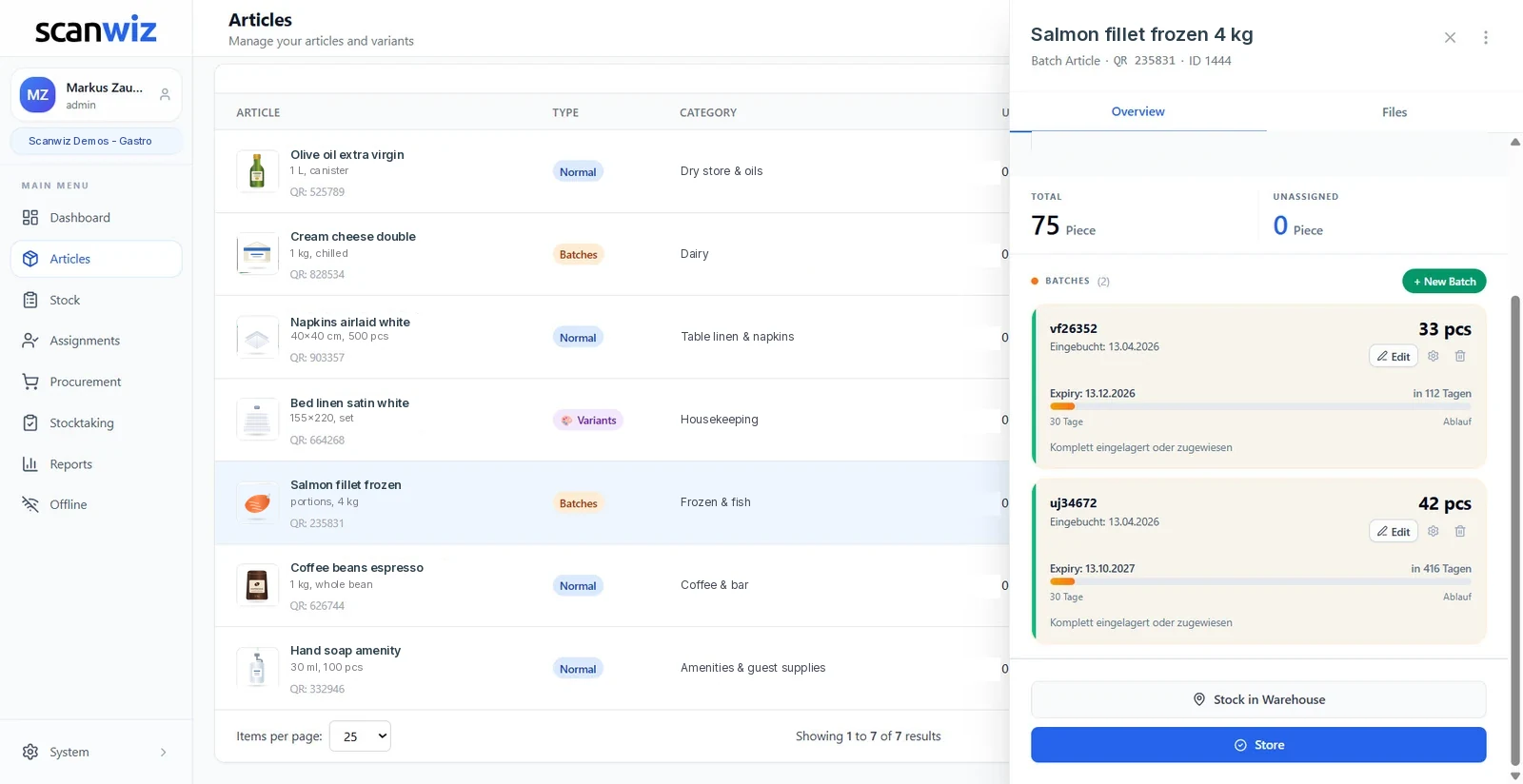
Every delivery carries its own batch with number, expiry date, supplier and purchase price. The days remaining sit right next to it, expiry alerts speak up in time – and in a recall you filter by batch and know within seconds where it is. Bed linen in 135×200 and 155×220, or uniforms from S to XXL, run as variants under one item.
- Days remaining, traffic light and expiry alerts per batch
- Purchase price per delivery – supplier price increases become visible
- Traceability by batch – for recalls and food safety
Stocktaking
Month-end count without the night shift
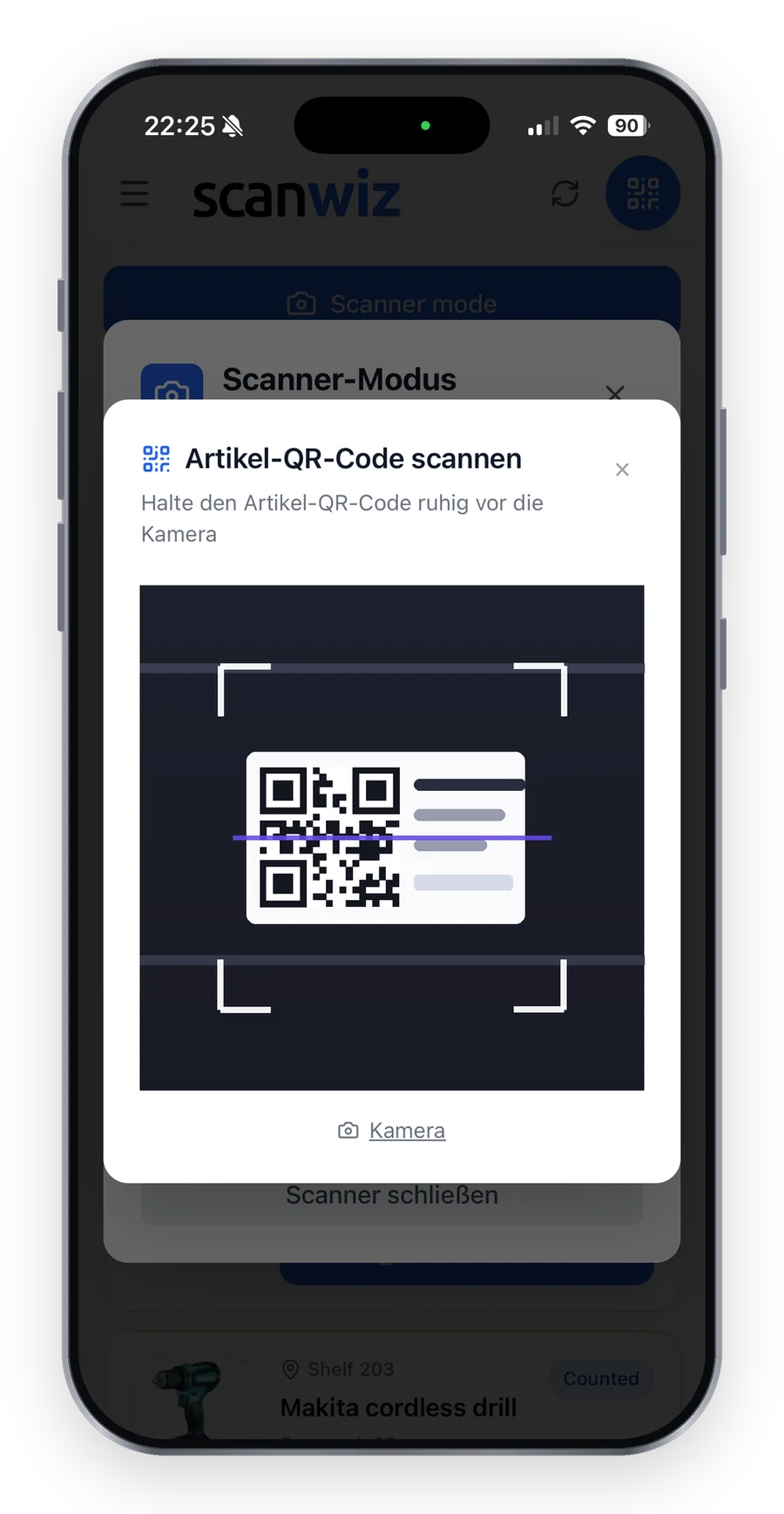
Counting happens in the app right at the shelf – kitchen, bar and store in parallel by several people. Tolerances in percent and units filter the noise, only real deviations go to approval. At the end you have the stock value at the cut-off date as Excel, CSV or PDF – the basis for your cost of goods, with no count sheets to type up.
- Full count, cycle count, spot check and blind count
- Batches and variants are counted at their own level
- Every count is kept with its number, period and deviations
One platform
Web app, mobile app and handheld scanner – one stock.
At the computer in the back office, on a phone in the kitchen or with a handheld scanner at goods receipt: everyone works on the same stock. Cloud-based, set up in minutes – from a single restaurant to a hotel group with several properties.
Getting started
Three steps to restaurant inventory management that works on the floor.
Try it free and without obligation – no strings attached. Register in the web app or download the mobile app straight away.
Import & structure
Take items, categories, locations, quantities and values from Excel – often straight from the supplier list. Floor carts and shelves get a QR code, the supplier’s EAN stays in use.
Book by scan
Goods receipt, transfers and withdrawals now run through the scan – along the way, while people work. Expiry date and batch travel along automatically, typos disappear.
Analyse & reorder
Minimum stocks speak up by themselves, and so do expiry alerts. Reports on stock and movements export as Excel, CSV or PDF – your first count in Scanwiz doubles as the opening balance.
Customer quotes
What customers say about inventory management with Scanwiz.
4.9 out of 5 stars from over 120 verified customer reviews.
“Scanwiz has noticeably simplified how we manage consumables and PPE. With barcode scanning, we record goods receipts and issues in seconds and always have a clear overview of stock levels and storage locations. The simple stocktake is especially helpful because it works during ongoing operations without bringing everything to a halt. The system runs stably and reliably—and we save a noticeable amount of time every month on documentation and reordering. A clear recommendation for trades and industry that want to keep their materials inventory under control.”
 Stefan KapseLaumann Carpentry & Roofing
“We’ve noticeably professionalized our materials management in maintenance and made it significantly more transparent. The clean mapping of variants (e.g., sizes, versions, and standards for PPE, as well as dimensions for C-parts) in particular reduces mix-ups and ensures reliable traceability in day-to-day work. With continuous inventory tracking, we’ve shortened search times and made material flows easier to plan. Support is also fast and pragmatic overall—a real relief for the entire team.”
 Moritz WinterbachWinterbach Engineering
“Since introducing Scanwiz, we’ve had materials management in our operation much better under control: stock levels are always traceable, issues and goods receipts are properly documented, and the analyses help us with replenishment and deployment planning. In day-to-day work, this saves noticeable time, reduces back-and-forth between the warehouse, job site, and workshop, and makes processes more reliable for the whole team.”
 Sedat BernaEggersmann Construction
Prices
Straightforward. Transparent. Affordable.
Pricing is based on the number of managed items and the range of features – users and locations are unlimited in every plan, even with high staff turnover. Batches with expiry dates and reporting are included from the Growth plan upwards. Several properties or something tailored? Get in touch.
- Unlimited users
- Unlimited storage locations
- Variant management
- Assignment function
- Stocktaking functions
- Offline mode
- Everything from the Starter plan
- Self-checkout function
- Batch management
- Purchasing & orders
- Reporting area
- Personal onboarding
- Scanwiz full version
- Scanwiz AI Connect (MCP)
- Material requests
- Organisational units
- Single Sign-On
- Access to the REST API
All plans free for 14 days · no credit card · cancel monthly
Frequently asked questions
Restaurant inventory management – answered briefly.
What does restaurant inventory management cover?
It covers capturing, booking and analysing every stock in the business: food and beverages in the kitchen and bar, linen and cleaning supplies in housekeeping, amenities, tableware and equipment. Every item gets a barcode and a location, food also a batch with an expiry date. Goods receipt, withdrawals and transfers are booked by scan, so stock, consumption and stock value stay traceable at any time – the basis for cost of goods and reordering.
Which businesses is Scanwiz suited to?
Restaurants, hotels, cafés, bars, caterers, canteens and hotel groups with several properties. Users and locations are unlimited in every plan – with seasonal staff and high turnover it matters that anyone can book along from day one without the cost rising per head.
Does Scanwiz replace my POS or back-office software?
No, and it is not meant to. Scanwiz takes care of the physical stock: what is in the cold room, at the bar and on the floors, what is expiring and what needs reordering. Recipe costing and the till stay in the systems you use for them. There is no installation and no IT project; if an integration is needed later, the Business plan includes a documented REST API.
Can I model several properties, kitchens and bars?
Yes, without limit. The structure runs from the property through areas like kitchen, bar and housekeeping down to the individual location – a floor cart can be kept just like a cold room. Transfers between store and floor are booked by scan, so it stays visible where an item is and how much of it sits where.
How do I keep expiry dates under control?
Through batches: every delivery carries its own expiry date, Scanwiz shows the days remaining with a traffic light and flags expiring goods through alerts. Whatever expires first sits at the top of the batch list – so older goods get used first without anybody doing the arithmetic. In a recall you filter by batch number and see straight away where the goods are.
Does Scanwiz work in the cold room and basement without reception?
Yes. In offline mode scans and bookings are captured locally on the device and transferred automatically as soon as there is a connection again. Cold rooms, wine cellars and basement stores are the normal case, not the exception. Scanning works with the phone camera – you can use the suppliers’ EANs directly, without relabelling. More on the page about the barcode scanner.
How do I get my existing stock into the system?
Through the Excel import: items, categories, locations, quantities and values can be taken from a spreadsheet – often straight from the wholesaler’s order list. Food and beverages keep their EAN, linen and floor carts get QR codes. Your first count in Scanwiz then doubles as the opening balance.
How does reordering from the wholesaler work?
You set a minimum stock for every item, every variant and every location – every floor cart too. Once withdrawals take the stock below it, the item lands on the order list automatically, grouped by supplier: beverage wholesaler, fresh produce supplier, laundry. Scanwiz suggests the quantity, you adjust it and send the order out. Further items from the same supplier can go on the same order – one delivery instead of three. Open orders and the order history sit in one place. Purchasing & orders are included from the Growth plan upwards.
How does the month-end count work with Scanwiz?
Counting happens in the app right at the shelf – as a full count, cycle count, spot check or blind count. Kitchen, bar and store count in parallel, each with several people. Tolerances in percent and units make sure only real deviations go to approval, and you can pause at any time when service calls. At the end, the stock value at the cut-off date is ready as Excel, CSV or PDF, and every count is kept with its number, period and deviations. More about it on the page for stocktaking software.
Does Scanwiz help with cost of goods?
Scanwiz supplies the figures you need for it: the stock value at the cut-off date from the stocktake, the purchase price per delivery from the batch, and reports on consumption and movements – filtered by category or by area such as kitchen, bar or housekeeping. That way supplier price increases become visible before they eat into the margin. You calculate the actual cost-of-goods ratio together with the sales from your POS or accounting; Scanwiz does not replace those systems, it makes sure the stock in them is right.
Does Scanwiz support traceability for food safety?
Yes. Every delivery is kept as a batch of its own with number, expiry date, supplier and purchase price, and every booking stays in the history with time, user and quantity – still auditable years later. If a manufacturer or wholesaler issues a recall, you filter by the batch number and see within seconds which locations the goods sit in and how much is left. Your own food-safety checks and documentation duties stay your responsibility, but the stock data for them is ready and clean. Batch management is included from the Growth plan upwards; more about it on the page for batch management.
Can I manage equipment, devices and uniforms as well?
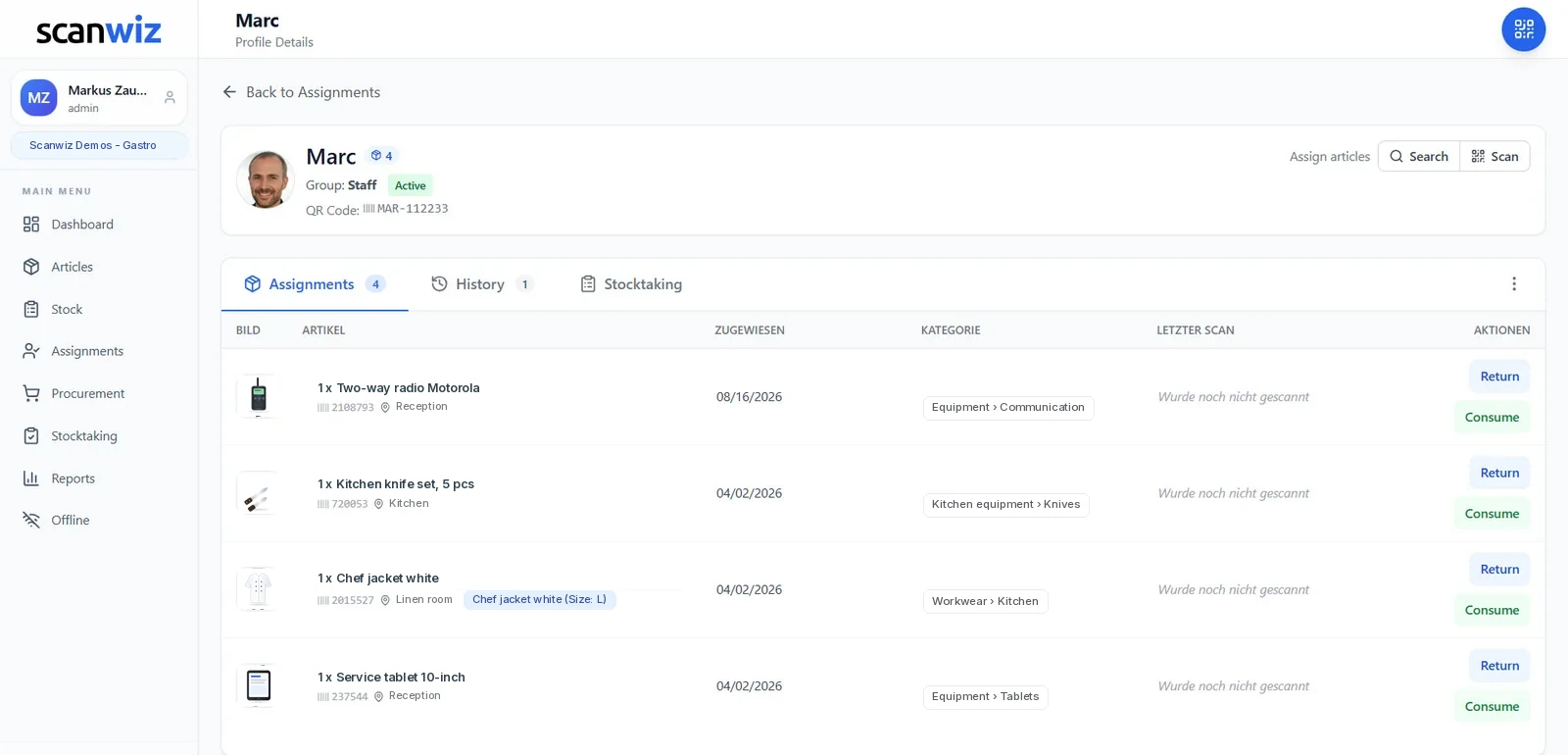
Yes. Alongside consumables with a quantity, kitchen appliances, machines, tablets or uniforms can be kept as individual objects and assigned by scan to a person, an area or a property – and booked back in the same way when they are returned. The item profile shows at any time who has what and since when, including the full history. With seasonal staff in particular, that ends the search for the second chef’s jacket or the bar tablet. The assignment function is already included in the Starter plan. More about it on the page for equipment management.
Is Scanwiz GDPR-compliant, and who can book what?
Scanwiz is GDPR-compliant and hosted in certified data centres in Germany. User roles define who may see and book what – for example, that a temp at the bar can book withdrawals but cannot correct stock levels. This applies consistently across the web app, the mobile app and the REST API, and tenant separation keeps your data strictly apart from that of other customers. You will find the details in our privacy policy.
How quickly is my team up and running – temps included?
Scanwiz is cloud-based and set up in minutes: the web app runs in the browser, and the mobile app is available for iOS and Android. Your items come in through the Excel import, often straight from the wholesaler’s order list, and the supplier’s EAN stays in use. Because booking means scanning, seasonal staff find their way around without a long briefing. On the Growth plan, we set up categories, storage locations and the first profiles together with you during personal onboarding. Guides and videos are available in the help & video library.
What does inventory management cost for a restaurant or hotel?
Plans start at $49 per month for up to 500 items (Starter). For batches with expiry dates you need Growth at $165 per month with up to 2,000 items including reporting; annual payment comes with a 10% discount. Users and locations are unlimited in every plan – one price for the whole team, however many seasonal staff join. You can try it beforehand free and without obligation, no credit card.
Over 250 customers already trust Scanwiz
Ready for less warehouse admin and more time for the work that matters?
Start free and with no obligation – no credit card, no risk. Or let us walk you through Scanwiz in a personal demo.



