
Comparison · Scanwiz or AERA-Online Lager
Scanwiz vs. AERA‑Online Lager: when your own inventory system pays off.
The AERA-Online stock module is free and sits right inside the purchasing platform many German dental practices already order through. Scanwiz costs money – and in return tracks every batch down to the person, plus equipment, inspection dates and stocktaking. Here’s what both publish themselves, with sources.
As of September 30, 2026 · Sources & method · All comparisons
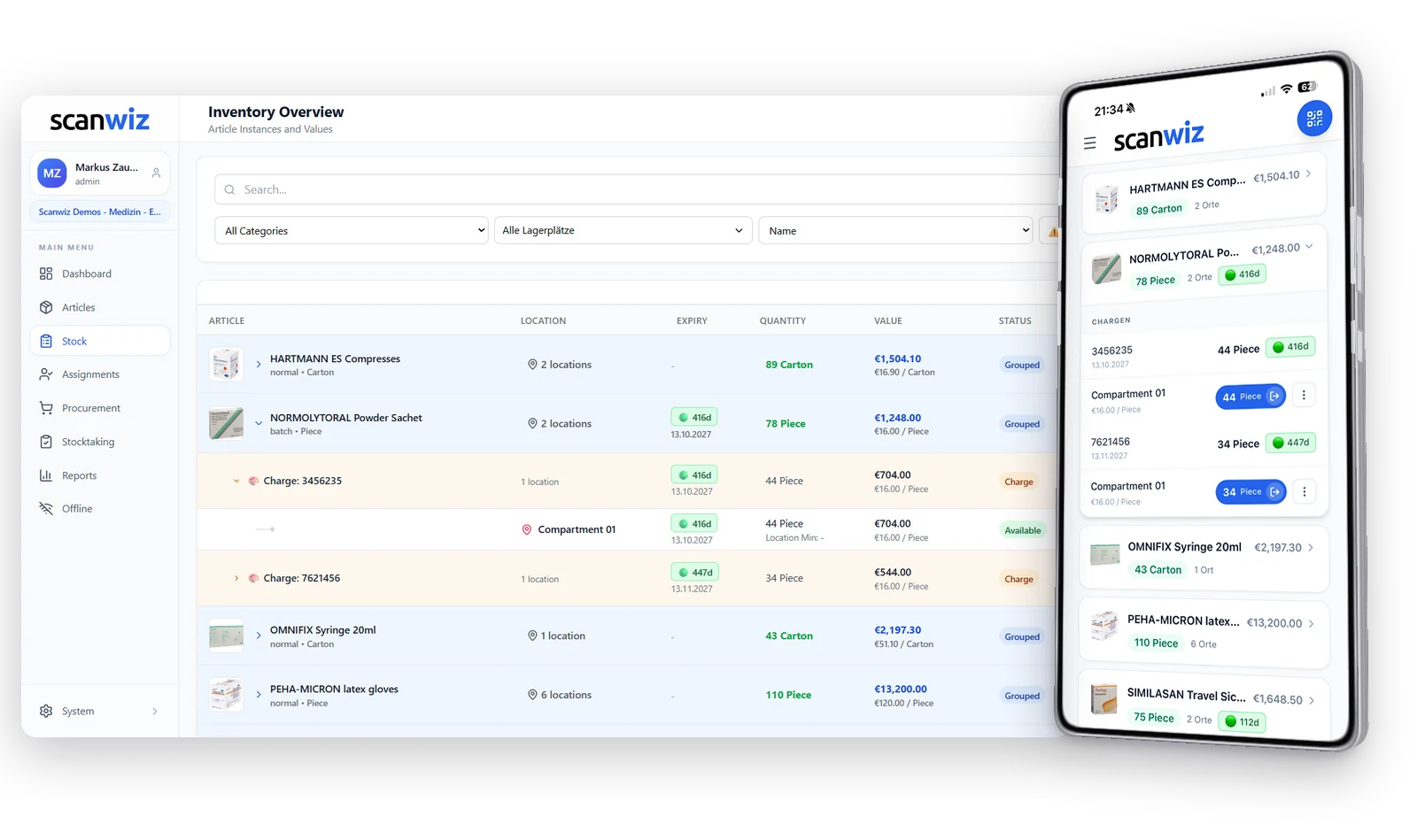
At a glance
Free versus complete – four differences.
Both keep storage locations, minimum and reorder levels and remind you to reorder. Both record batches and expiry dates. The differences lie behind that.
What it costs
$49 a month for up to 500 items; batches and expiry dates from Growth at $165.
Free after registration, no extra software.[1]
Where you buy
Independent of where you buy: shopping list by supplier, order from any dealer.
Stock inside the purchasing platform with 1.8 million offers from 350 suppliers; reordering runs through AERA with price comparison.[1]
What you scan
Manufacturer barcodes with any smartphone or tablet, plus USB and Bluetooth scanners.
Scan app with AERA barcodes; goods receipt creates its own labels.[3]
What’s included
The recall test
The supplier calls. What now?
Four steps from goods receipt to the question of who received an affected batch. Described according to both vendors’ publications.
- 01
Goods receipt
The delivery arrives.
Scanwiz
Scan the pack, record batch, expiry date, quantity and price.
AERA-Online
Booking in with best-before date and batch number, plus goods receipt labels in one step.[3]
- 02
Withdrawal
In the treatment room.
Scanwiz
Scan the pack, pick the batch, book the quantity – the stock of that batch goes down.
AERA-Online
Withdrawal by scan right at the supply cabinet.[3]
- 03
Handout
To a colleague, a room or a site.
Scanwiz
The batch number stays attached to the assignment and shows on the profile – with the date.
AERA-Online
AERA doesn’t describe assignment to people.
- 04
Recall
Batch 7621456 is affected.
Scanwiz
Enter the number: what is where, what was withdrawn, who received something. Export as Excel, CSV or PDF.
AERA-Online
Batch and expiry date are stored on the products in stock.[1] Tracing down to the person isn’t documented.
ScanwizAn answer with storage location and person – as an export for audits and records.
AERA-OnlineStock and bookings per batch in the store.[1] AERA doesn’t describe who received something.
The decisive link
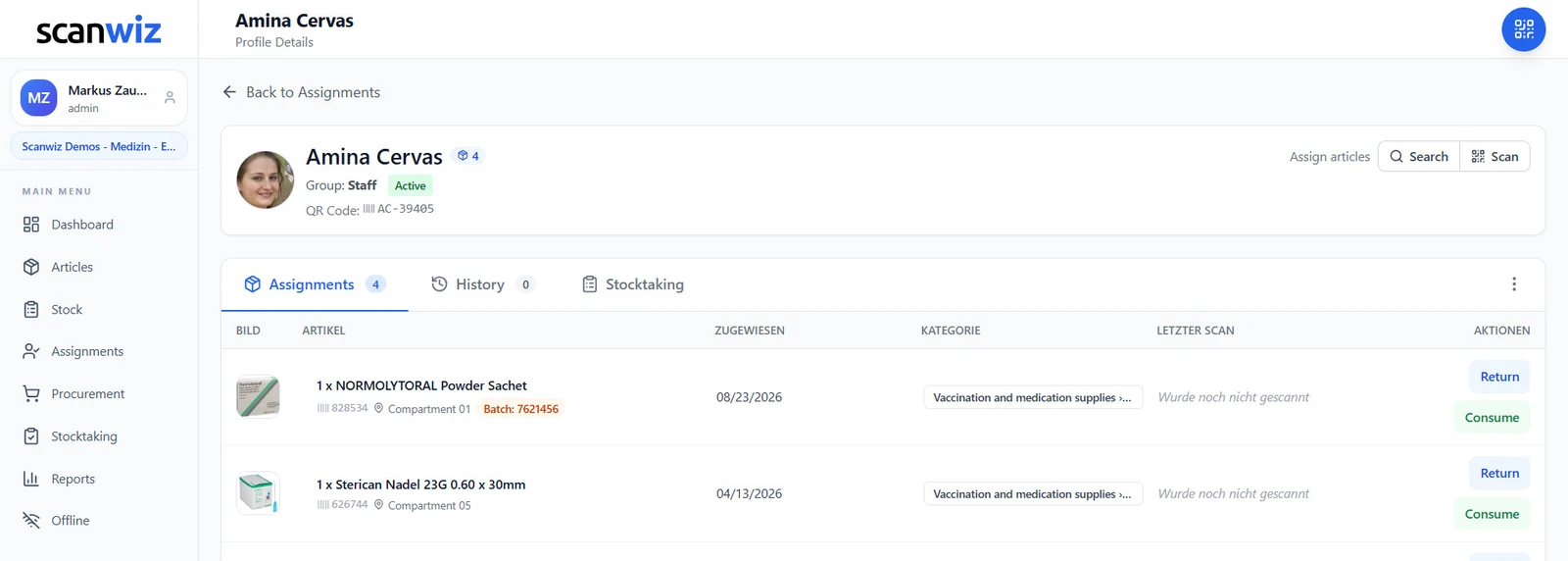
The batch number travels with the person.
When something is issued to a colleague, a department or a site, Scanwiz keeps the batch number attached to exactly that assignment. This is where “somewhere in the practice” becomes a defensible answer to the question of who received which batch.
The AERA-Online stock module keeps batches and expiry dates on the products in stock. That’s enough to keep an eye on expiry. To answer where a batch went, you need the booking down to the person.
- Batch number visible on the profile, with the date of issue
- Returns and consumption stay traceable down to the batch
- Eight batch reports, export as Excel, CSV or PDF
Feature comparison
Twelve criteria that decide.
Only the points where the two differ. Based on AERA’s product pages and the scan app description.
| Criterion | Scanwiz | AERA-Online |
|---|---|---|
| Price & purchasing | ||
| Price | $49 / month; batches from Growth at $165 | Free after registration[1] |
| Getting started | 14-day trial, Excel import | Register and start, free training[1] |
| Purchasing with price comparison | Not offered – shopping list by supplier | |
| Batches & proof | ||
| Batches & expiry dates | Own stock per batch, with price and supplier | |
| Expiry warning | Days remaining, traffic light, alerts on the dashboard | Reminder on expiry according to an AERA advertorial[4] |
| Tracing down to the person | Batch number on every assignment | Not documented |
| Batch reports | Eight reports, export Excel, CSV, PDF | Not documented |
| Stock & daily work | ||
| Scanning | Manufacturer barcodes, any smartphone, external scanners | Scan app with AERA barcodes, own goods receipt labels[3] |
| Without bookings (kanban) | Not offered | Stock cards and labels as reorder aids[1] |
| Stocktaking | Four methods by scan, blind counts too | Not documented |
| Equipment & inspections | Maintenance, intervals, records on the device | Not documented |
| Server location | Data centers in Germany | Not stated |
LevelStorage locations · minimum and reorder levels · reorder reminders · recording batches and expiry dates[1]

“Managing our medication stock used to be time-consuming and error-prone. With Scanwiz, stock levels, removals and responsibilities are visible digitally at any time. The rollout was smooth and the team adopted it immediately.”
Decision guide
Which one suits your practice?
Free is a strong argument. Here’s when it’s enough.
Scanwiz fits if …
- you need to know who received which batch – not just what’s left in the cabinet.
- equipment, steriliser maintenance and inspection dates should run in the same system.
- you want to stay independent of where you buy.
- stocktaking should run by scan at the cabinet, with several people too.
- you’re not a dental practice: medical practice, care, lab or clinic.
AERA-Online Lager fits if …
- you already order through AERA-Online and want your stock in the same place.
- inventory management must not cost anything.
- stock cards and labels as reorder aids are enough for you.
- you mainly track batches to keep an eye on expiry.
Both work: order at AERA, keep stock in Scanwiz.
The AERA-Online price comparison stays free.[1] You order there at the best price and book the delivery into Scanwiz by scan – with batch, expiry date and storage location. There’s no technical connection; you use them side by side.
FAQ
Scanwiz or AERA-Online Lager – answered briefly.
Is the AERA-Online stock module really free?
Yes. According to AERA, the stock management features are available free of charge after registering on AERA-Online, with no extra software. The module is integrated into the price comparison and ordering platform used for reordering.
Why pay for Scanwiz?
If you need more than stock levels and reordering: Scanwiz keeps every batch with its own stock, price and supplier down to the person it was issued to, and provides eight batch reports. On top come stocktaking by scan, equipment with inspection dates and material requests. Scanwiz costs $49 a month for up to 500 items; batches are included from Growth at $165. You test free for 14 days.
Can the AERA-Online stock module handle batches and expiry dates?
Yes. According to AERA, batch numbers and expiry dates can be stored for products in stock to meet MDR requirements; the scan app books goods in with best-before date and batch number. AERA doesn’t describe tracing down to the person who received something.
Do I need my own labels for Scanwiz?
No. Scanwiz reads the barcodes on manufacturer packs with the camera of any smartphone or tablet; you only need QR labels for items without a code or for storage locations. According to its description, the AERA-Online Scan App works with AERA barcodes and creates its own labels at goods receipt.
Can I use AERA-Online and Scanwiz together?
Yes, side by side. You keep ordering through the AERA-Online price comparison and book the delivery into Scanwiz by scan. There’s no technical interface between the two.
How up to date is this information?
As of September 30, 2026. All information about AERA comes from aera-online.de, the App Store and an AERA advertorial; the sources are listed at the end of the page. If you spot a mistake, write to us – we’ll correct it.
Sources & method
We only compare what AERA publishes itself: product pages on aera-online.de, the scan app description in the App Store and an AERA advertorial, retrieved on September 30, 2026. These sources are in German. Scanwiz information comes from our pricing overview and feature pages, such as equipment management and the barcode scanner.
What AERA doesn’t describe is marked “not documented” in the table – not “missing”. AERA-Online is a trademark of AERA EDV-Programm GmbH; this page is not affiliated with AERA. If you spot a mistake, write to us – we’ll correct it.
- AERA-Online – Einfache Lagerverwaltung mit dem AERA-Online Lager (German) – Free stock management, stock tracking, batches and expiry dates, minimum and reorder levels, stock cards, 1.8 million offers and 350 suppliers.
- AERA-Online – Produktinformation (German) – Price comparison and ordering platform, basket optimiser, AERA-Online stock module.
- App Store – AERA-Online Scan App (German) – Scan app: AERA barcodes, booking in with best-before date and batch, goods receipt labels, withdrawals by scan, order suggestions.
- dental-wirtschaft.de – Advertorial zum AERA-Online Lager (German) – Reminders for low stock and expiring material, documenting batches.
Over 250 customers already trust Scanwiz
The call comes eventually. The answer should already be there.
Create one batch article, book in two deliveries and hand out one pack. After that you’ll know whether it fits – 14 days free, no credit card.
4.9 out of 5 stars from over 120 verified customer reviews



