
Industry · Practice, clinic & lab
Medical inventory management for practices – without paper or spreadsheets.
Book medication, sterile goods and practice supplies by scan – batch-specific, with expiry date and a complete record. Scanwiz keeps the stock current while your team works with patients.
Batches · Expiry dates · Variants · Traceability · Stocktaking
In short
Medical inventory management means every article has a barcode, a storage location and a current stock level – and for medication and sterile goods, a batch with its own expiry date on top of that. With Scanwiz your team books goods receipts and withdrawals straight by scan, batch-specific and without typing anything in. The stock is created while people work, instead of being maintained in a spreadsheet in the evening.
The difference
An end to index cards and expiry-date roulette.
Less searching, counting and asking around: the very transactions that cost time today happen along the way with digital inventory management – documented, auditable, without paper in the supply cabinet.
The ampoules are gone – and the treatment room found out, not the store.
The minimum quantity speaks up before the cabinet is empty – the article lands on the shopping list by itself.
Expired stock only shows up once it is in your hand – in front of the patient.
Days remaining and expiry alerts speak up in time – issue the older batch first, the date is right there next to it.
In a recall the search starts in delivery notes and folders.
Filter by batch number: storage location, remaining quantity and every handout are right there.
Stocktaking means counting all Saturday while the practice stays closed.
Counting happens in the app between consultations – with tolerances and differences posted directly.
In everyday use
This is what medical inventory management looks like in Scanwiz.
Six views from the real application – from the batch list and the withdrawal on a phone through to reporting and stocktaking.
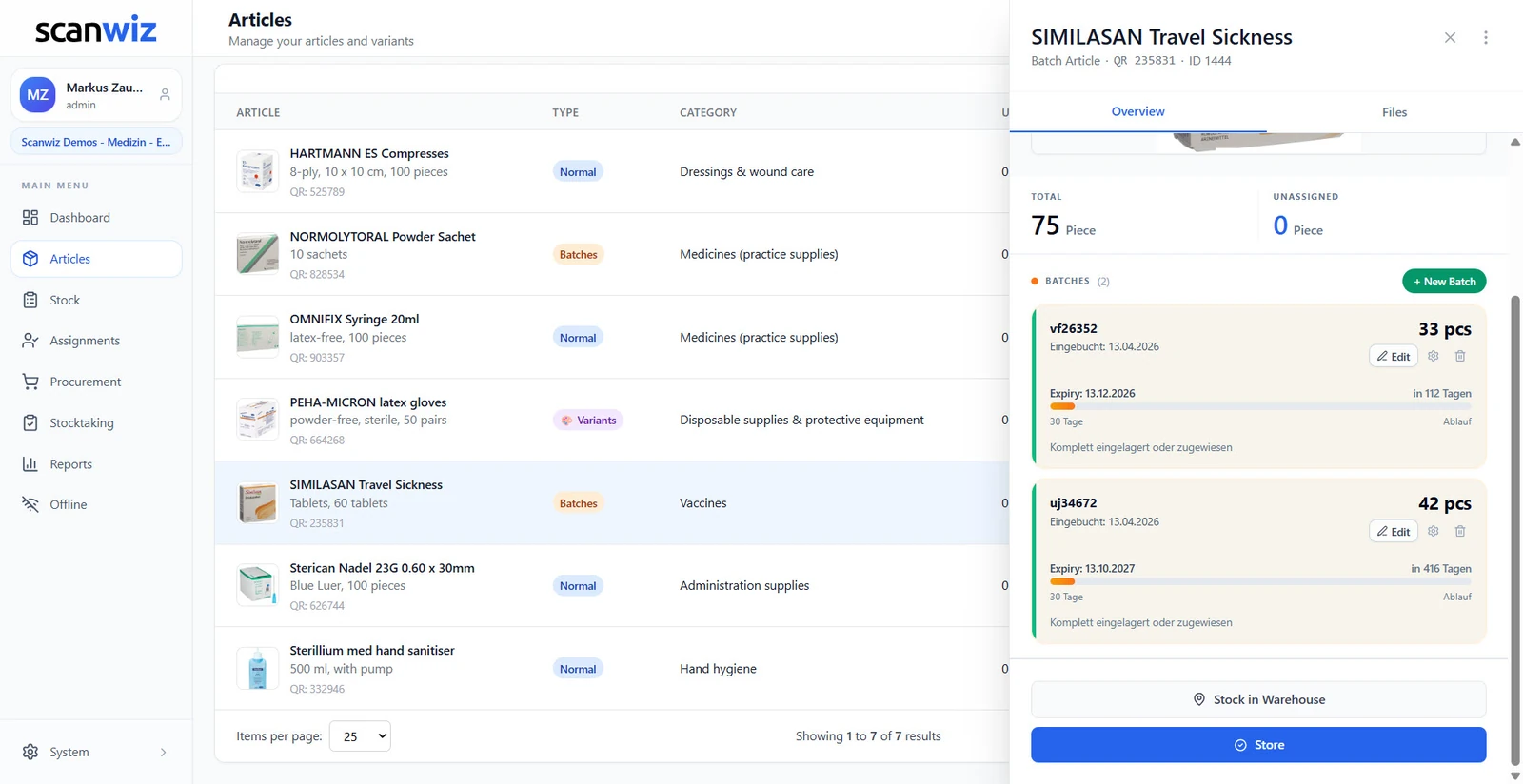
Batches & expiry
Every delivery with its own number and its own date
One row per batch: number, quantity, booking date, expiry date and the days remaining. Whatever expires first sits at the top – so your staff can see at the shelf which pack goes out next, instead of finding something at the back of the cabinet that expired weeks ago.
- Days remaining, a traffic light and expiry alerts
- Issue the older batch first – the date is right there next to it
- Minimum quantity per batch across all storage locations
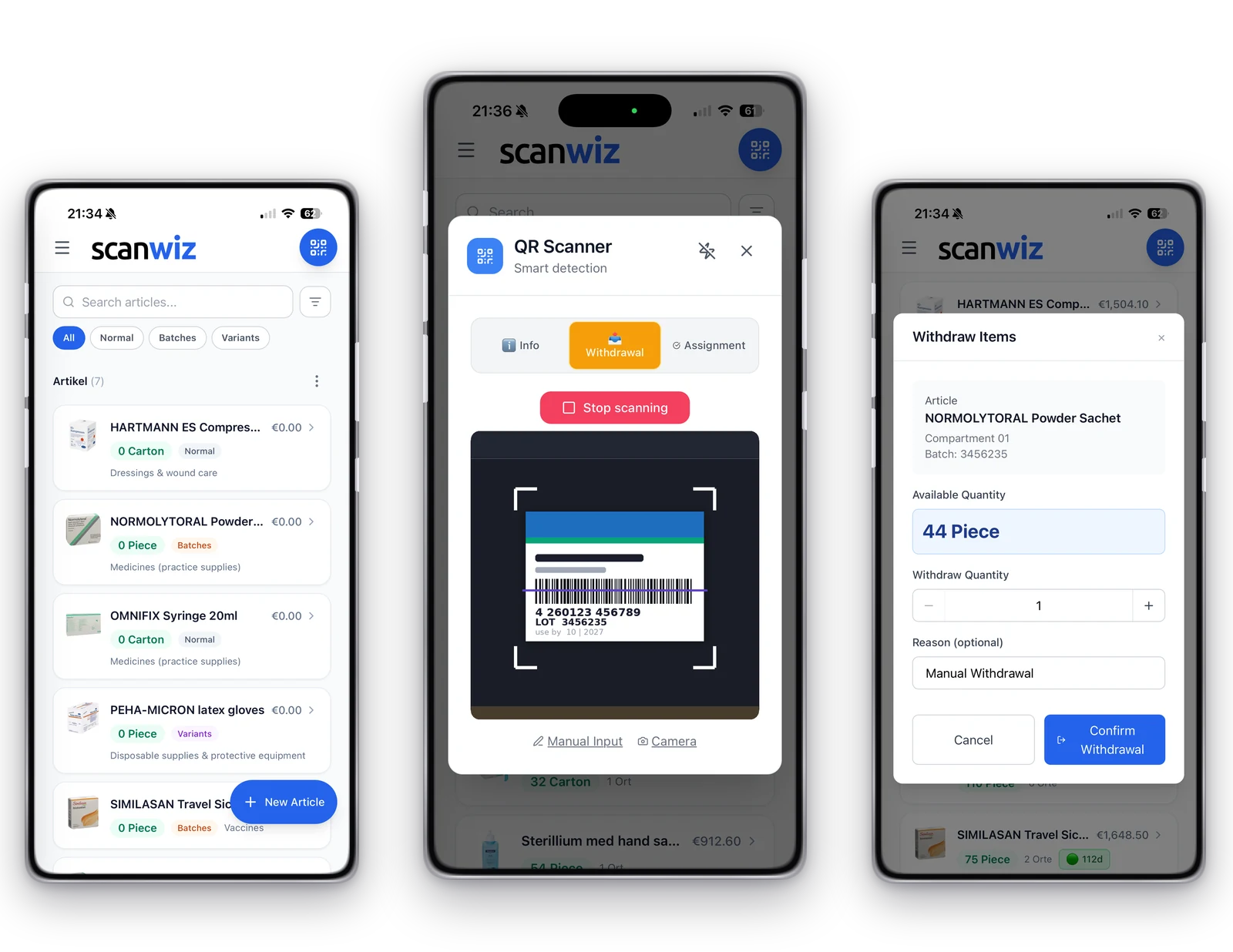
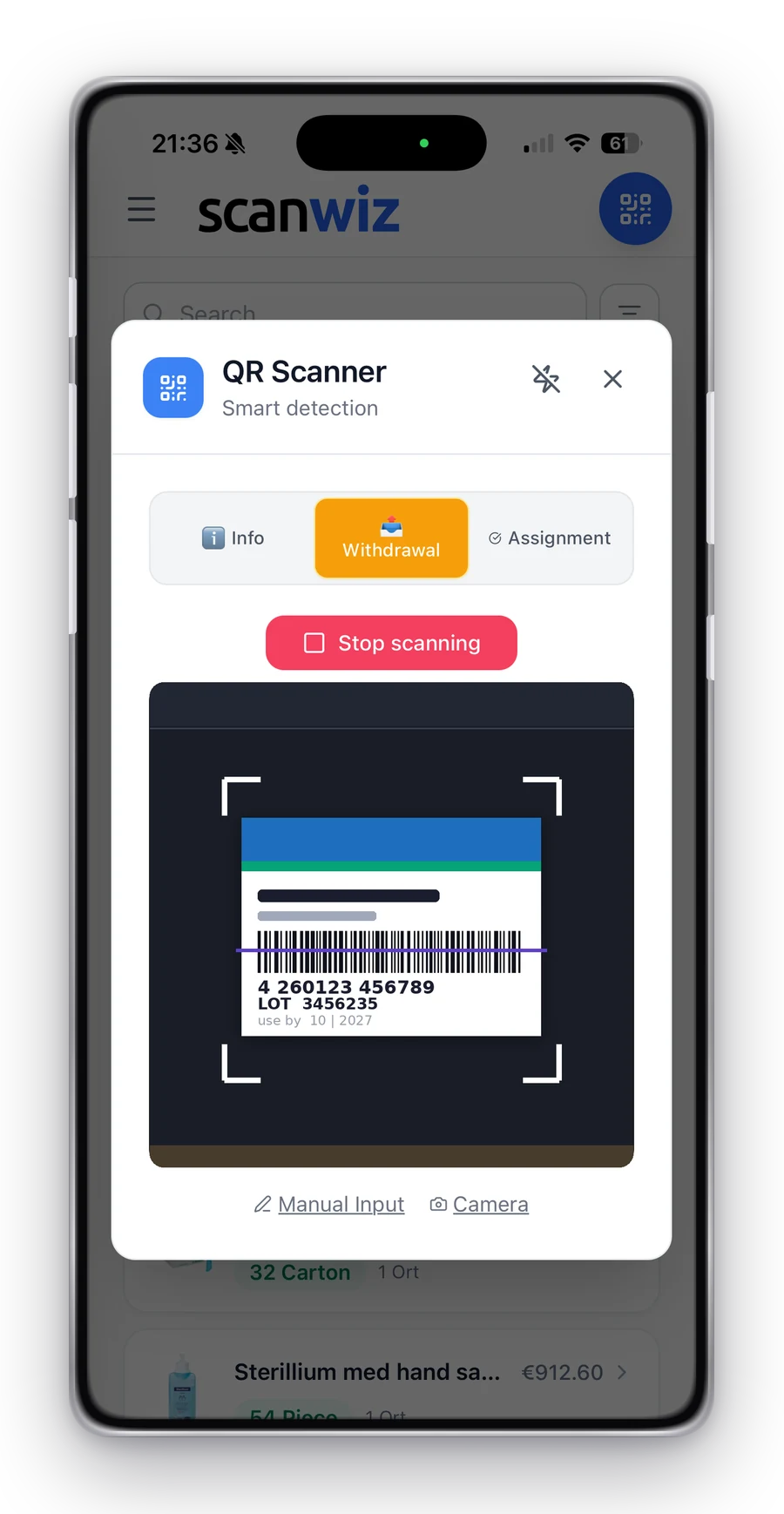
At the point of care
Withdrawal in seconds – batch-specific
Scan the pack, confirm the quantity, done. Scanwiz picks up the batch and books it out without anybody typing a number. This is where documentation stands or falls in a busy practice: whatever takes longer than the act itself gets put off until later – and later often means never.


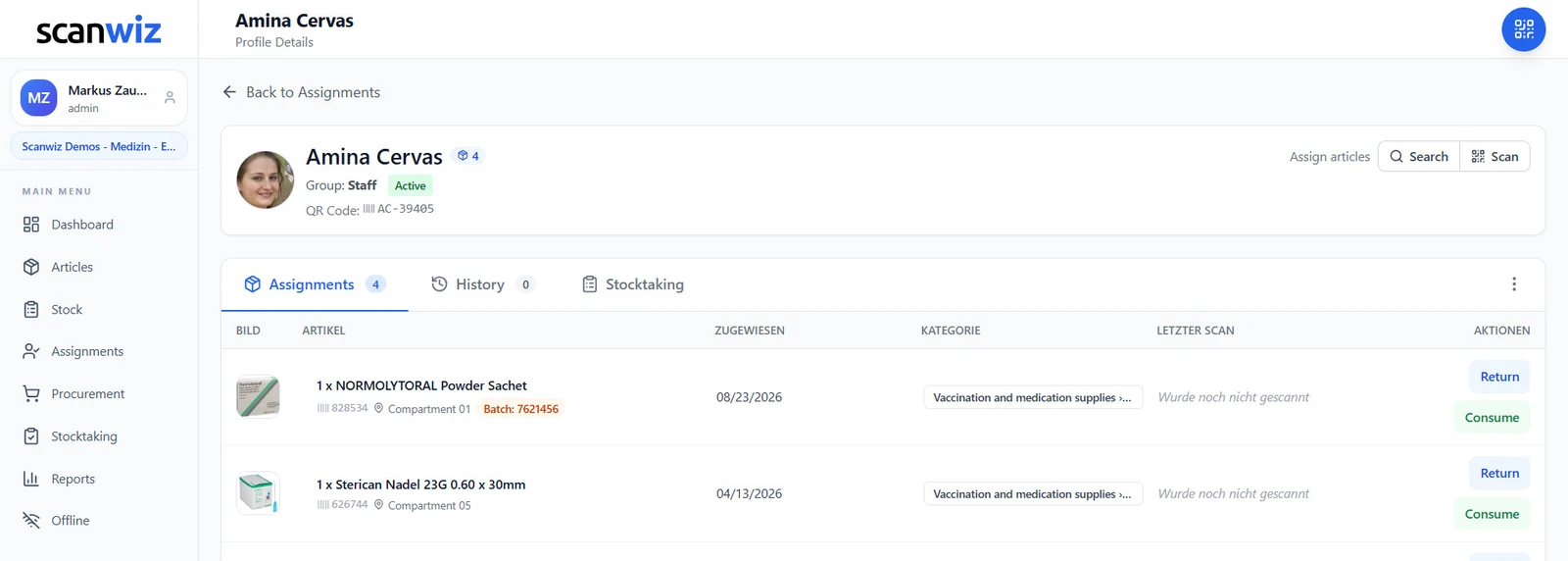
Traceability
In a recall, only one question counts
Where is batch 4453235 – and who received something from it? The batch number stays attached when an item is issued to a person, instead of getting lost at the point of booking out. Rather than working through delivery notes, you filter by the number and have the answer in seconds: storage location, remaining quantity and every handout with its date.
- The batch number stays traceable down to the person
- Every booking documented with time, user and quantity
- One batch can sit in several storage locations
Variants
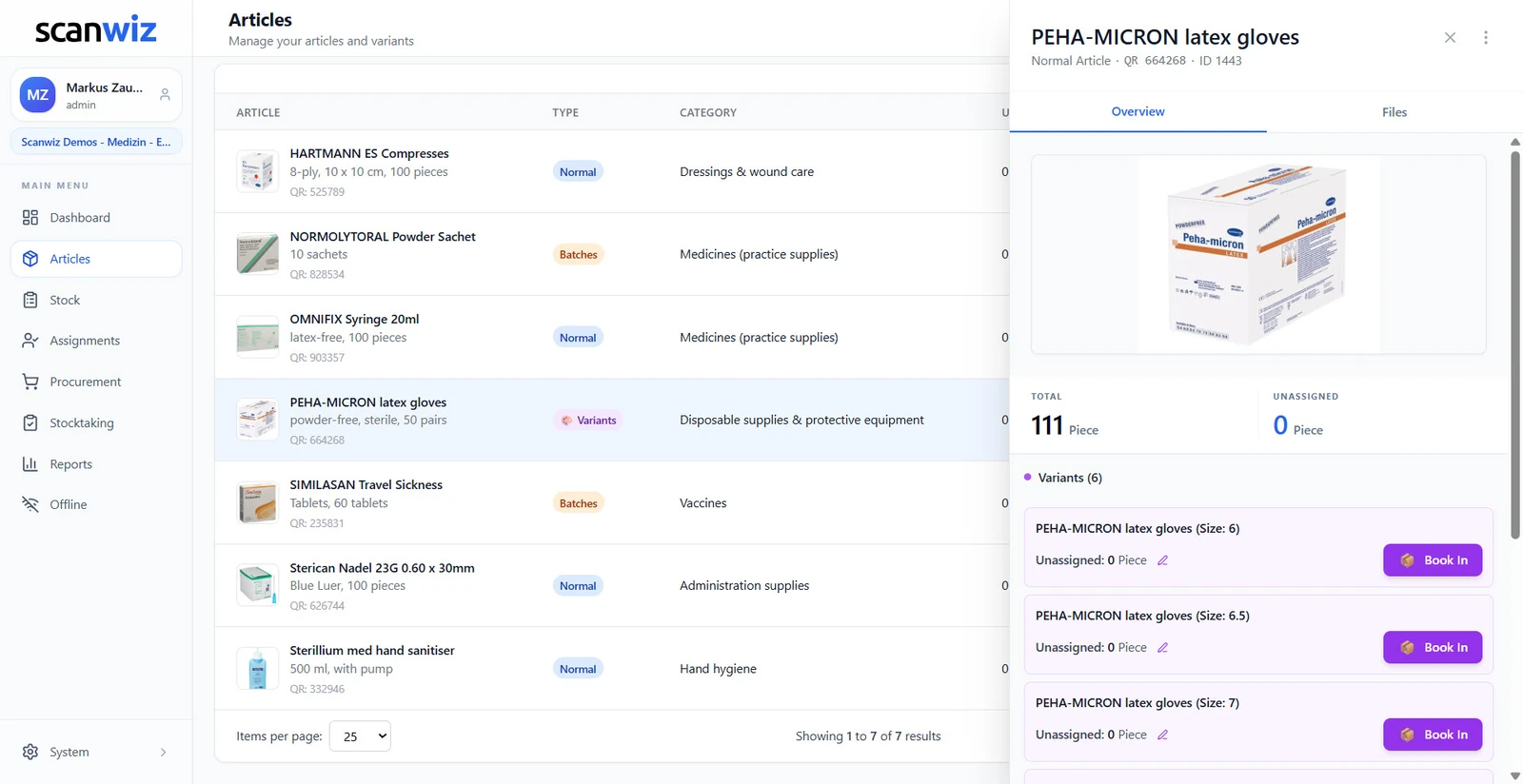
Six sizes are not six articles
Gloves from S to XXL, needles by gauge, catheters by length: every version carries its own stock and the total sits on top. The warning then names the size that is running low – not just the article, leaving somebody to work out which version is actually missing.
- One master record, one stock level per version
- Minimum quantity per variant – the warning names the size
- Add new versions without recreating the article
Reporting & proof
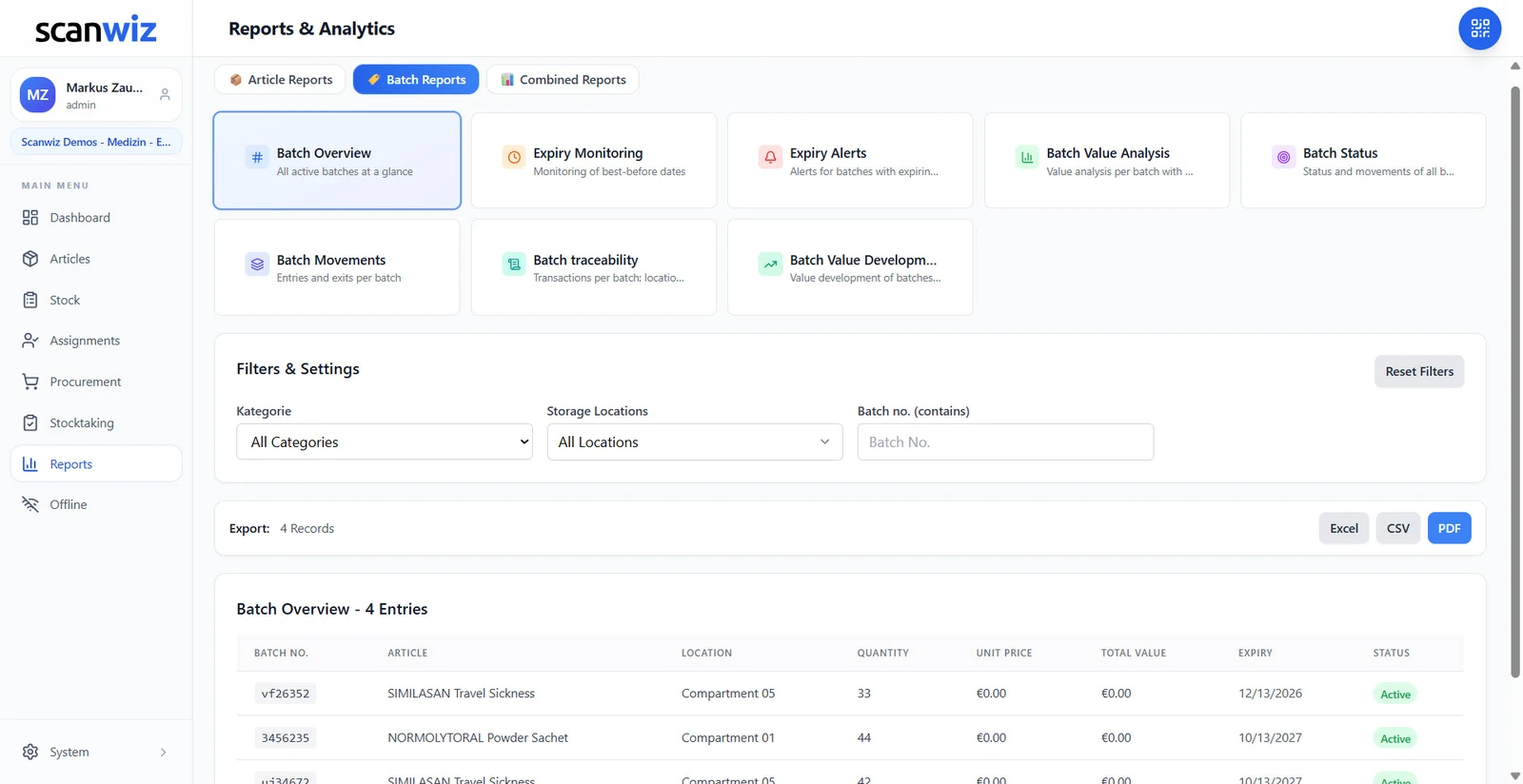
Eight reports that only exist with batches
Without batches you can count stock. With batches you can answer questions: which goods expire first, what was consumed in which quarter, where capital is tied up. Filtered by category, storage location or batch number – and exportable as Excel, CSV or PDF when quality management, your accountant or an auditor needs something in writing.
- Expiring batches, consumption and stock value at a glance
- Filters by category, storage location and batch number
- Export as Excel, CSV and PDF – for QM, audits and accounting
Stocktaking
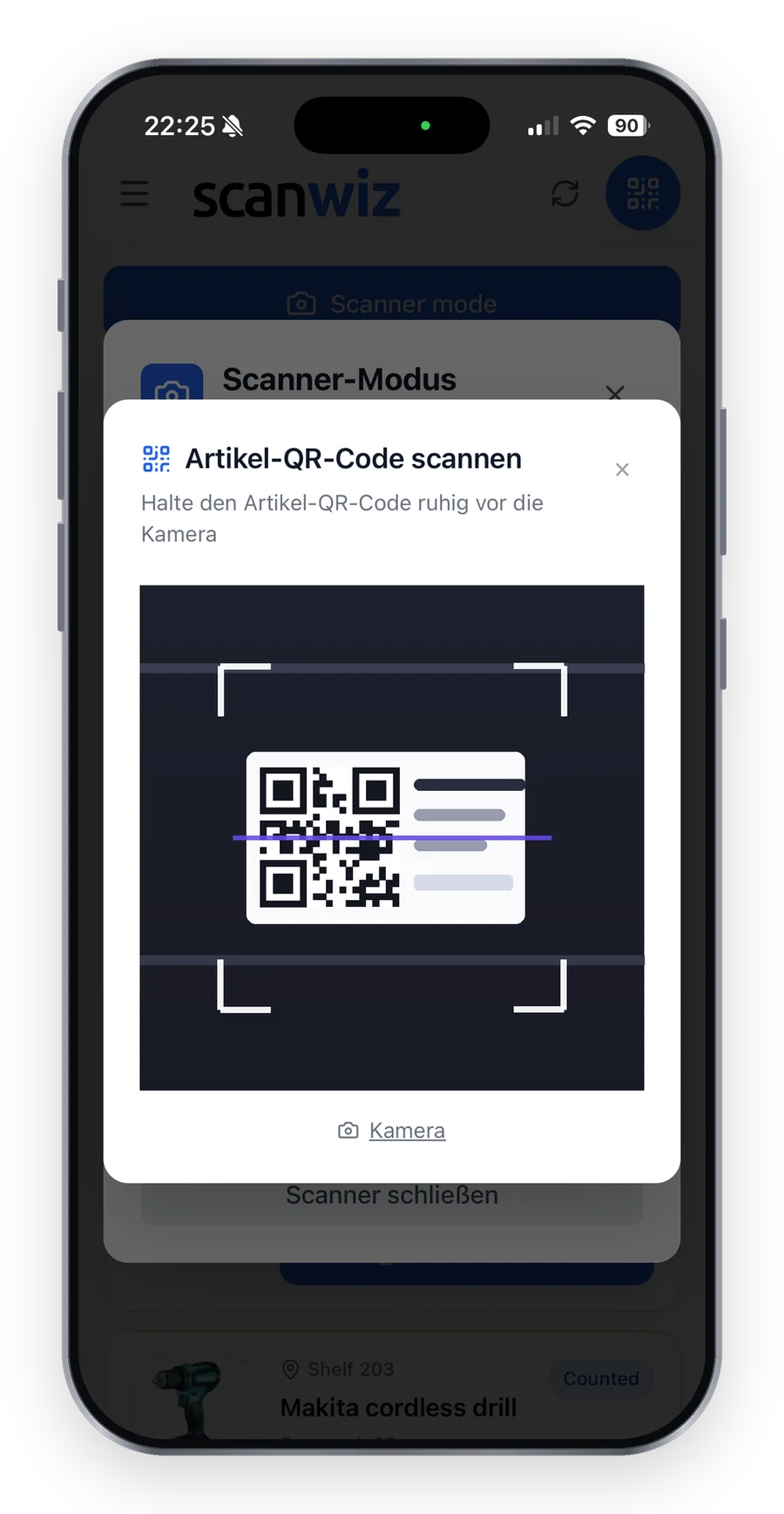
Counting between two consultations
A stocktake runs as a session of its own on the phone, with tolerances in percent and in units. Only real deviations go to approval, everything else passes. Pausing and continuing tomorrow is intended – the practice does not have to close for it, and batches are counted along the way.
- Four stocktaking types, including spot check and blind count
- Pause and continue later, several people counting in parallel
- Every session is kept with its number, period and deviations
One platform
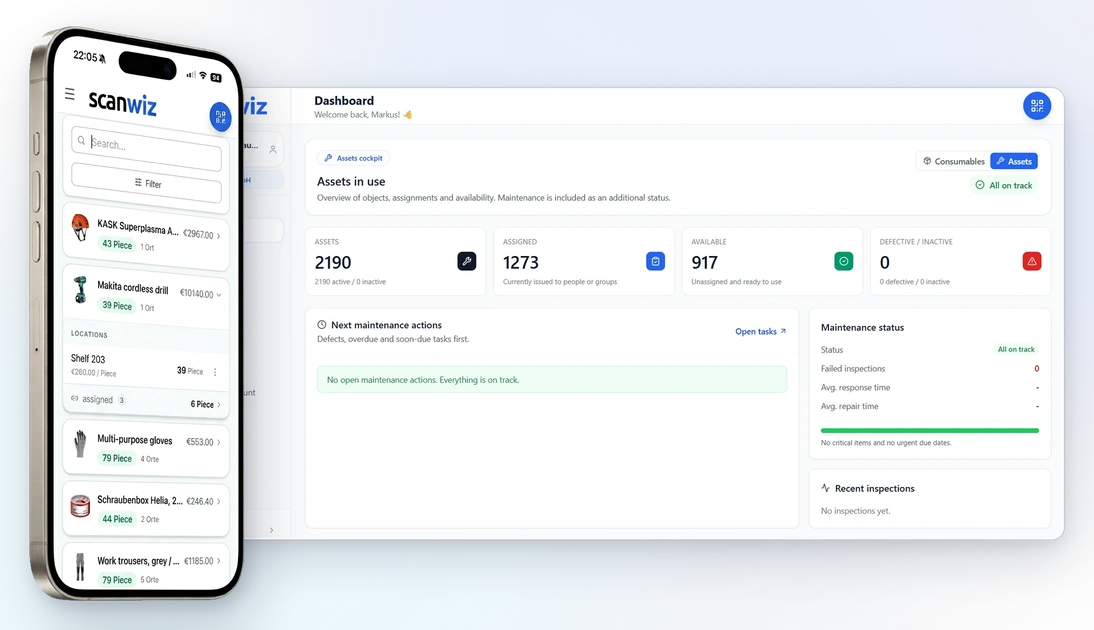
Web app, mobile app and scanner – one stock.
At the computer on reception, on a phone in the treatment room or with a handheld scanner at goods receipt: everyone works on the same stock. Cloud-based, set up in minutes – from a single practice to a group with several locations.
Getting started
Three steps to digital medical inventory management.
Try it free and without obligation – no strings attached. Register in the web app or download the mobile app straight away.
Create articles & batches
Set up articles, storage locations and opening balances, and decide what is tracked in batches. Manufacturer barcodes you already have can stay in use – the scanner detects common formats by itself.
Book by scan
The team books goods receipts and withdrawals directly in the app. The batch number travels along automatically, sizes and versions stay cleanly separated – mix-ups and follow-up questions drop noticeably.
Monitor & prove
Days remaining and expiry alerts run automatically, and eight batch reports export as Excel, CSV or PDF. You see early what is expiring or running low – and have the record ready when an audit comes.
Customer quotes
From a care service to a practice to a laboratory.
4.9 out of 5 stars from over 120 verified customer reviews.
“As an outpatient care provider, we prepare a large share of our clients’ medication in the office — so having a complete overview is essential. Managing our medication stock used to be time-consuming and prone to errors: when do we need to reorder, and who prepared which medication? With Scanwiz, we finally have a reliable solution. Stock levels, removals, and responsibilities are visible digitally at any time and in real time. Our team uses Scanwiz every day — its intuitive operation made the rollout smooth, and adoption was immediate. For care services that value quality and reliability in medication management, Scanwiz is an easy recommendation.”
 Joachim HeckM+M The Care Team
“We have significantly professionalized the warehouse organization in our chemical laboratory and made it much more transparent. In particular, the clear mapping of batches and variants reduces mix-ups and ensures reliable traceability in daily operations. Barcode scanning and ongoing inventory documentation have enabled us to shorten throughput times and make our material flows easier to plan. Support is also fast and solution-oriented—all in all, a real relief for the entire team.”
 Jessica FeiglePetersson Chemistry Laboratory
“Since introducing Scanwiz, we have better control over materials management in the clinic: inventories are more traceable, withdrawals and goods receipts are clearly documented, and the evaluations help with planning. This saves time in everyday work, reduces queries, and makes processes more reliable for the team as a whole.”
 Jasper FelixMerian Iselin Clinic
Prices
Straightforward. Transparent. Affordable.
Pricing is based on the number of managed articles and the range of features you need. Batch management is included from the Growth plan upwards. Need more, or something tailored? Get in touch and we will put together a plan that fits.
- Unlimited users
- Unlimited storage locations
- Variant management
- Assignment function
- Stocktaking functions
- Offline mode
- Everything from the Starter plan
- Self-checkout function
- Batch management
- Purchasing & orders
- Reporting area
- Personal onboarding
- Scanwiz full version
- Scanwiz AI Connect (MCP)
- Material requests
- Organisational units
- Single Sign-On
- Access to the REST API
All plans free for 14 days · no credit card · cancel monthly
Frequently asked questions
Medical inventory management – answered briefly.
What is medical inventory management?
It covers capturing, booking and analysing all practice supplies: medication and vaccines, sterile goods and single-use items, dressings, reagents and protective equipment. Every article gets a barcode and a storage location; articles tracked in batches also get a batch with a number and an expiry date. Goods receipts and withdrawals are booked by scan, so stock levels and movements stay traceable at any time.
Which facilities is Scanwiz suited to?
Medical practices, group practices, clinics, laboratories and outpatient care services of any size – from a single practice to a group with several locations. Users and storage locations are unlimited in every plan, so the whole team can book along without the cost rising per head.
What is the difference between a batch and a variant?
A batch distinguishes deliveries of the same article and carries its own number, expiry date and purchase price – typical for medication, vaccines and sterile goods. A variant distinguishes versions of the same article, such as glove sizes S to XXL or a needle gauge. The two combine: gloves in six sizes, each size with batches of its own.
Which articles should a medical practice track in batches?
Everything that arrives with a batch number and an expiry date: medication and vaccines, sterile goods, single-use items with a limited shelf life, and reagents and lab supplies. For these articles the batch decides which pack goes out first and who is affected by a recall. Articles without an expiry date – office supplies, practice supplies without a shelf life or small devices, for example – you simply keep as standard articles with a minimum quantity. In Scanwiz you decide per article whether it is tracked in batches, and existing articles can be switched to batches later without recreating them. With vaccines and sterile goods in particular this saves searching, because the shortest remaining shelf life always sits at the top of the batch list.
Are expiry dates monitored automatically?
Yes. Every batch carries its own expiry date, Scanwiz shows the days remaining with a bar and a traffic light, and flags expiring goods through expiry alerts. Whatever expires first sits at the top of the batch list – so the older batch goes out first, without anybody doing the arithmetic.
How does traceability work in a recall?
You filter by the batch number and see straight away which storage locations the batch sits in, how much is left and who received something from it. The batch number stays attached when an item is issued to a person, instead of getting lost at the point of booking out – which is exactly what matters when a manufacturer issues a recall.
Can I book batches from my phone?
Yes. Scan the pack, confirm the quantity – the batch is picked up and booked out without anybody typing a number. Scanning works with a phone camera, a tablet or a handheld scanner you already own, and common manufacturer barcodes can stay in use. More about it on the page for batch management.
How do I get my existing stock into the system?
Through the Excel import: articles, categories, storage locations and opening balances can be taken from a spreadsheet, so you do not start from zero. Existing articles can also be switched to batches later on. After that the stock keeps itself current through the daily scans.
How does reordering practice supplies work?
You set a minimum quantity for every article and every variant – for batch articles across all storage locations. Once withdrawals take the stock below it, the article lands on the shopping list automatically, grouped by supplier and with a suggested order quantity you can adjust before sending. Because the warning names the exact size for variants, a shortage of size M gloves or of needles in a particular gauge shows up before the treatment room runs out. Purchasing & orders are included from the Growth plan upwards.
Does Scanwiz help with quality management, audits and inspections?
Yes, because the record is created as people work instead of being pieced together afterwards. Every booking is kept with time, user, quantity and destination – still auditable years later. For every batch you can see when it was booked in, where it sits and who received something from it. The eight batch reports, covering expiring batches, consumption and stock value among others, export as Excel, CSV or PDF. Every stocktaking session is kept with its number, period and deviations as well. That way the paperwork for quality management or an inspection is ready without anyone digging through folders. More about it on the page for stocktaking software.
Does Scanwiz work without an internet connection?
Yes. In offline mode everything is captured locally and transferred automatically as soon as there is a connection again – handy in a basement store, in rooms with poor reception or on the road with an outpatient care service. Offline mode is already included in the Starter plan. Scanning works with a phone camera, a tablet or a handheld scanner you already own; the scanner detects common code types such as EAN, Code 128 and Data Matrix by itself. More about it on the page for the barcode & QR scanner.
Can I manage several locations or a group practice with Scanwiz?
Yes. Storage locations are unlimited in every plan – from the supply cabinet in the treatment room to the practice store and a second site. Everyone works on the same stock, and one batch can sit in several storage locations without losing the overview. For larger practice groups with separate responsibilities, the Business plan adds organisational units, material requests and Single Sign-On. Transfers between storage locations and sites are booked by scan as well, so you can always see where each batch currently is.
Is Scanwiz GDPR-compliant, and where is the data stored?
Scanwiz is GDPR-compliant and hosted in certified data centres in Germany. User roles define who may see and book what – consistently across the web app, the mobile app and the REST API. Tenant separation keeps your data strictly apart from that of other customers. For medical inventory management you record materials, stock and bookings; Scanwiz does not need any patient data for that. You will find the details in our privacy policy.
How quickly is my practice team up and running?
Scanwiz is cloud-based and set up in minutes: the web app runs in the browser, and the mobile app is available for iOS and Android. Existing lists come in through the Excel import, and manufacturer barcodes you already have can stay in use. On the Growth plan, we set up categories, storage locations and the first profiles together with you during personal onboarding. Guides and videos are available at any time in the help & video library.
What does Scanwiz cost for a practice?
Plans start at $49 per month for up to 500 items (Starter). For batches and expiry dates you need Growth at $165 per month with up to 2,000 items; annual payment comes with a 10% discount. You can try it beforehand free and without obligation – no credit card, cancel any time.
Over 250 customers already trust Scanwiz
Ready for less warehouse admin and more time for the work that matters?
Start free and with no obligation – no credit card, no risk. Or let us walk you through Scanwiz in a personal demo.



