
Feature · Material requests
Material requests by app: order, reserve, assign – without notes and shouting.
Employees order material from your own stock like in a shop – for their profile or a project. The warehouse reserves by scan, marks it ready and assigns it directly on pickup. Everyone sees the status, nobody hunts for the note.
Catalogue · Cart · Reservation · Assignment · Handover receipt
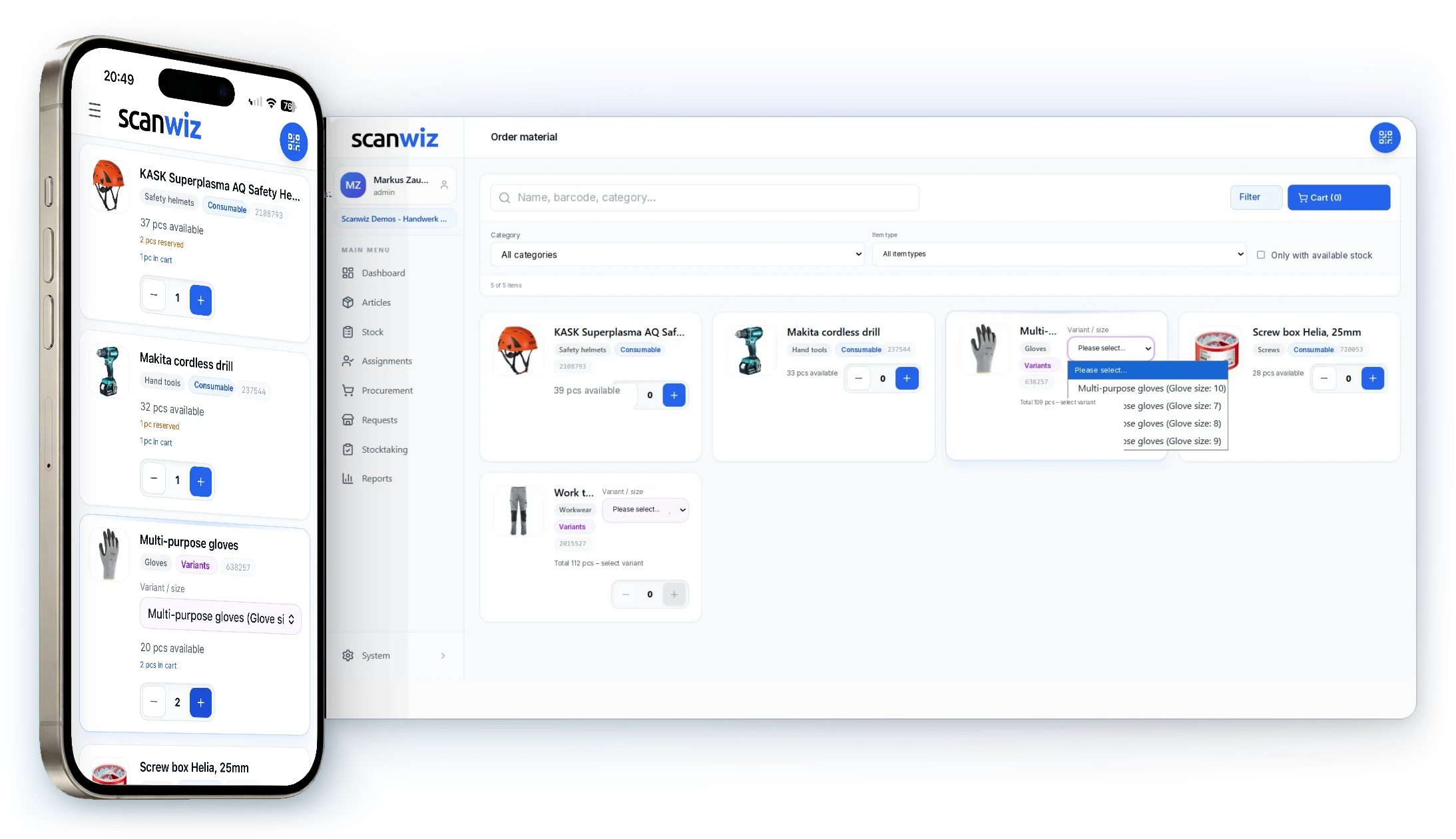
Items from the catalogue into the cart, add profile or project, send.
Scan the item at its location, confirm the quantity – the stock is blocked.
Everything together, ready for the pickup date. The requester sees the status.
Items land on the profile, with a digital signature as a receipt if you want one.
In short
A material request is an internal order: an employee requests items from your own warehouse, the warehouse releases them and prepares them for pickup. In Scanwiz this runs as a numbered process with a status – requested, reserved, ready, assigned. The reservation blocks the stock, the assignment on pickup books the items straight onto the profile, and the digital signature turns it into a receipt. “Have you still got any gloves?” becomes a process everyone can follow.
The difference
Material requests instead of notes, shouting and “has that gone out yet?”.
Fewer questions, fewer double allocations, fewer “I never got that”: the same errands that bounce between workshop, warehouse and office today run as one process – documented and visible to everyone.
The fitter writes a note, the storeman finds it on Friday.
The request arrives in the warehouse immediately – with a number, a pickup date and a purpose.
Two colleagues need the same three helmets – the second finds an empty shelf.
The reservation blocks the stock: what is set aside for one request cannot be taken by anyone else.
“Is my material ready yet?” – the third call to the warehouse this morning.
The status is in the app: requested, reserved, ready. Nobody has to call.
Who took the circular saw? The handover note is somewhere in the van.
On pickup it is assigned to the profile, with a digital signature – and the receipt sits on the profile as a PDF.
In everyday use
This is what material requests look like with Scanwiz.
Seven views from the real application – from the cart on the phone through release in the warehouse to assignment with a signature.
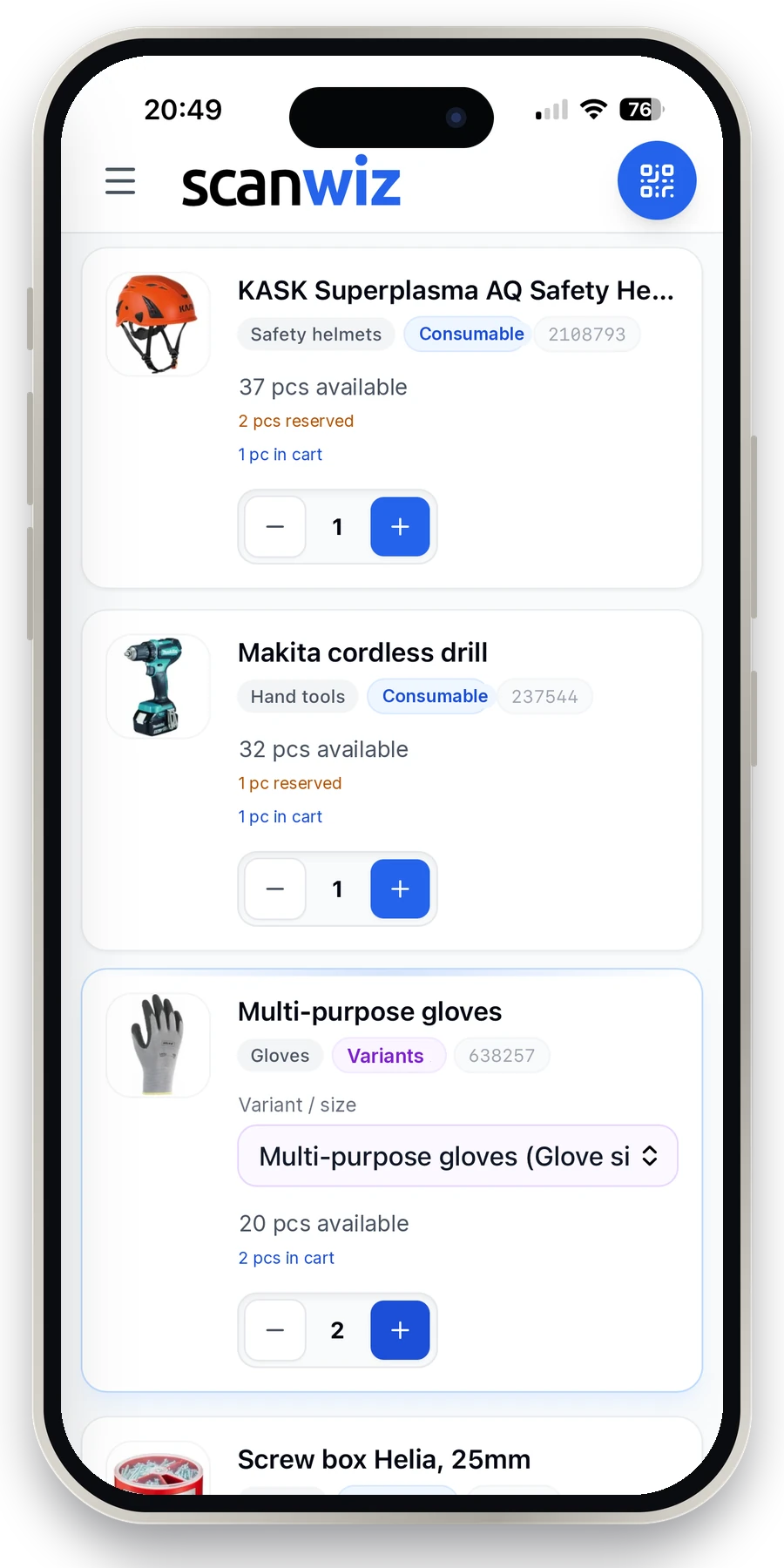
Requesting
People order from stock that actually exists
Whoever needs material opens the app, searches or scans the item and puts the quantity in the cart. Only what is genuinely available shows up – with variants where there are sizes or colours. No note for the storeman, no asking around in the corridor, no “have you still got any of those…”.
- Availability and unit sit on the item – piece, box, pack
- Variants are chosen while requesting, not afterwards
- On the phone, the tablet or in the browser – the same cart
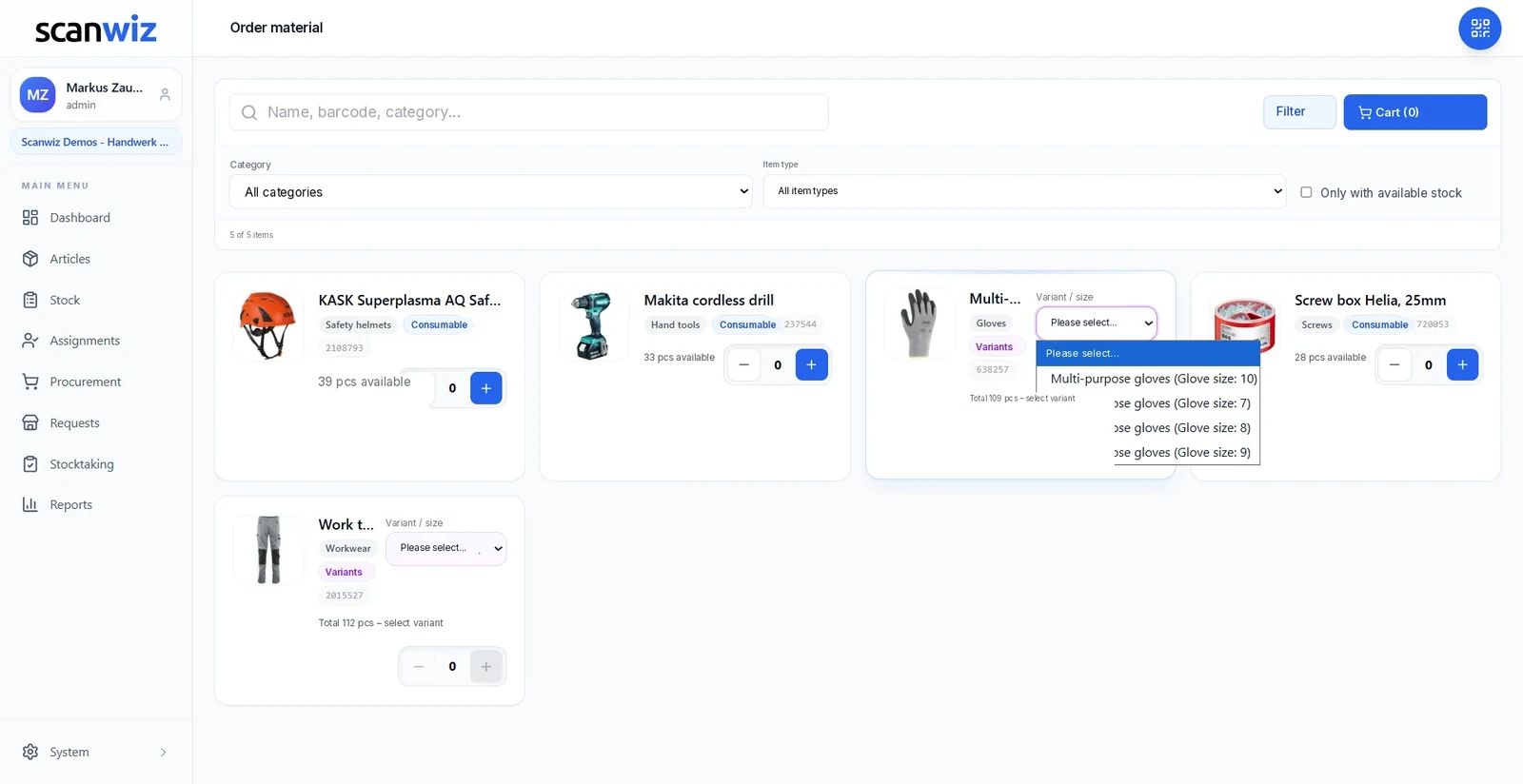
The internal catalogue
Like a shop – except the goods are already in the building
The catalogue shows your own stock: category, item type, availability, variants. Filters by category and “only with available stock” keep the list short. Anyone who needs two orange safety helmets picks the variant and sees straight away whether they are there – without asking the warehouse.
- Filter by category, item type and available stock
- Search by name, barcode or category
- Consumables and equipment in the same catalogue
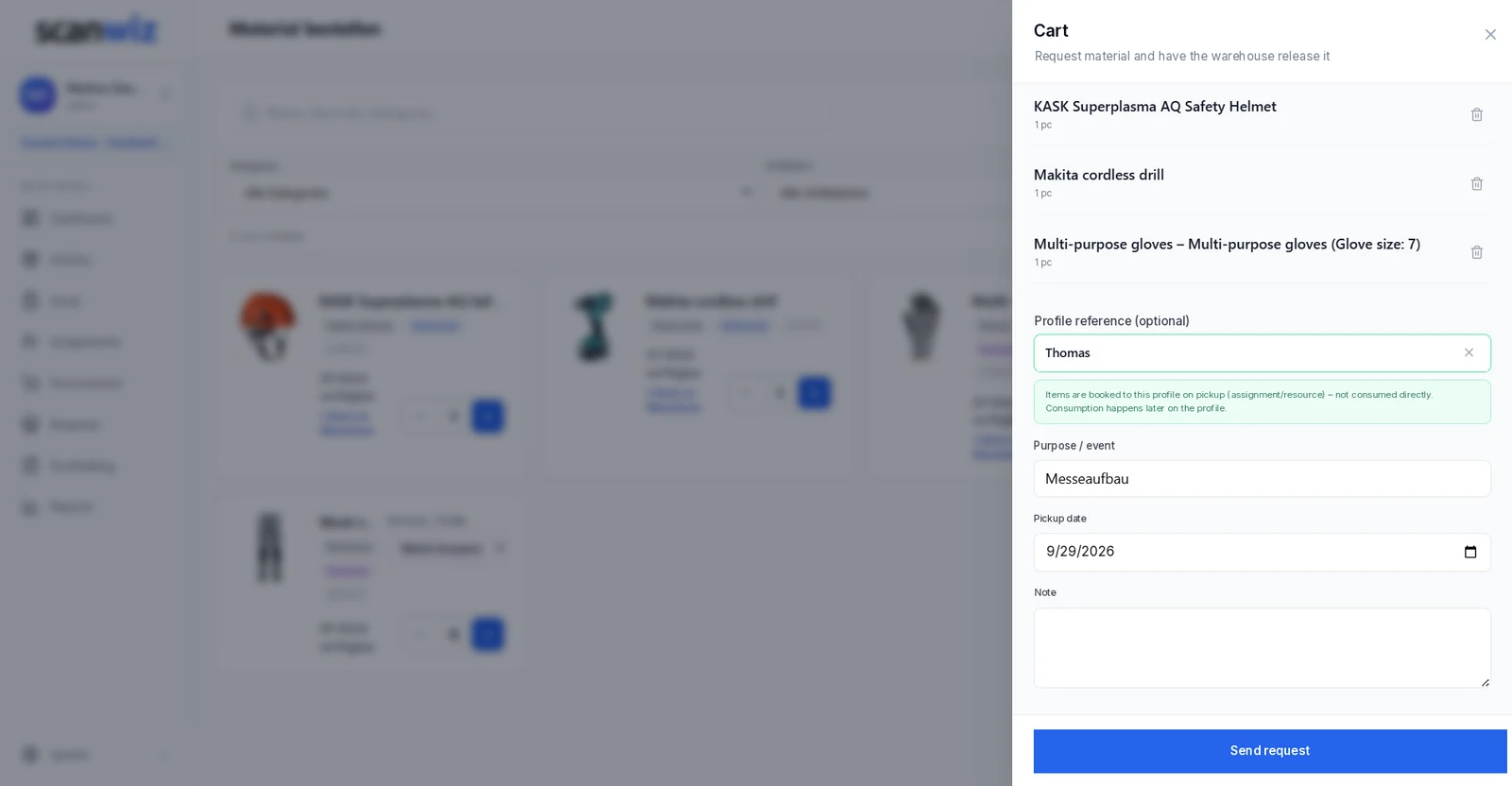
For whom, what for, by when
For a profile or a project – with a pickup date
Before it goes off, the cart says what this is about: a profile reference, so the items are assigned directly on pickup. A purpose or project, so the warehouse knows what it is for. A pickup date, so it is ready in time. And a note for everything else that matters.
In the warehouse
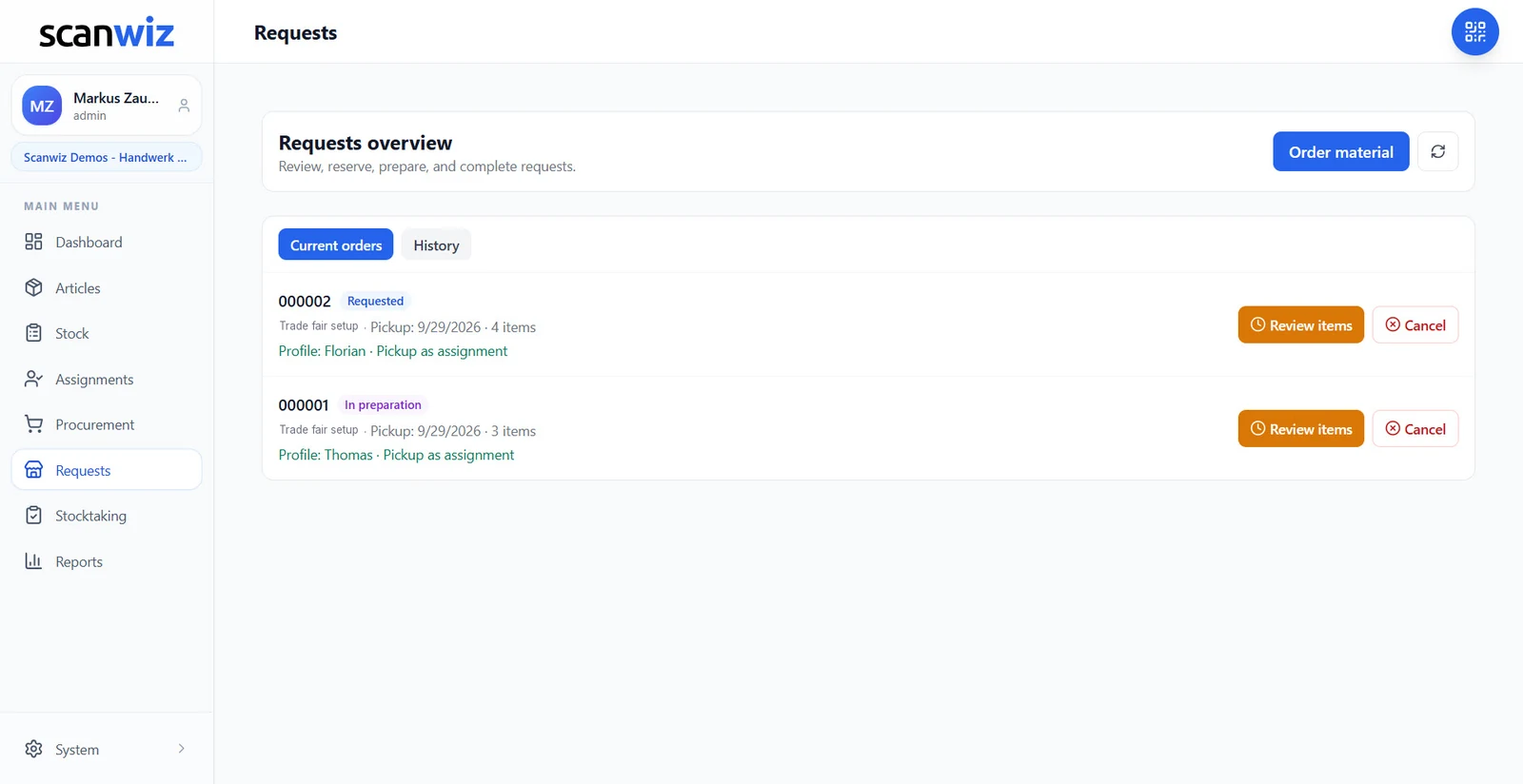
Every material request in one place – review, reserve, cancel
Warehouse and management see each open request with its number, status, purpose and pickup date. Review items, reserve them, cancel where needed – and who released what and when stays in the history. What used to be a shout across the yard becomes a numbered process.
- Current requests and history kept apart, with a status per request
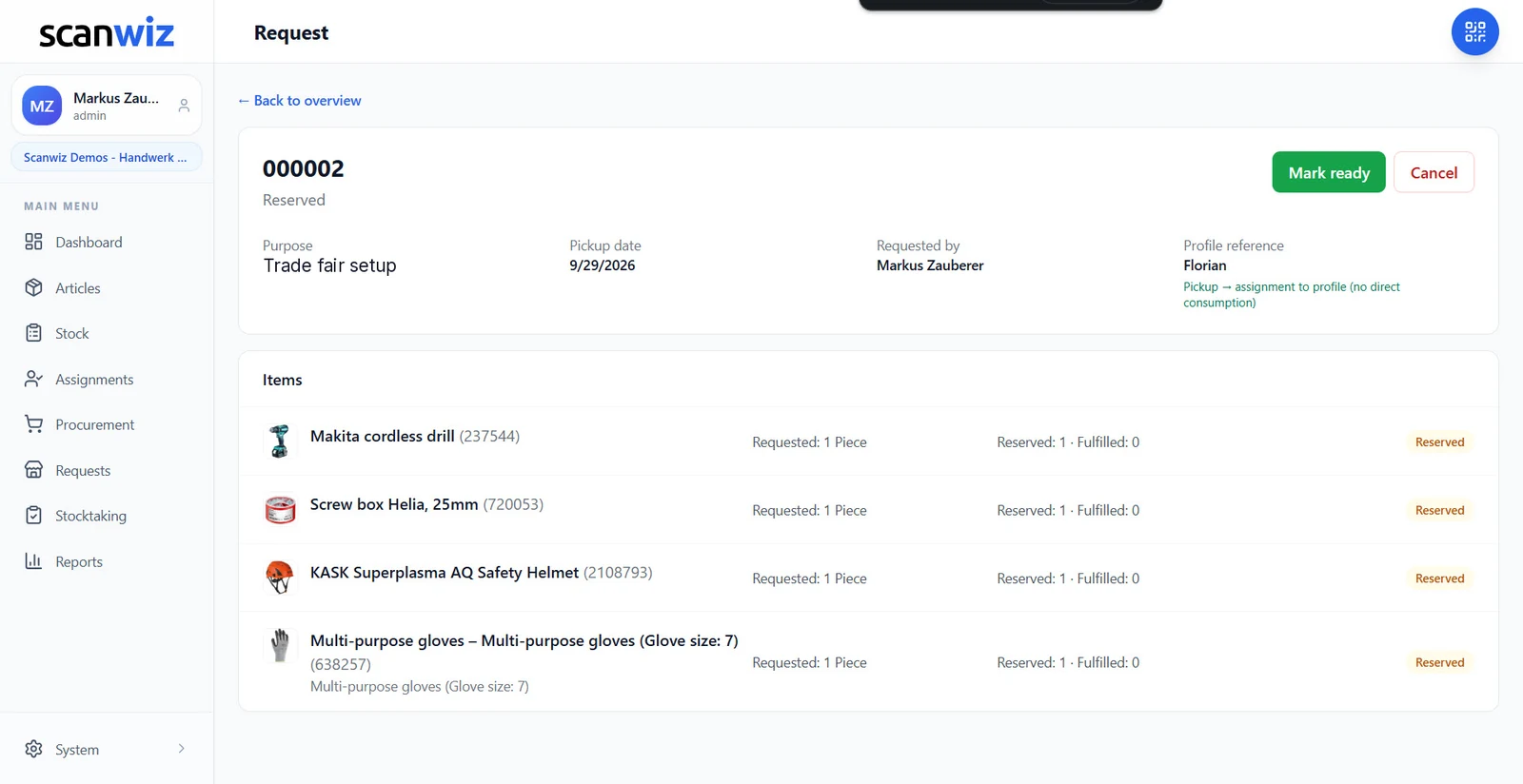
- Requested, reserved and fulfilled visible per item
- Cancel in one click – the stock is free again
Reserving & preparing
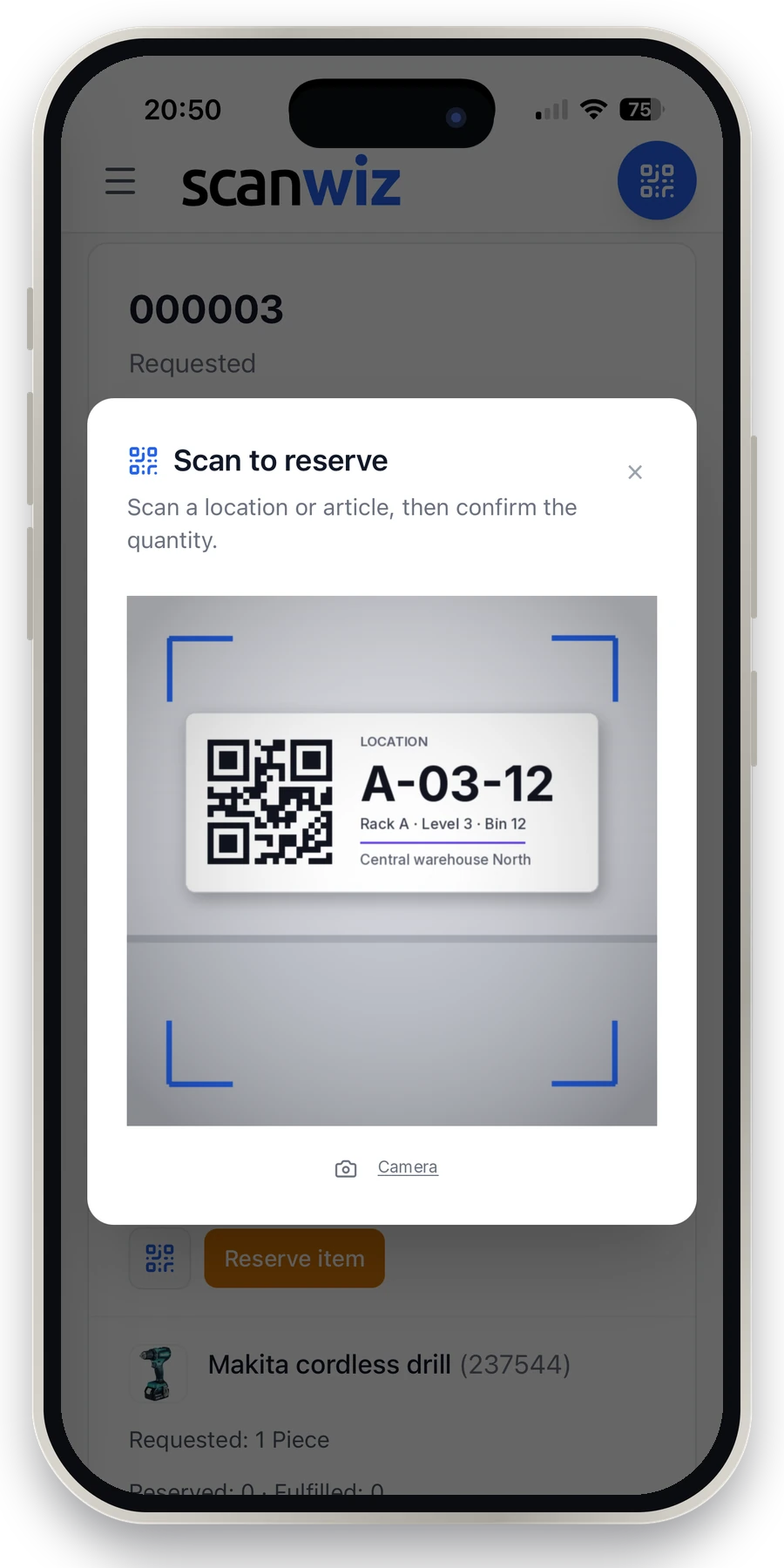
Reserving happens by scan – at the shelf, not at the desk
The storeman walks to the rack with the phone, scans the location or the item and confirms the quantity. The item switches to “reserved”, the stock is blocked for this request and cannot be handed out twice. Once everything is together, the request is marked ready – and the requester sees it immediately.
- A reservation blocks the stock – no double allocation
- Scan the storage location or the item, then confirm the quantity
- Mark ready and cancel straight from the request
Pickup & assignment
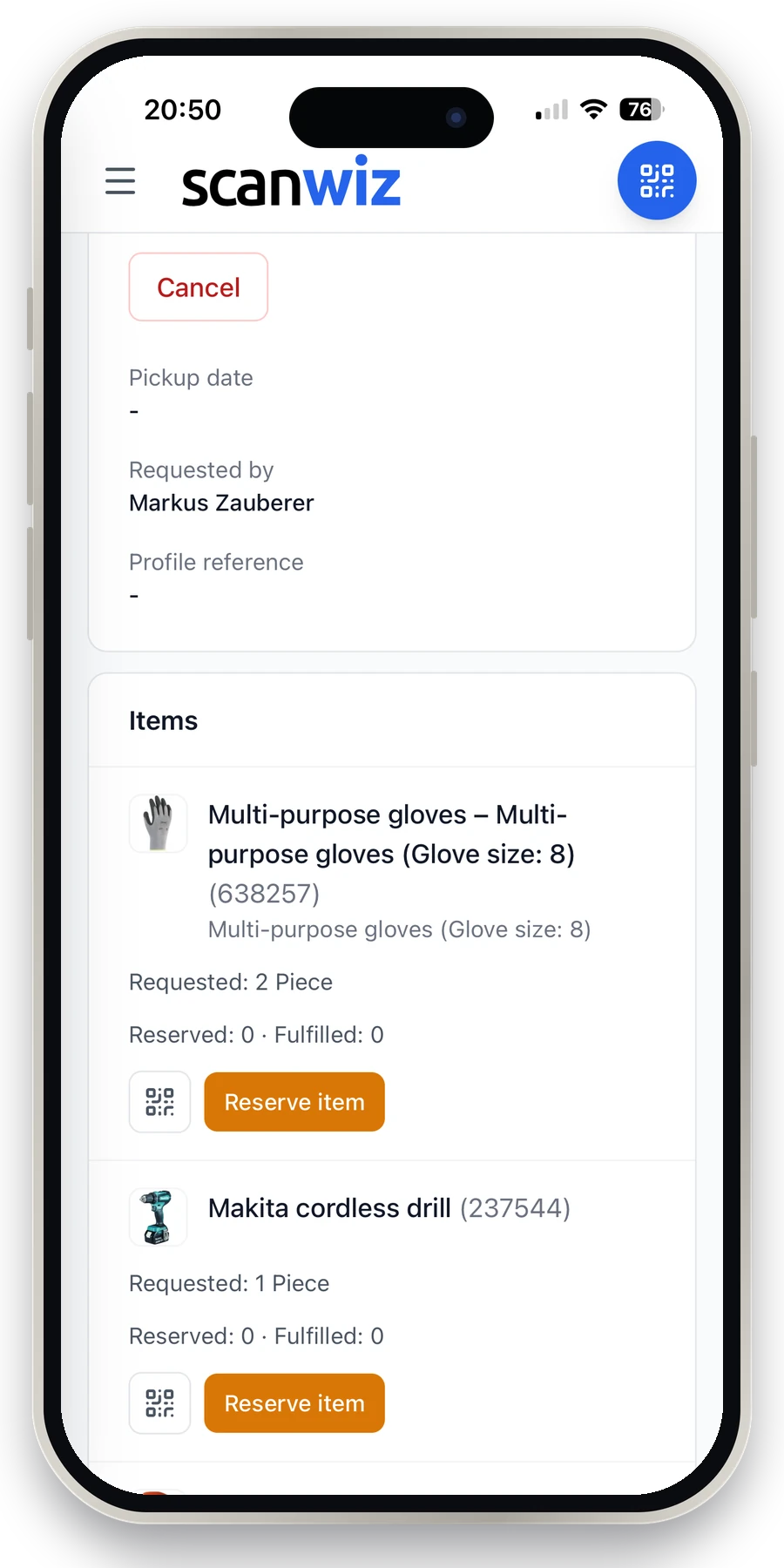
On pickup, everything lands on the right profile
If the request was made for a profile, the items are assigned directly on pickup – as an assignment, not as consumption. The employee sees in their profile what they hold; the warehouse sees what has gone out. Consumption is booked later on the profile, when it is actually consumed.
- Assignment to a person, vehicle or project on pickup
- Status visible at any time – including to whoever asked
- Every request keeps its number, date and history
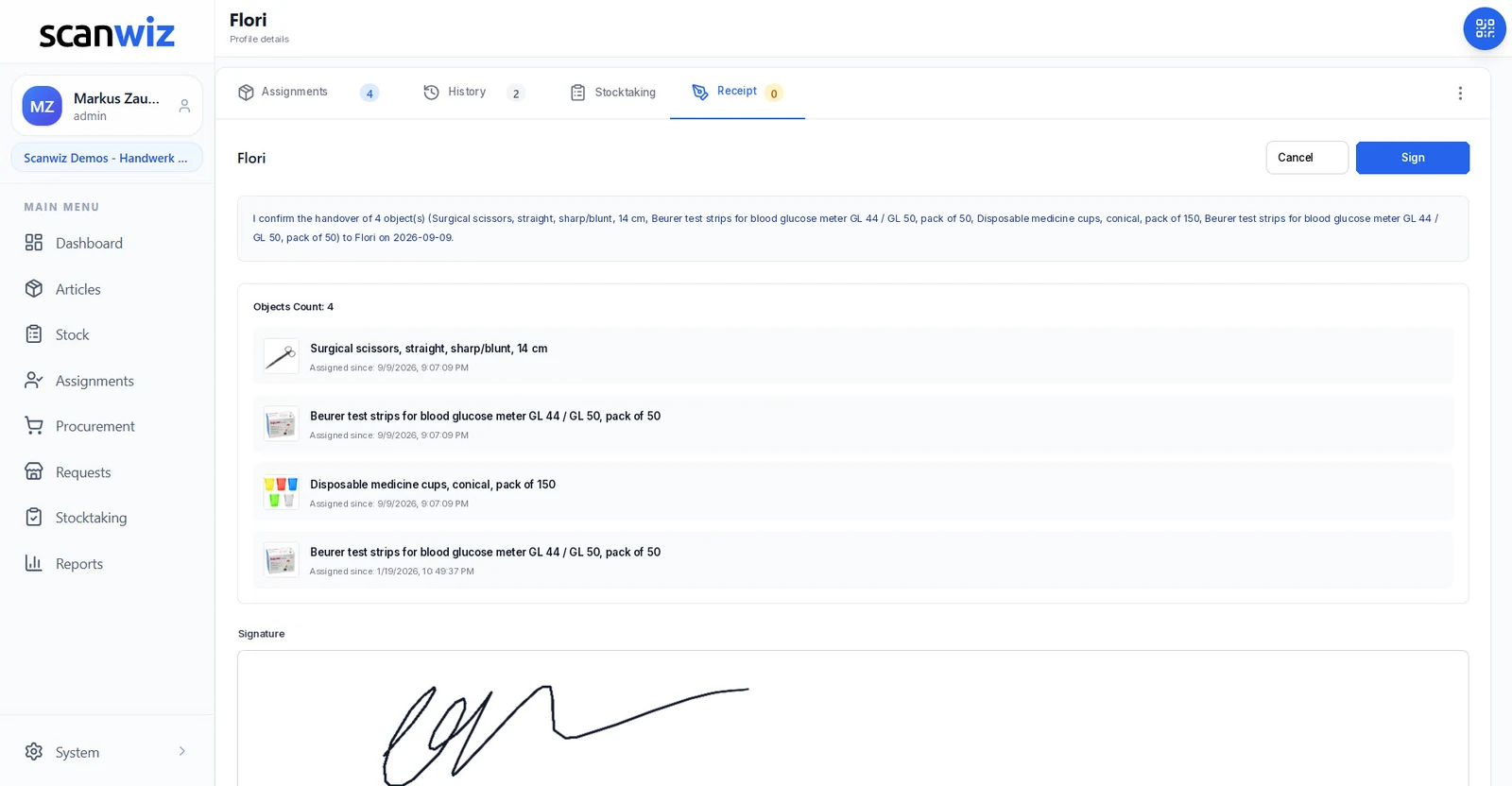
And at handover?
Sign digitally – the receipt sits on the profile
Whoever receives material confirms the handover with a digital signature – on the device or through a link by email. Scanwiz turns that into a PDF receipt listing every object and files it on the profile. When someone asks months later who got what and when, the answer is one click, not a folder.
- Signature on the device or requested by email
- PDF receipt with every object, the date and the signature
- Filed on the profile – for audits, returns and proof
Who does what
Three roles, one process – and everyone sees the same status.
Material requests keep a clean line between who orders, who releases and who is accountable. Each role sees exactly what it needs – on the same stock.
Employee
Needs material for the site, the treatment room trolley or the project – and does not want to go looking for someone first.
- Orders from the catalogue in the app
- Adds profile, purpose and pickup date
- Sees the status of the request at any time
Warehouse
Works through the requests by pickup date instead of sorting notes or remembering what someone shouted across the yard.
- Reviews items and reserves them by scan
- Marks the request ready once it is complete
- Assigns straight to the profile on pickup
Management
Wants to know what goes where and what it costs – without asking anyone.
- Sees every request with purpose and project
- Cancels or releases when needed
- Has the handover receipt as proof
Getting started
Three steps to material requests that work.
Try it free and without obligation – no strings attached. Register in the web app or download the mobile app straight away.
Open the catalogue
Your stock is the catalogue – there is no second list to maintain. Decide who may request and who releases; profiles for employees, vehicles and projects are set up in minutes.
Request & reserve
Employees place a material request in the app, the warehouse reserves by scan at the storage location. The status moves from requested through reserved to ready – visible to everyone, without a single phone call.
Assign & sign
On pickup the items land on the profile and the handover is signed digitally – on the device or by email. The PDF receipt sits on the profile, and the request moves into the history.
Customer quotes
What customers say about working with Scanwiz.
4.9 out of 5 stars from over 120 verified customer reviews.
“Scanwiz has noticeably simplified how we manage consumables and PPE. With barcode scanning, we record goods receipts and issues in seconds and always have a clear overview of stock levels and storage locations. The simple stocktake is especially helpful because it works during ongoing operations without bringing everything to a halt. The system runs stably and reliably—and we save a noticeable amount of time every month on documentation and reordering. A clear recommendation for trades and industry that want to keep their materials inventory under control.”
 Stefan KapseLaumann Carpentry & Roofing
“We’ve noticeably professionalized our materials management in maintenance and made it significantly more transparent. The clean mapping of variants (e.g., sizes, versions, and standards for PPE, as well as dimensions for C-parts) in particular reduces mix-ups and ensures reliable traceability in day-to-day work. With continuous inventory tracking, we’ve shortened search times and made material flows easier to plan. Support is also fast and pragmatic overall—a real relief for the entire team.”
 Moritz WinterbachWinterbach Engineering
“Since introducing Scanwiz, we’ve had materials management in our operation much better under control: stock levels are always traceable, issues and goods receipts are properly documented, and the analyses help us with replenishment and deployment planning. In day-to-day work, this saves noticeable time, reduces back-and-forth between the warehouse, job site, and workshop, and makes processes more reliable for the whole team.”
 Sedat BernaEggersmann Construction
Prices
Straightforward. Transparent. Affordable.
Pricing is based on the number of managed items and the range of features – users and storage locations are unlimited in every plan. Material requests are part of the Business plan: everyone on the team can request material without the price rising per head. Get in touch and we will put together a plan that fits.
Starter
$ 49/ month
10% discount for annual payment
For up to 500 items
- Unlimited users
- Unlimited storage locations
- Variant management
- Assignment function
- Stocktaking functions
- Offline mode
Try risk-free. No obligation.
Growth
$ 165/ month
10% discount for annual payment
For up to 2,000 items
- Everything from the Starter plan
- Self-checkout function
- Batch management
- Purchasing & orders
- Reporting area
- Personal onboarding
Try risk-free. No obligation.
Business
On request
Get in touch with us
Scalable to your needs
- Scanwiz full version
- Scanwiz AI Connect (MCP)
- Material requests
- Organisational units
- Single Sign-On
- Access to the REST API
We usually reply the same working day.
Frequently asked questions
Answered briefly.
What is a material request?
A material request is an internal order from your own warehouse: an employee requests items for themselves, a vehicle or a project, and the warehouse reviews, reserves and prepares them. In Scanwiz every request is a process with a number, a status and a history – from “requested” through “reserved” and “ready” to the assignment on pickup. Unlike procurement, nothing is ordered from a supplier; this is about material that is already in the building.
Who are material requests for?
Any business where material is stored centrally and needed by many people: trades businesses with installation teams, workshops, practices and clinics with ward stores, manufacturers, hotels with housekeeping. Wherever notes, shouting or WhatsApp messages are the ordering system today, requests replace them with a process everyone can see.
What is the difference between a reservation and an assignment?
A reservation blocks stock for one request: the item is still in the warehouse, but nobody else can take it. The assignment happens on pickup: the item moves onto the profile of a person, vehicle or project – as an assignment, not as consumption. Consumption or return is booked later on the profile. That way it stays clear who holds what, without stock disappearing while it still exists.
Can I order for a project instead of a person?
Yes. The profile reference is optional – a profile can be a person, a vehicle, a site or a project. There is also a “purpose / event” field so the warehouse knows what the material is for. On projects, management and accounting can see which material went where.
How does the digital signature at handover work?
Whoever receives material confirms the handover in the profile with a signature – on the device or through a link sent by email. Scanwiz creates a PDF receipt with every object handed over, the date and the signature, and files it on the profile. The receipt stays there even once the items have long been returned or consumed.
Does reserving work without a signal in the warehouse?
Scanning at the storage location runs on the phone camera or a handheld scanner you already own. In offline mode scans are captured locally and transferred as soon as there is a connection again. More on scanning on the page about the barcode scanner, and more on profiles and assignments on the page about equipment management.
Can employees see what happens to their request?
Yes. Every request has a number and a status the requester sees in the app: requested, reserved, ready. Per item it shows how much was requested, reserved and fulfilled. The call to the warehouse asking “is my material ready?” disappears – and the warehouse can work calmly by pickup date.
What do material requests cost?
Material requests are part of the Business plan, which we put together to fit your needs – based on the number of managed items and the features you want. Users and storage locations are unlimited, which matters here because everyone on the team should be able to request material without the price rising per head. For orientation: Scanwiz plans start at $49 per month for up to 500 items. Simply ask for a quote – we usually reply the same working day.
Over 250 customers already trust Scanwiz
Ready for less warehouse admin and more time for the work that matters?
Start free and with no obligation – no credit card, no risk. Or let us walk you through Scanwiz in a personal demo.
4.9 out of 5 stars from over 120 verified customer reviews



