
Tool management for trades & construction
Tool management that goes out to the job site.
Hammer drills, cordless drivers, lasers, ladders: with Scanwiz, every tool gets a QR code. Check-out, return and hand-over run by scanning with a phone – on site, in the van and even without signal. You always see who has what, and since when.
Check-out · Return · Vans · Signature · Inspections · Offline
In short
Tool management records which tools a business owns, where they are right now and who has them. Every device is kept as an individual item with an inventory number and QR code. In Scanwiz, tools are checked out to employees, vans or job sites by scanning and booked back the same way – on a phone, at the tool counter or in the van. Every transaction stays in the tool’s history for good. The software replaces the sign-out sheet that nobody fills in in the morning and nobody checks at night.
The real problem
Tools are rarely stolen. They are forgotten.
The laser has been in a colleague’s van for three weeks, the hammer drill on a site that finished two weeks ago. Nobody did anything wrong – nobody wrote it down, that’s all.
Without a system
Paper, Excel and memory
- The sign-out sheet hangs in the workshop and gets filled in under time pressure – or not at all
- “Who has the laser?” costs a few phone calls every morning
- Tools move from colleague to colleague without anyone noticing
- Inspection dates for power tools live in a second list
- When someone leaves the company, the answer leaves with them
With Scanwiz
One scan per hand-over
- Check-out and return take two scans – faster than any form
- Each tool shows who has it and since which day
- Hand-over between colleagues by transfer, without a detour via the store
- Inspection dates sit on the tool and remind you themselves
- The history stays in the system, even after someone leaves
Loss calculator
What does searching cost you?
Search time and replacement purchases never show up as a line of their own. Enter your own figures – we don’t use an industry average, we use your numbers.
Searching, asking around, driving back, organising replacements
Lost, never returned or bought twice
Estimated cost per year
–
- Search time–
- Cost of search time–
- Replacement purchases–
Based on 220 working days per year · Your figures, your estimate · Prices as per price list, excl. VAT
A working day
From the workshop gate to clocking off – one hammer drill, five stops.
This is what tool management looks like when it works day to day: nobody keeps a list, yet every stop is documented.
-
06:45
Check-out
Marc scans his profile and the hammer drill at the tool counter. Booked – without a storekeeper standing by.
-
07:30
On site
There’s no signal in the basement on site. The app books anyway and syncs automatically later.
-
11:15
Hand-over
A colleague needs the hammer drill in the afternoon. One transfer, and it’s on his profile.
-
14:00
Defect
The cable is frayed. Scan the QR code, take a photo, report the defect – the workshop has a job.
-
16:30
Return
Back in the store, flagged as defective so nobody takes it out again tomorrow morning. The whole day is in the history.
See it in action
On the phone on site, on the computer in the office.
The same tool management in the app and in the browser. Five screens from the real product.
The app
Tool tracking in your pocket, not in the office
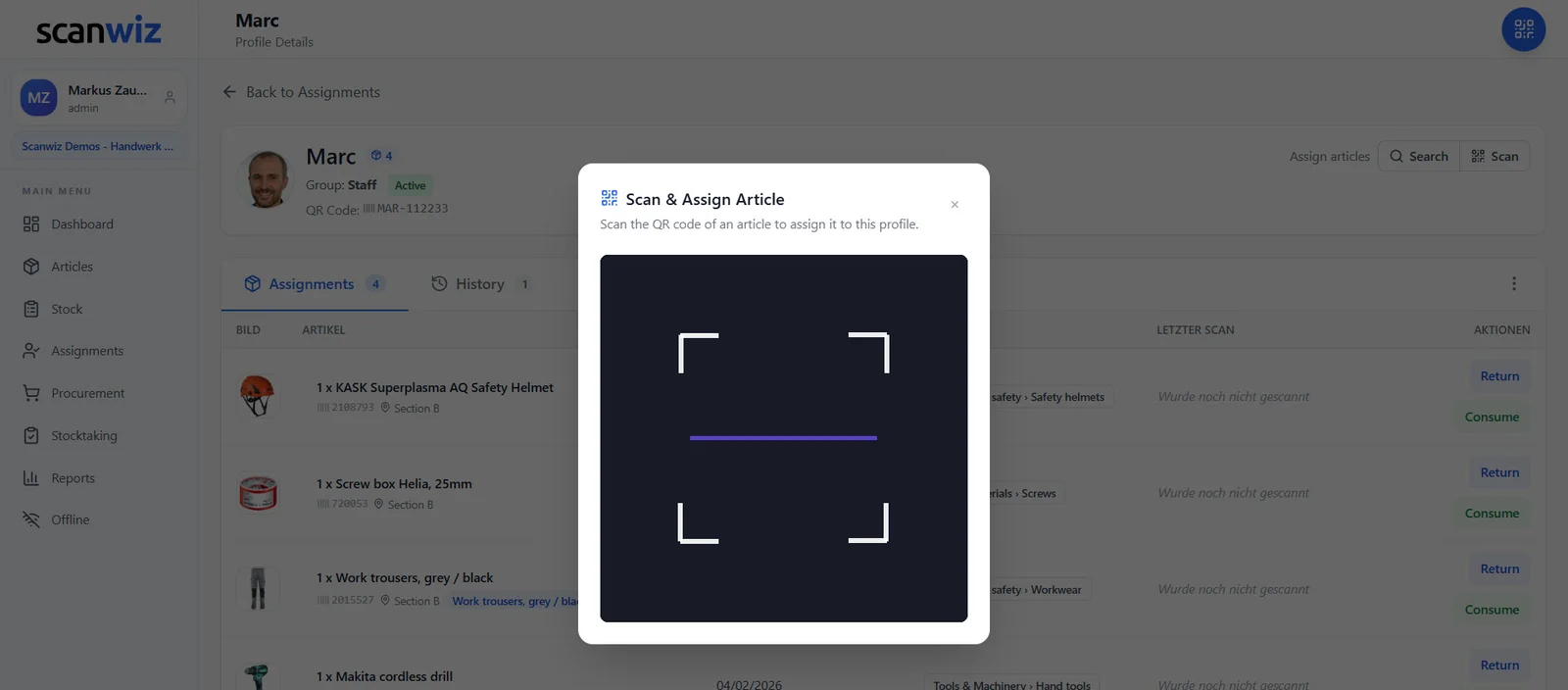
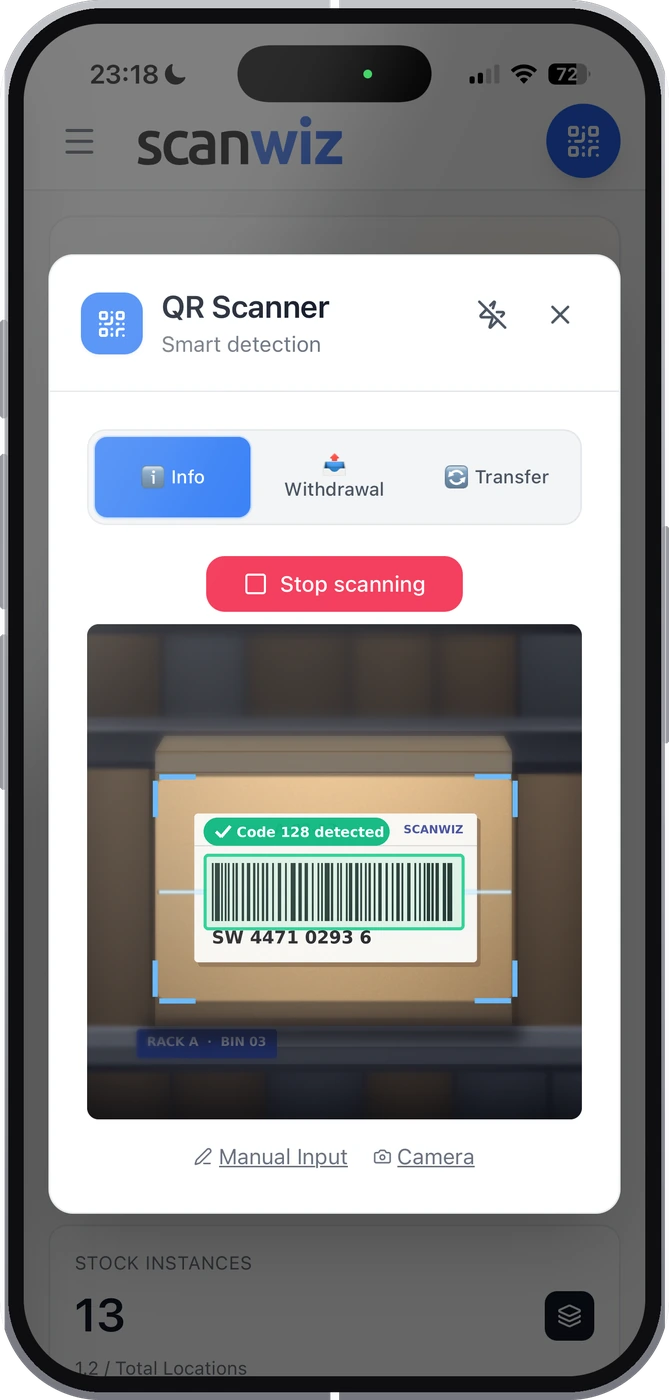
On site, speed is what counts. Open the app, scan the QR code, choose the recipient: the tool is booked before anyone could find a pen. Without signal, data is stored locally and synced later.
- App for iOS and Android – the phone camera is the scanner
- Offline mode for basements, underground car parks and site containers
- Unlimited users – everyone on site books for themselves


Who has what
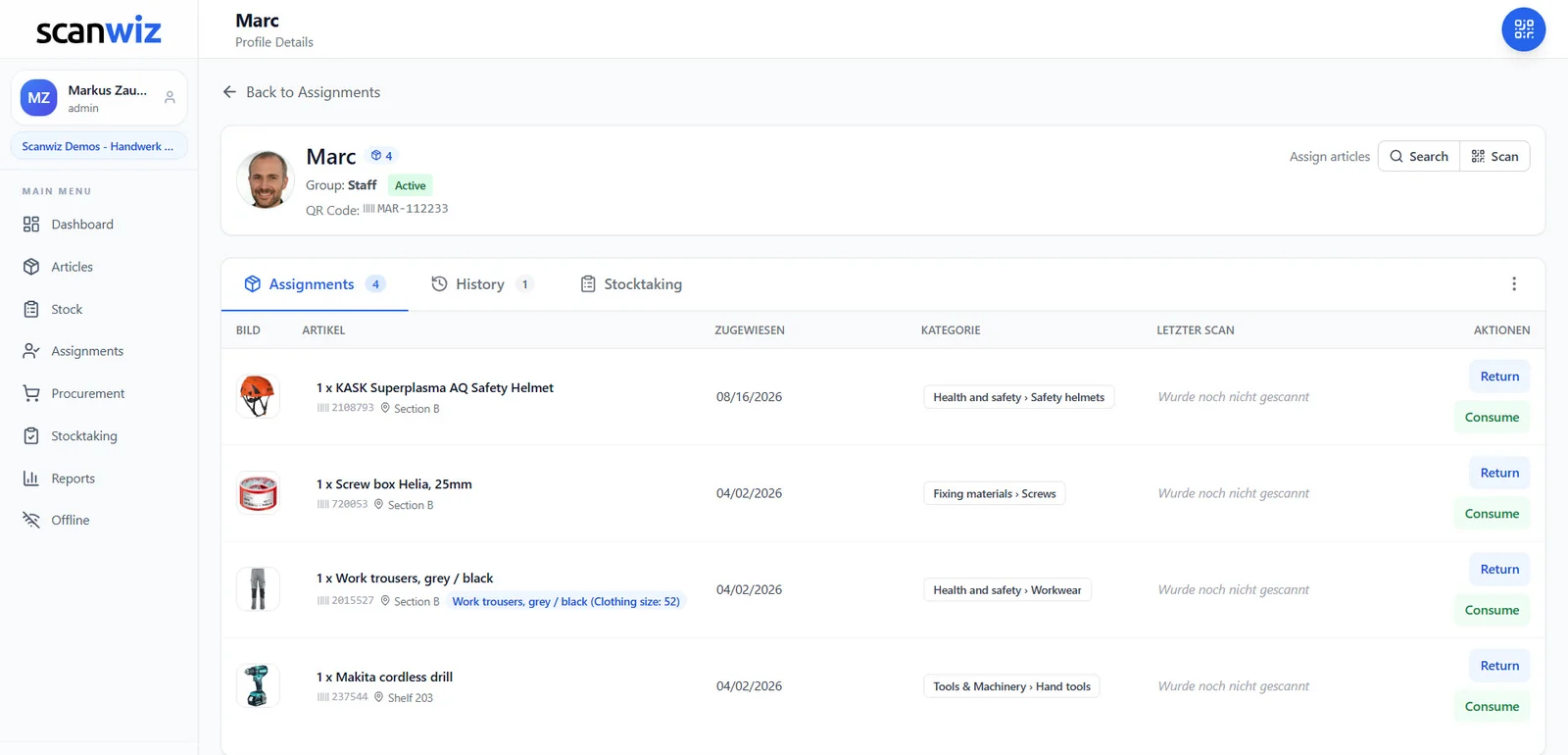
Every person, van and job site with its own tool list
Marc’s profile shows everything he currently has – with inventory number and check-out date. The tool shows the reverse: who has it now and who had it before. Bringing it back or passing it on is a single click.
- Identical cordless drivers stay distinguishable by inventory number
- Transfer straight from colleague to colleague
- Consumables like bits and anchors on the same profile, just without a return
Tool check-out
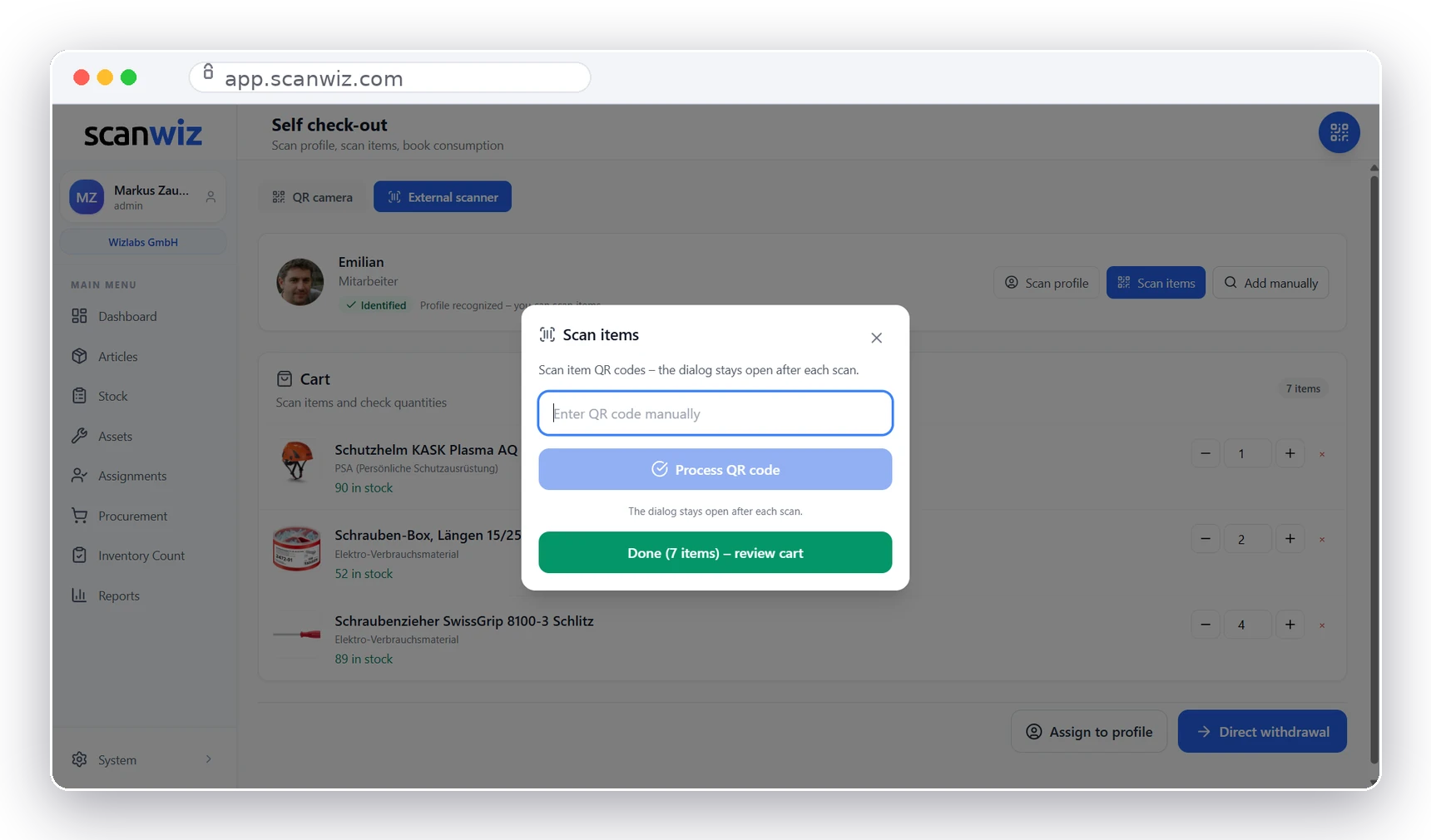
Seven in the morning, no queue at the counter
A screen with a scanner at the tool counter is all it takes. Anyone heading out scans their profile and then the tools. No login, no training, no storekeeper writing down names. SelfCheckOut is included from the Growth plan.
- Profile QR on a badge, locker or helmet
- USB and Bluetooth scanners connect like a keyboard
- Check out several tools in one go
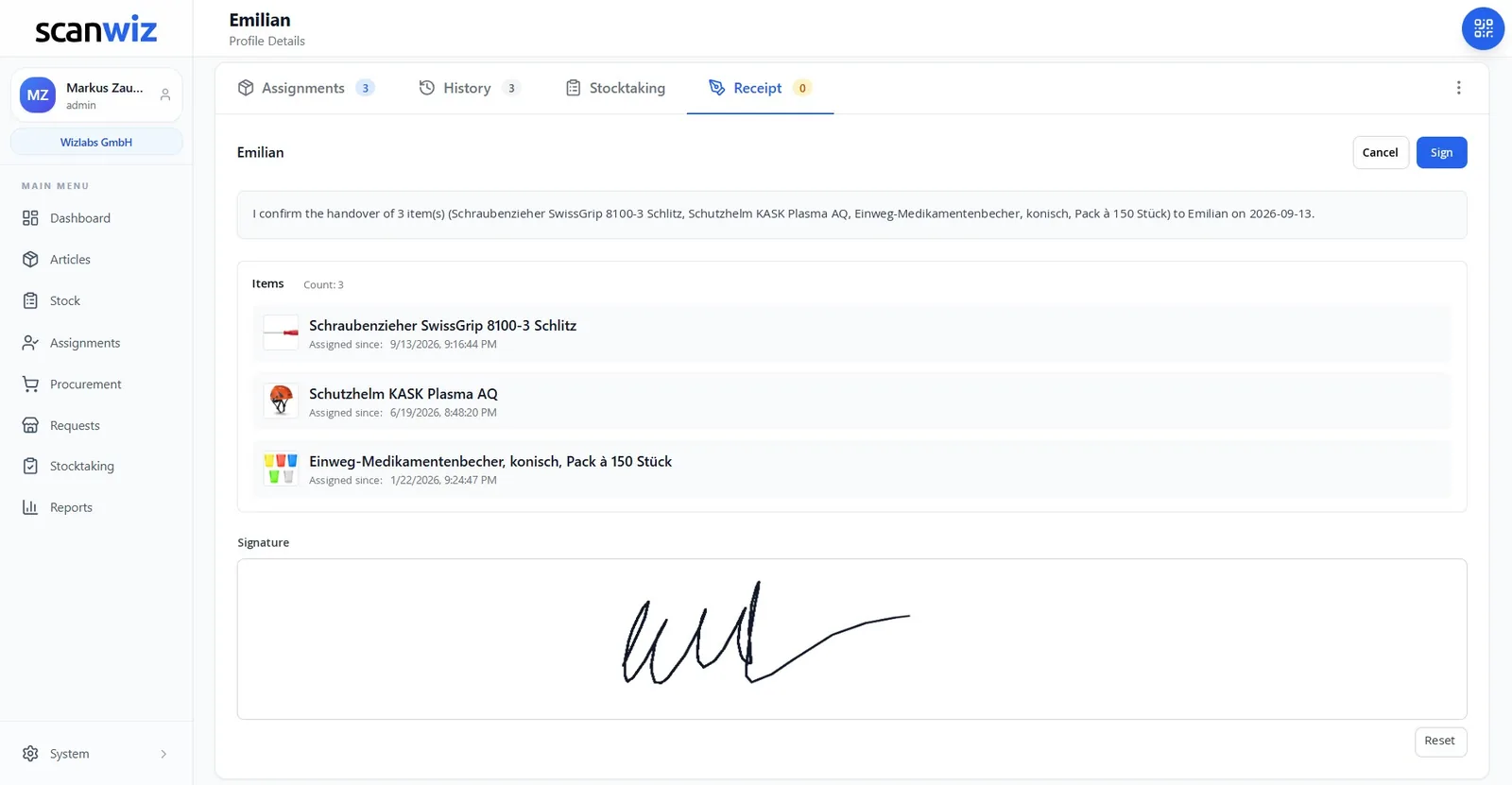
Hand-over with signature
Get expensive tools signed for – without a form
A €900 cordless combi hammer goes to a new employee? Four clicks turn the assignment into a receipt: confirmation text, item list, signature on screen. If the person is not on site, they confirm by email.
- The receipt stays on the person’s profile for good
- Clear proof when someone leaves or something breaks
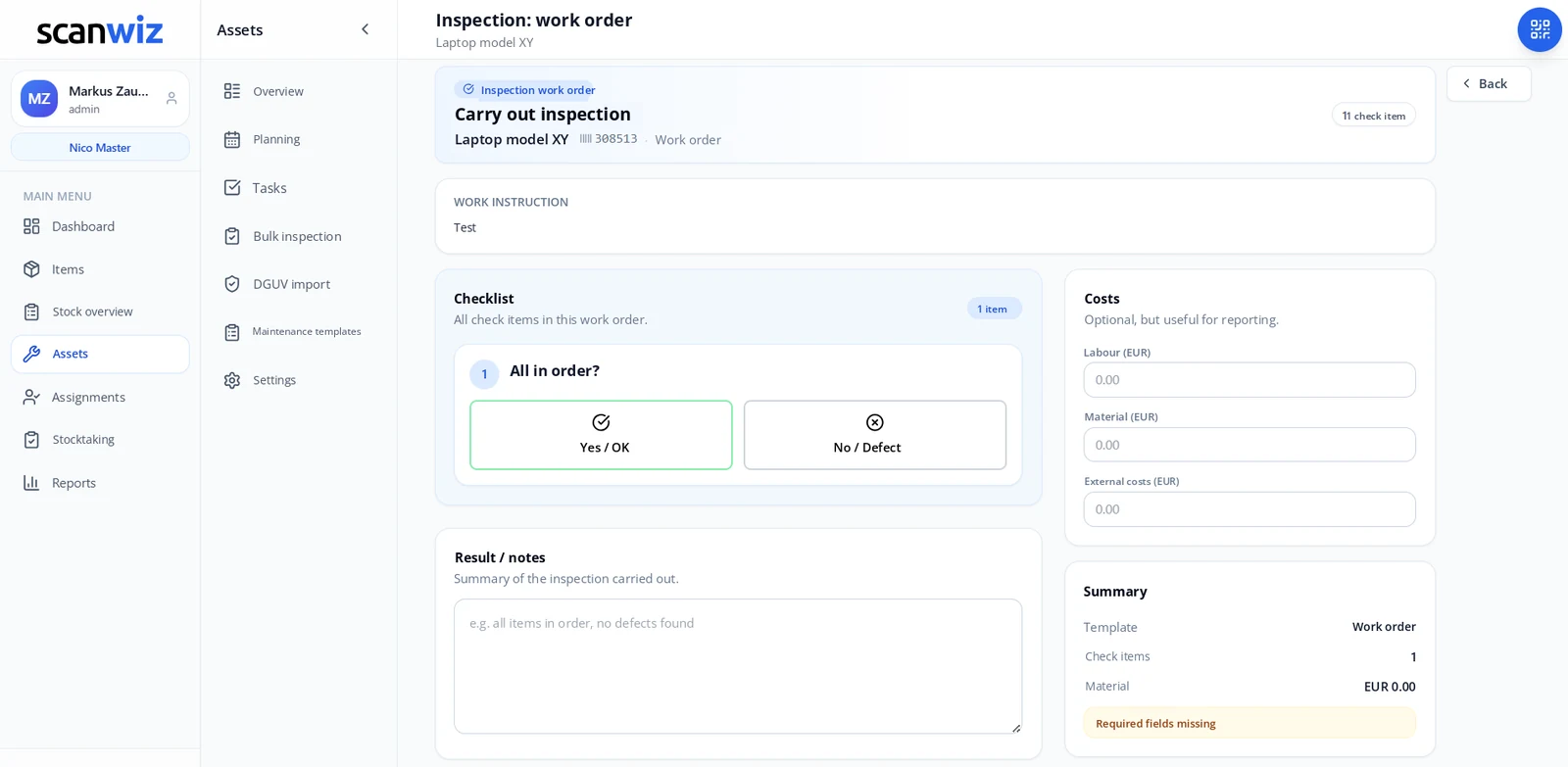
Inspection dates
Inspect power tools without keeping a second list
Recurring inspections sit directly on the tool. Scanwiz reminds the person in charge, guides them through the inspection with a checklist and stores the report in the logbook. Existing inspection data for electrical equipment can be brought in with the DGUV import (German format).
- Bulk inspection: many tools in one pass
- Report a defect with a photo, lock the tool, order the repair
Where tools in the trades really are
The smallest share is in the store.
Most tools are out and about – in the van, on site, with the crew. That’s why in Scanwiz each of these can hold tools, not just people.
The van
Every van keeps its own tool list. Switching vehicles? One transfer, and the kit moves with it.
The job site
Scaffolding, dehumidifiers and power distributors stay assigned to the site. When the job ends, you see what still has to come back.
The crew
What a whole team uses is booked to the crew rather than to one person who doesn’t have it alone.
The employee
Personal tools and measuring devices stay with the person. Their profile shows everything they currently carry.
The subcontractor
Tools lent to external firms are not forgotten – they stay in the system as an open assignment.
Workshop & store
Shelves, cabinets and containers have a QR code too. Whatever comes back gets a fixed place again.
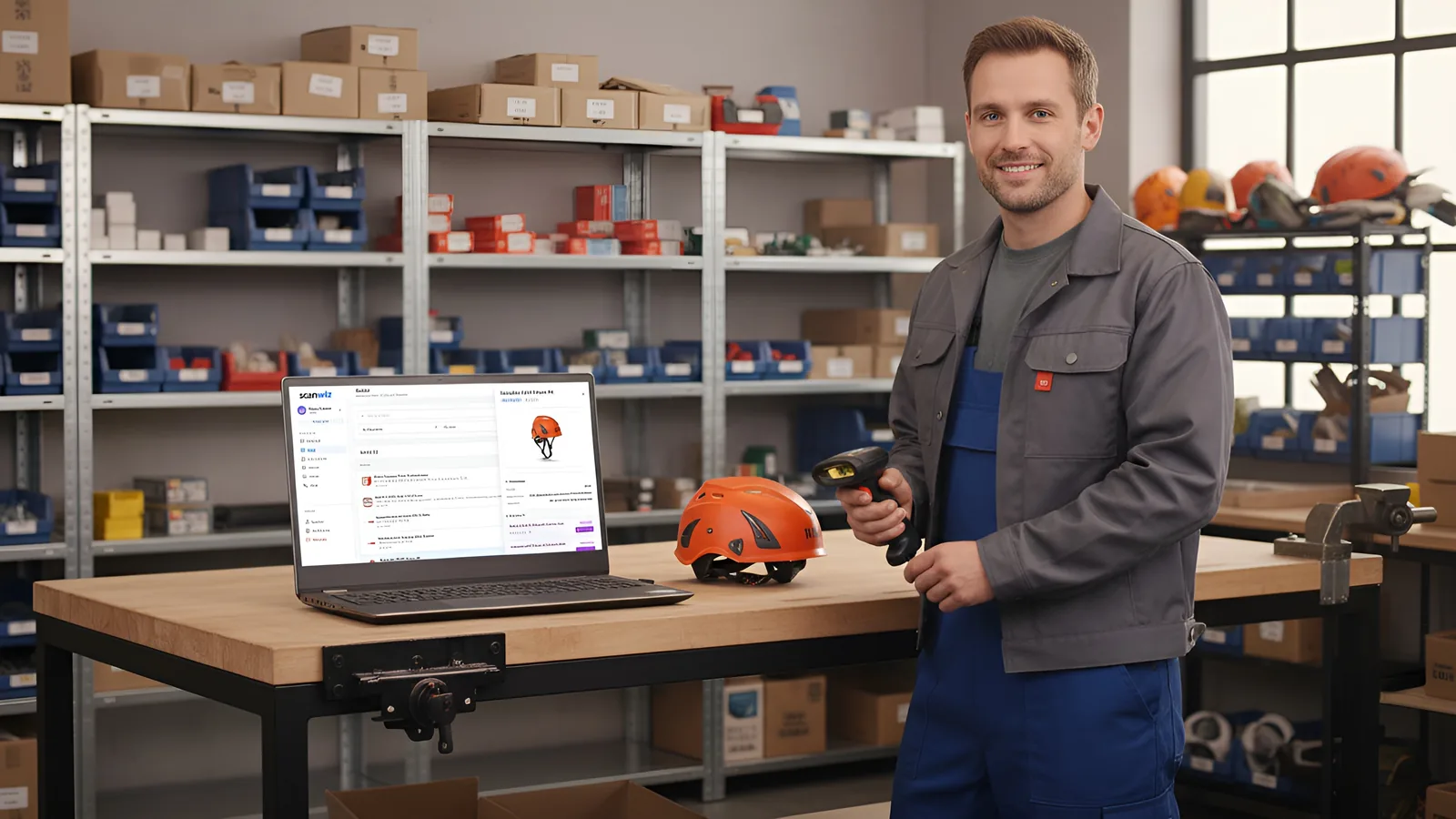
Getting started
Label once, then the inventory keeps itself up to date
Import your existing tools from Excel with inventory number, value and location. Then every tool gets its QR label. From that moment on, every booking comes from a scan rather than a manual entry.
- Print QR labels from Scanwiz
- Keep using existing barcodes and serial numbers
- A first stocktake by scan gives you a clean starting inventory
From the trades
“With barcode scanning we record goods in and out in seconds and always keep track of stock levels and locations. […] A clear recommendation for trade and industrial businesses that want their materials store under control.”
 Stefan Kapse
Laumann Zimmerei- und Bedachung
Other ways to manage tools
Spreadsheet, manufacturer platform or trade software?
Compared honestly, with sources and dates – including the cases where the other option fits better.
Tool tracking in Excel
When a spreadsheet is enough – and the point where it starts costing you time.
Hilti ON!Track
Manufacturer-linked tool tracking versus a brand-independent solution for a mixed fleet.
ShareMyToolbox
Two tool trackers head to head: prices, features, data location.
HERO trade software
Complete trade software or a specialised inventory and tool solution alongside it.
Equipment in general
Manage IT, PPE and vehicles alongside tools: the feature in detail.
FAQ
Tool management – answered briefly.
What is tool management?
Tool management records which tools a business owns, where they are and who is currently using them. Every device is kept as an individual item with an inventory number and QR code. Check-out, return and hand-over are booked by scanning and stay in the tool’s history for good. So you can always answer who has the hammer drill, and since when.
What is the difference between tool management and equipment management?
Tool management is part of equipment management. Equipment also covers machines, vehicles, IT devices and protective gear. In Scanwiz, both run in the same system: a tool is checked out and returned exactly like a laptop or a forklift. More on the equipment management page.
Do I need special hardware for tool management?
No. You scan with the camera of an ordinary smartphone or tablet in the Scanwiz app for iOS and Android. If you scan a lot at a tool counter, you can also connect a USB or Bluetooth scanner. You print the QR labels yourself and can keep using existing barcodes.
Can I assign tools to a van or a job site?
Yes. Besides employees, vans, job sites, crews, departments and external companies can hold tools. Each of them has its own profile with a QR code and its own tool list, so a van’s kit can be tracked just like a fitter’s personal tools.
How do I stop tools going missing?
By documenting every hand-over. Tools rarely disappear through theft – they disappear because nobody knows who had them last. When check-out and return only take two scans, they actually get booked. Scanwiz then always shows what is out and with whom. For expensive tools, you can also have the hand-over confirmed by signature.
Does tool management work without internet on site?
Yes. The Scanwiz app has an offline mode. Scans and bookings are stored locally on the device and synced automatically as soon as there is a connection again. Basements, underground car parks and site containers are no problem.
Can I manage power tool inspections too?
Yes. Recurring inspections sit directly on the tool, with interval, reminder, checklist and inspection report. Existing inspection data for electrical equipment can be brought in with the DGUV import. Which inspection is required and how often is set by the applicable regulations and the qualified person. More on the maintenance and inspections page.
Can I import my tool list from Excel?
Yes. The Excel import brings in tools, categories, inventory numbers, values and locations from your existing list. Then the tools are labelled with QR codes and the current assignments are recorded once. From then on, the inventory keeps itself up to date through daily scans.
How much does tool management with Scanwiz cost?
The Starter plan costs €45 per month for up to 500 items and includes assignments. Growth costs €145 per month for up to 2,000 items and adds SelfCheckOut and reporting, among other things. Users are unlimited on every plan, and annual payment saves 10%. You can try it free for 14 days without a credit card. Details in the pricing overview.
What happens to the tools when someone leaves?
The person’s profile lists everything they still have. Open assignments are returned or transferred to colleagues. Then you set the profile to inactive: it disappears from the working list, but the history is kept. If the hand-over was signed, the receipt is on the profile as well.
Over 250 customers already rely on Scanwiz
Tomorrow morning the van heads out again. This time you know what’s inside.
Try tool management free for 14 days with your own tools and your whole team – no credit card. Or let us show you Scanwiz in a personal demo.
4.9 out of 5 stars from over 120 verified customer reviews



