
Feature: Maintenance & Inspections
Inspection dates that remind you themselves.
Scanwiz schedules recurring maintenance and inspections for every asset, reminds the responsible person in good time and walks your team through the inspection with a checklist. What comes out at the end is a record – without anyone having to maintain a list of due dates.
Calendar & counters · Checklists · Reminders · Inspection record
In brief
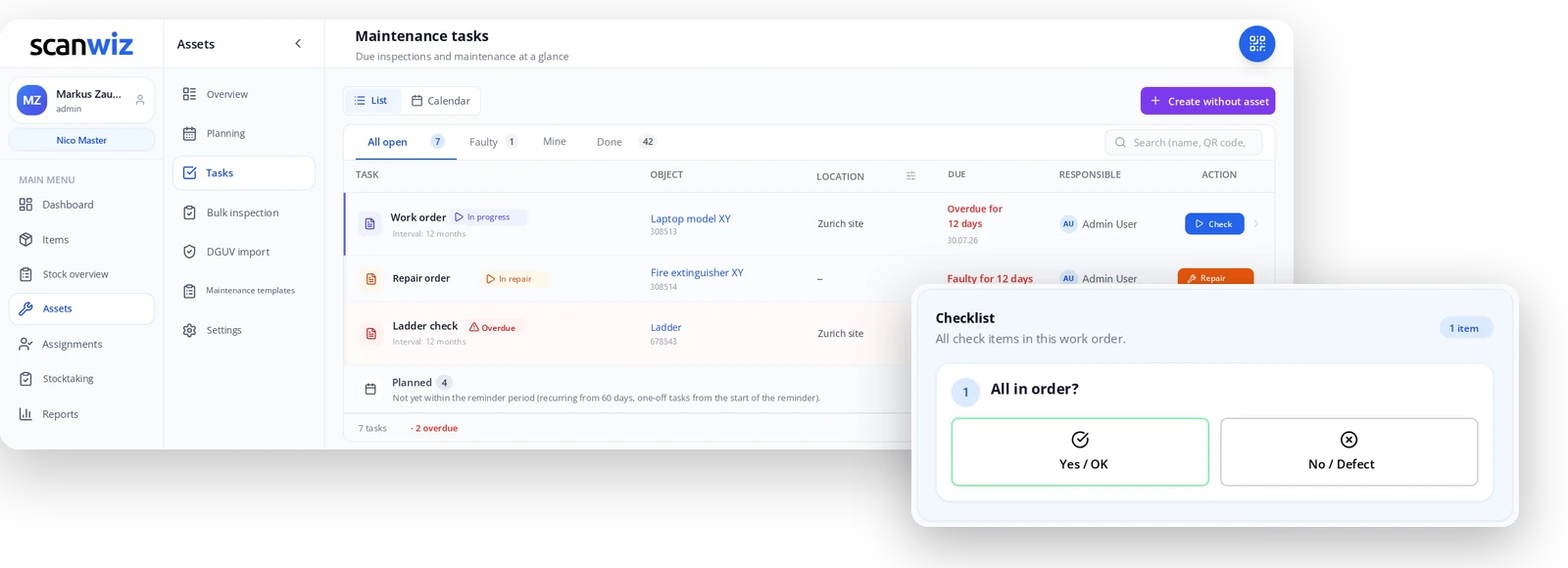
Maintenance software replaces the list of due dates in Excel: you define an interval for each asset, Scanwiz calculates the next date from it, raises it with the responsible person in good time, guides them through the inspection with a checklist and files the result permanently in the object’s history. Instead of a spreadsheet somebody has to remember, you get a process that speaks up by itself.
How it runs
Set it up once. Then the clock runs itself.
The work is all at the beginning – and there is less of it than you think. After that, every future task appears on its own, in the right order and with the right person.
-
01
Create a template
Name, interval, reminder period and the items on the checklist. Defined once, used again and again.
-
02
Assign objects
Apply a template to a single asset – or to every ladder at once.
-
03
Get reminded
The task appears on the board ahead of the date. Until then it sits under “Planned” and bothers nobody.
-
04
Inspect
Scan the QR code, work through the checklist, record the result – with photo, note, material and signature.
-
05
Prove it
The report lands in the object’s log book. The next date is already set.
Intervals
What happens when an inspection runs late?
This is exactly where lists of due dates fall apart. A statutory inspection should keep its rhythm even if it happened two weeks late. Routine servicing, on the other hand, should start over. Scanwiz knows both – you decide per template.
Ladder check · Aluminium step ladder 678543 · Interval 12 months
- 7 Feb 2026Due according to plan
- 20 Feb 2026Actually inspected, 13 days later
- 7 Feb 2027Next date
The rhythm stays. The delay does not move the plan – the inspection does not creep further back year after year. This is the right mode for statutory inspections tied to a fixed calendar date.
Oil change · Forklift H 16 · Interval 12 months
- 7 Feb 2026Due according to plan
- 20 Feb 2026Actually completed, 13 days later
- 20.02.2027Next date
The interval starts over. Counting begins on the day the work was done – which is what makes sense for routine servicing: oil changes, cleaning, vehicle checks.
Time & counter · Forklift H 16 · whichever comes first
→ reached on 12 Nov 2026
→ due on 7 Feb 2027
A forklift that runs a lot needs servicing sooner than one that sits idle. In “Time & counter” mode you define both – it falls due whichever comes first. The counter reading is captured directly on the asset; kilometres or cycles work just as well.
Example figures for illustration
Carrying out an inspection
Tick boxes, don’t type.
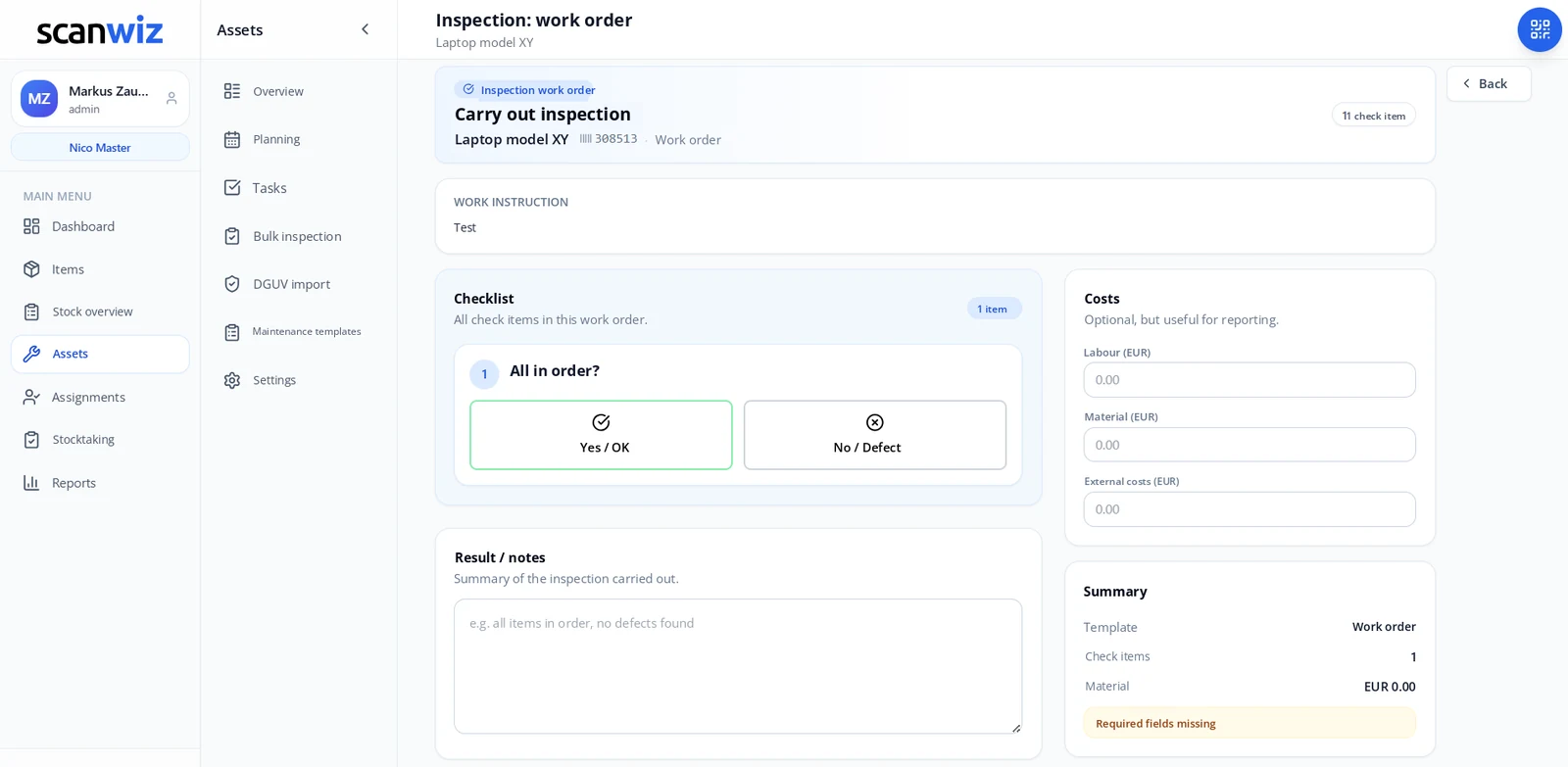
The checklist comes from the template – everyone checks the same things in the same order. Try it: what happens when one item is not in order?
- 1 Stiles, rungs and fittings undamaged?
- 2 Spreader restraint present and working?
- 3 Inspection label legible and current?
Answer the three items to see the result.
Interactive example · in Scanwiz you define the items yourself
Two speeds
Quick check or work order
A visual check on a ladder is done in twenty seconds – that is what the quick check is for, with no intermediate states. A repair, by contrast, drags on for days: the work order can be saved as a draft, extended with material and closed later.
- Work instruction sits directly above the checklist
- Photo, note and consumables attached to the job
- Capture labour, material and external costs, optionally
- Signature on the device itself, when the template requires it
Tasks
A list that knows what is due today.
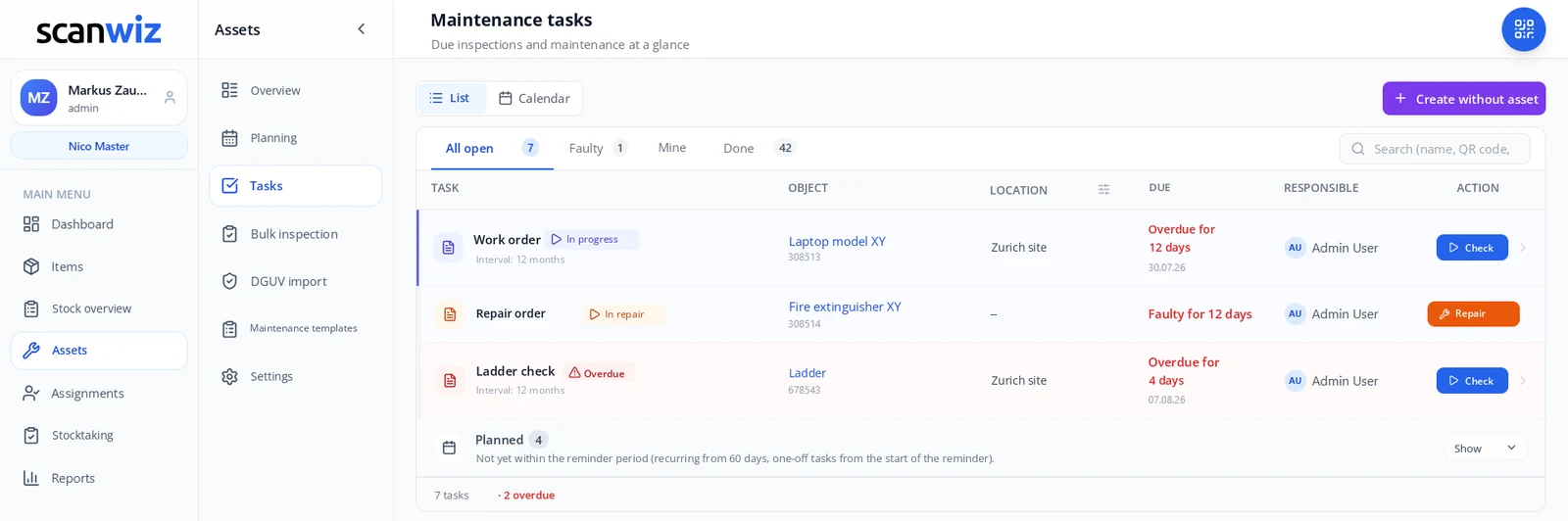
Not “sometime in February”, but “overdue for four days”. And not with everyone, but with the person who is responsible.
The task board
Overdue shows up in red, not in the small print
Every row names the object with its inventory number, the assigned location, the deadline and the responsible person – and next to it the button that starts the inspection. Anything still far off stays under “Planned” and only surfaces once the reminder period begins.
- View as a list or as a calendar for weekly planning
- “Mine” filter – everyone sees their own inspections
- Separate tab for faulty assets under repair
- Search by name or QR code, with the scanner too
- Tasks without an asset too – walkarounds, cleaning, site inspections
And if something breaks before the date comes round? Then someone scans the QR code on the object and reports the defect right there – with a photo, in ten seconds.
to the barcode scannerWhen it is many at once
120 ladders are no reason for 120 clicks.
The annual inspection day in spring is where it really hurts for most operations. Scanwiz has two shortcuts: one for the inspection itself, one for getting started with data you already have.
Bulk inspection
One template, many objects, one pass.
- Pick an inspection template and apply it to several assets at once
- Work through object by object without hunting for each one
- Each result still lands individually in that object’s log book
- Built for ladders, extinguishers, small electrical appliances and racking inspections
Importing existing inspection data
So that the history does not start from zero.
- Bring assets and master data over from Excel
- Dedicated import for existing electrical equipment test data
- Last inspection as the starting point – the next date is calculated from it
- No running two systems: the plan is complete from day one
Record
Every inspection keeps a record.
The real question in an audit is rarely “did you inspect?” but “show me when, by whom and with what result”. Two minutes of inspection produce exactly that answer.
The log book on the object
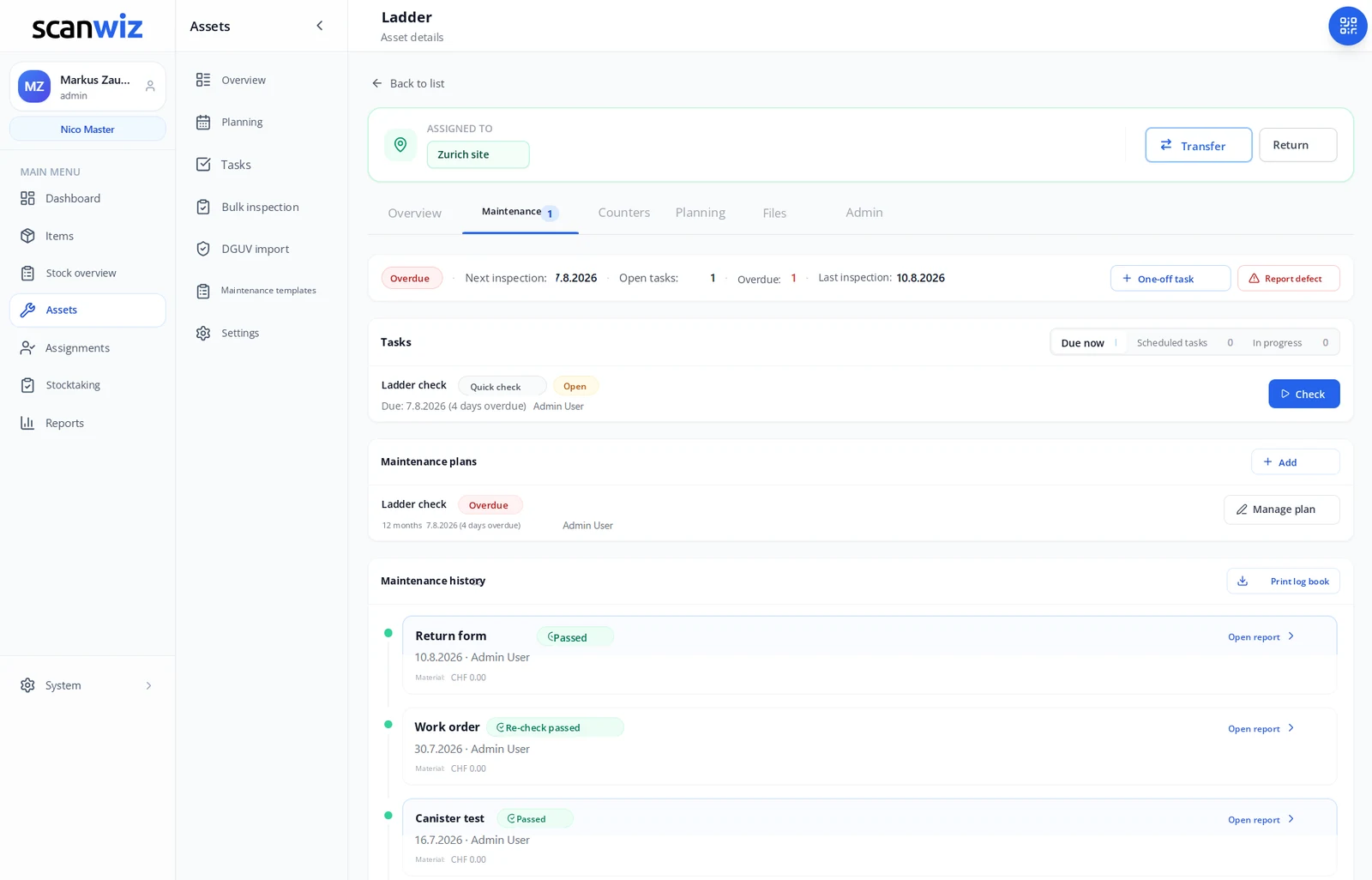
The whole story of an asset on one page
Every inspection, every repair, every re-check – in chronological order, right on the object instead of scattered across folders and inboxes. Open the ladder and you see it at once: next inspection, open tasks, last inspection, and below that every single report.
- Print the log book as a whole – the record for audits and stocktaking
- Every report can be opened on its own, with inspector, result and notes
- Cost history from labour, material and external invoices
- Manuals, certificates and test reports as files on the object
When does a repair stop paying off? Because labour, material and external costs accumulate on the object, the answer sits in the cost history – not in somebody’s gut feeling.
try it freeReliability
Six things that no longer depend on one person.
Inspection deadlines are rarely missed on purpose. They are missed because a file belongs to one person only, because responsibility was never spelled out, or because somebody was on holiday.
Reminders instead of memory
The deadline announces itself, with the lead time you set. Nobody has to remember it any more.
Responsibility is unambiguous
Every task has a responsible person – traceable before and after.
Signature on the device
Where confirmation is required, the inspector signs on the display – and the report carries it.
An unbroken history
Every entry stays with the object, even when it changes location, owner or department.
The QR code is the inspection label
Scan it and the full inspection history is on the display – instead of a label that only knows one date.
Data in Germany
Hosted in certified data centres in Germany, GDPR compliant – for inspection records too.
Frequently asked questions
Answered briefly.
Which maintenance jobs and inspections can I manage with Scanwiz?
Anything that recurs and has to be documented: ladders and steps, fire extinguishers, electrical equipment, vehicles and forklifts, machines, tools, medical devices or IT hardware. For each type of inspection you create a template with an interval and a checklist, and assign the assets to it. Tasks with no asset at all – a walkaround or a cleaning job, say – are possible too.
How does Scanwiz calculate the next inspection date?
From the interval on the template, in two variants. With “Fixed date” the rhythm is preserved: if the annual inspection happens 13 days late, the next one is still due on the original date. With “Next date after completion” the interval restarts on the day the work was done. The first variant suits statutory inspections, the second routine servicing.
Can I plan by operating hours instead of by calendar?
Yes. In “Time & counter” mode you define both, for example every 12 months or every 500 operating hours. Servicing falls due at whichever comes first. Besides operating hours you can run kilometres or cycles as counters; the readings are captured directly on the asset.
What happens when an inspection turns up a defect?
The defect is recorded against the item concerned, together with a note and a photo. From there you can raise a repair order with an owner, and the asset can be flagged as faulty so that nobody keeps using it. The case stays visible in the object’s history until a re-check closes it.
Who gets reminded about a due inspection?
The responsible person. Every task has an owner, and the “Mine” filter shows each person exactly their open inspections. How much lead time they get is set per template – 30 days is typical. Before that the task stays under “Planned” and does not appear in the working list.
Can I inspect many similar objects at once?
Yes, that is what bulk inspection is for. You select the template and the assets concerned and work through them one after another, instead of searching for and opening each object separately. For stocks such as ladders, extinguishers or small electrical appliances this is the fastest route. Each result is still documented individually on the object concerned.
How do I get my existing inspection data into the system?
Assets and master data can be imported from Excel. For electrical equipment test data there is an additional dedicated import. That way you do not start from zero: Scanwiz calculates the next date straight from the last documented inspection, and the plan is complete from day one.
Can Scanwiz be used for PAT testing and similar statutory inspections?
Scanwiz covers the intervals, checklists and records needed for recurring inspections of electrical equipment, and captures every completed inspection with inspector, timestamp, result and signature. Which inspection is actually required in your operation, and at what interval, is determined by the applicable regulations and by the competent person – no software makes that call for you. What Scanwiz does is make sure it is never forgotten afterwards.
Do I get a record I can print?
Yes. Every completed inspection produces a report you can open on its own. On top of that you can print the complete log book for each asset – with all inspections, repairs and results in chronological order.
Can costs be captured per maintenance job?
Yes, optionally per template. Labour, material and external costs are captured on the job and totalled in the asset’s cost history. Over the years that shows you which device has cost what – and when the next repair stops being worth it.
Does this work right at the object as well?
Yes. Scan the QR code on the asset and you land straight on its history, its open tasks and the next inspection – with no list to search through. A defect can be reported on the spot too, with photo and owner.
Is maintenance included in my plan?
Just get in touch – we will tell you what applies to your plan and set up the first templates with you. You can try everything beforehand for 14 days, free and without obligation.
Over 250 customers already rely on Scanwiz
The next inspection deadline is already running. The only question is who is watching it.
Start free and without obligation – no credit card, no risk. Or let us show you Scanwiz in a personal demo.
4.9 out of 5 stars from over 120 verified customer reviews



