

Managing warehouse consumables digitally means every item has a fixed location, a scannable code and a minimum stock level – and every withdrawal is booked where it happens. Then you always know how many gloves, wall plugs or cleaning agents are left, and reordering starts before the shelf is empty.
Key takeaways
- The problem is rarely purchasing – it’s the unbooked withdrawal.
- Reorder point = daily usage × lead time + safety stock. C items rarely need more maths than that.
- Start with one area – PPE or workshop material – not the whole warehouse.
- Scan, self-service or internal requests beat any tally sheet.
Contents: What are consumables? · Why they’re hard to control · Data to record · Reorder point · 7 steps · Organising withdrawals · Mistakes · With Scanwiz · FAQ
What counts as consumables?
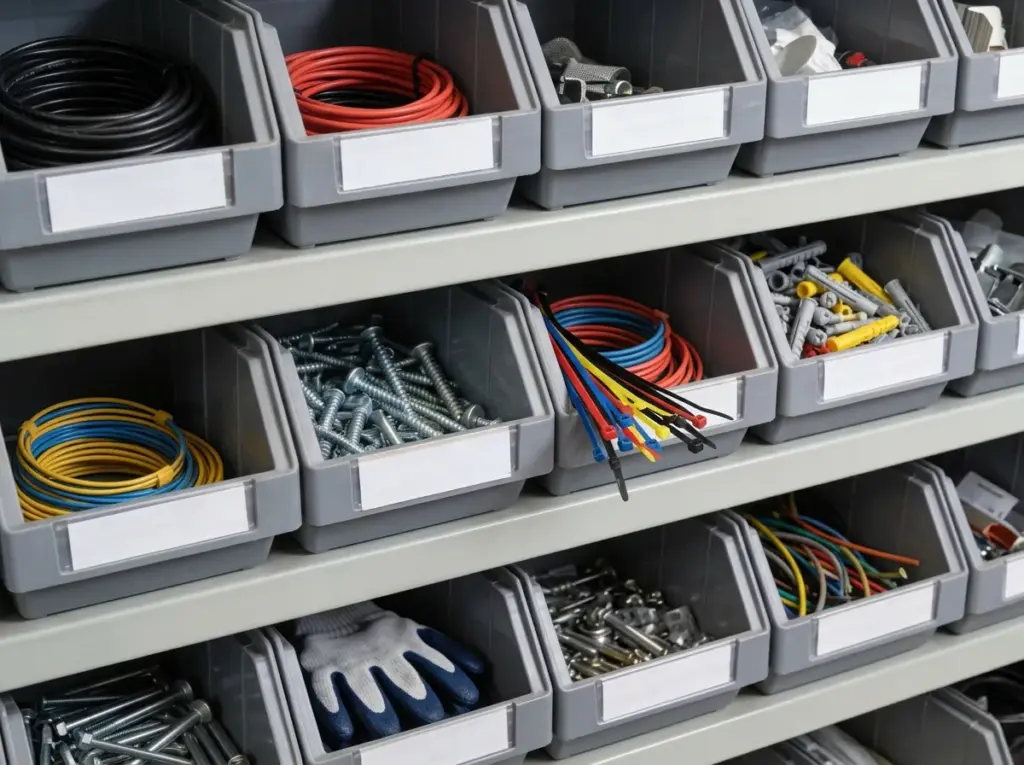
Consumables are items that are used up or permanently installed and therefore need to be repurchased again and again:
- C parts and fixings: screws, wall plugs, nuts, cable ties, tape, silicone
- Personal protective equipment (PPE): gloves, safety glasses, ear protection, masks
- Workshop supplies: abrasives, drill bits, lubricants, cleaning rags
- Hygiene and cleaning: disinfectants, cleaning agents, paper towels
- Medical and lab supplies: cannulas, swabs, dressings, reagents
Tools and devices that come back after use are not consumables. Manage them as individual assets in equipment management – otherwise you know there are “12 cordless drills” but not who has which one.
Why consumables are so hard to control
- Unbooked withdrawals: material is taken “just quickly” – and system stock only exists on paper.
- Scattered stock: main store, workshop, vans, satellite stores – without an overview you buy again although two boxes are still in the van.
- Panic buying: when the shelf is suddenly empty, you pay a premium at the nearest supplier.
- Process costs: for C parts, ordering, searching and counting often cost more than the goods themselves.
- Stocktake surprises: only the count shows what’s really there – too late to find the cause.
Which data to record
| Field | Required? | Note |
|---|---|---|
| Item number and description | Yes | Consistent naming prevents duplicates |
| Unit | Yes | Piece, pack, roll, litre – as withdrawn |
| Location | Yes | Create vans and satellite stores as locations too |
| Current stock | Yes | Count once, then only book |
| Minimum stock | Yes | Per location, not just in total |
| Barcode or QR code | Strongly recommended | Use the manufacturer code or print your own label |
| Supplier, price, order quantity | Recommended | For ordering and stock value |
| Variant | If needed | Size, length, pack size – see variant management |
| Batch and expiry date | If needed | Disinfectants, medical supplies, food – see batch management |
| Cost centre or project | Optional | To analyse consumption per job or department |
How to calculate the reorder point
The right value depends on usage, lead time and safety buffer. The guide reorder point formula and its free calculator help you work it out in a minute.
Reorder point = average daily usage × lead time in days + safety stock
Example: you use 2 boxes of nitrile gloves per day, the supplier needs 5 days and you want 4 boxes of buffer. Reorder point = 2 × 5 + 4 = 14 boxes. As soon as only 14 are left, you order.
Choose the safety stock by criticality: generous for gloves without which work must stop, tight for cable ties. And calculate with real usage – after four to six weeks of clean bookings you know it, and it pays to fine-tune.
Manage consumables digitally in 7 steps
- Pick one area – where “it’s empty again” happens most often.
- Create items with clear names, numbers and units. Existing spreadsheets can usually be imported.
- Define locations – shelves, boxes, rooms, vans or site containers.
- Label: barcodes or QR labels on bins or containers. For small parts, the label goes on the bin, not the screw.
- Count opening stock and set minimums – roughly first, then refined with real data.
- Set the booking rule: receipts, withdrawals and transfers are always scanned. If nobody has time to book, the process is too complicated.
- Review monthly: what runs out, what sits? Adjust reorder points, discontinue slow movers.
Organising withdrawals: 4 models
| Model | How it works | Best for |
|---|---|---|
| Scan at the shelf | Staff scan item and quantity with their phone before leaving | Open stores, small teams |
| Self-checkout at the counter | Screen and scanner at the issue point – scan profile and items, done | Workshops, businesses with an issue counter |
| Internal material request | Staff order from stock like in a shop; the store reserves and issues | Trades with job sites, multiple sites |
| Kanban / two-bin | When one bin is empty, it’s scanned and reordered; the second bridges the gap | Fast-moving C parts |
How an internal request works without notes and phone calls is shown on material requests. For trades: create each van as its own location and book the transfer when loading – see Scanwiz for craft and industry.
Common mistakes – and when software pays off
- Only booking receipts – without withdrawals, stock is fiction.
- Duplicate items sharing demand but not stock.
- No minimum stock – you reorder at zero, i.e. too late.
- Unclear responsibility – nobody orders, or everyone at once.
- Too complicated a process – if a withdrawal needs a PC, it won’t be booked.
Software pays off as soon as two of these apply: more than two people withdraw from the same stock, material sits in several places or vans, rush orders are routine, the stocktake takes more than a day, or only one person maintains the spreadsheet. See Scanwiz vs. Excel and how to run inventory in Excel until then.
Managing consumables with Scanwiz
- Phone scan: scan code, enter quantity, done – camera, tablet or existing scanner, even offline. See barcode scanner.
- Own QR labels for anything without a manufacturer code, individually or as label sheets.
- Minimum stock per item and location: items below the limit go to the shopping list, which becomes purchase orders per supplier; receipts are booked by scan.
- Self-checkout at the counter – booked without a storekeeper.
- Material requests from real stock, reserved by scan, assigned on pickup.
- Mobile stocktaking with four count types and tolerances.
- Consumption reports per cost centre (from Growth) – or just ask Scanwiz AI Connect: “How much PPE did we use in September?”
Whether in the workshop, a medical practice or a restaurant: more than 250 businesses work with Scanwiz, rated 4.9 out of 5 from over 120 reviews. Users and locations are unlimited in every plan – see pricing.
FAQ on warehouse consumables
How do I manage warehouse consumables digitally?
Create every item with description, unit, location, minimum stock and barcode, count opening stock once and then book every movement by scan – receipts, withdrawals and transfers. Reordering is triggered as soon as minimum stock is reached.
How do I calculate the reorder point for consumables?
Reorder point = average daily usage × lead time in days + safety stock. Example: 2 boxes per day × 5 days lead time + 4 boxes buffer = 14 boxes.
What is the difference between consumables and equipment?
Consumables are used up or installed and managed as quantities. Equipment such as tools and devices comes back and is managed as individual assets with asset number, assignment and inspection intervals.
How do I make sure withdrawals get booked?
Make booking faster than skipping it: phone scan at the shelf, self-checkout with a scanner at the counter, or internal material requests where the store issues and books.
Do I need special scanner hardware?
No. With Scanwiz a smartphone camera is enough; EAN, Code 128, Data Matrix and QR are recognised. Existing handheld scanners can still be used.
Conclusion
Managing consumables digitally is less about software than about clear processes: unique items, fixed locations, minimum stock per location and withdrawals that get booked because booking is faster than not booking. Once these basics are in place, rush orders, search times and stocktake surprises disappear.
Updated October 2026.
Over 250 customers already trust Scanwiz
Never hear “we’re out of gloves” again.
Minimum stock, shopping list and withdrawals by scan – so consumables are reordered before the shelf is empty. Start for free or request a personal demo.


