
The reorder point formula tells you the stock level at which you need to reorder so the new delivery arrives before the shelf is empty. The formula itself is simple: average daily usage times replenishment lead time plus safety stock. The hard part is the input values – and that’s exactly where most stockouts come from.
Use the calculator below to get your reorder point in a minute. Then you’ll learn how to determine usage and lead time properly, which three methods exist for safety stock and how to maintain the reorder point day to day without recalculating every week.
Key points at a glance
- Formula: Reorder point = average daily usage × lead time + safety stock.
- The reorder point is also called the reorder level. It always sits above the safety stock, your buffer for surprises.
- The replenishment lead time is more than the supplier’s delivery time: it includes ordering, goods receipt and putting away.
- Usage and lead times change. A reorder point calculated once and never reviewed is usually wrong after a year.
Contents: Reorder point calculator · Terms · Formula · Examples · Safety stock · Maximum stock and order quantity · Service vehicle · Excel · Tips · Common mistakes · With Scanwiz · FAQ
Reorder point calculator: your reorder level in one minute
Enter your average usage, the replenishment lead time and the safety buffer you want. The calculator instantly shows your reorder point, safety stock and – if you enter a typical order quantity – the maximum stock.
Average of the last few weeks or months, not the peak
From placing the order until the item is ready to use on the shelf
Reserve for late deliveries and unexpected extra usage
Used to calculate the maximum stock
Your reorder point
– units
- Average usage per working day–
- Usage during lead time–
- Safety stock–
- Maximum stock–
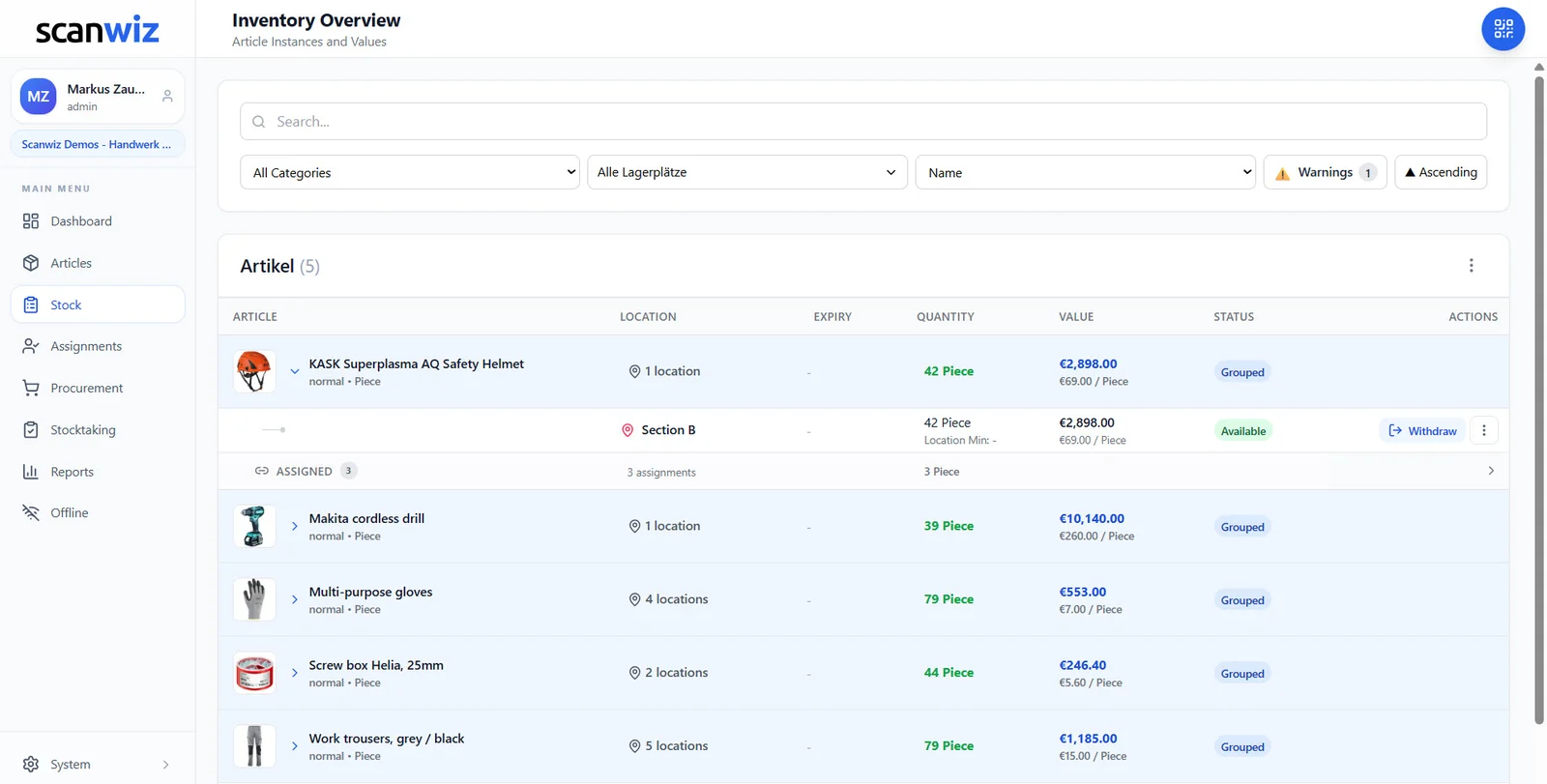
Reorder as soon as stock drops to – units. In Scanwiz, enter this value as the minimum stock – the item then lands on the shopping list automatically.
Based on 5 working days per week and 21 per month · results rounded up to whole units · maximum stock = safety stock + order quantity
What is the reorder point? The terms at a glance
The reorder point is the stock level at which an order is triggered. It’s sized so that the remaining stock covers usage until the new goods arrive – with the safety stock still left over. It’s also known as the reorder level or order point; the method behind it is the reorder point system.
| Term | Meaning | Question it answers |
|---|---|---|
| Safety stock (buffer stock, sometimes minimum stock) | Buffer only used for late deliveries or extra usage | How much reserve do I need for surprises? |
| Reorder point (reorder level) | Stock level at which you reorder | When do I order? |
| Order quantity | Amount ordered each time | How much do I order? |
| Maximum stock | Stock right after goods receipt, the upper limit for the shelf | How much may be on the shelf at most? |
A note on terms: “minimum stock” is used inconsistently. In textbooks it usually means safety stock. In many inventory systems – Scanwiz included – the “minimum stock” field is the threshold at which an item goes onto the shopping list. That’s where the reorder point belongs, not the safety stock.
Reorder point or periodic review?
The reorder point belongs to the continuous review system: you order as soon as a certain quantity is reached, whatever the day. The alternative is the periodic review system: you order on fixed dates, say every Monday, and top up to the maximum stock. Periodic review suits suppliers with fixed delivery days. The reorder point reacts faster to fluctuating usage and is the more flexible choice for most stores in trades, practices and workshops. Many businesses combine both: the reorder point as the trigger, the order bundled on the next delivery day.
Reorder point formula: how it’s built
Reorder point = average daily usage × replenishment lead time + safety stock
The formula has three building blocks. Each deserves a closer look:
- Average daily usage: Take usage over a representative period – say the last three months – and divide it by the working days. Peaks are handled by the safety stock, not the average.
- Replenishment lead time: The time from reaching the reorder point until the new goods are ready to use on the shelf. It includes internal processing and approval, the supplier’s lead time, shipping and goods receipt and put-away.
- Safety stock: The reserve for everything that doesn’t go to plan. How to calculate it is covered in safety stock formula.
Crucially: usage and lead time must be in the same unit of time. If you use usage per working day, the lead time has to be in working days too. A supplier who delivers “in a week” needs five working days, not seven.
Applying the reorder point formula: two practical examples
Example 1: screws in a trade business
A joinery uses an average of 200 chipboard screws 4 × 40 mm per week. The wholesaler delivers in three working days, plus one day for ordering and one day for goods receipt and putting away. Three working days of buffer should be enough.
| Average daily usage | 200 units ÷ 5 working days = 40 units |
| Replenishment lead time | 1 + 3 + 1 = 5 working days |
| Safety stock | 40 units × 3 days = 120 units |
| Reorder point | 40 × 5 + 120 = 320 units |
| Maximum stock with order quantity 1,000 | 120 + 1,000 = 1,120 units |
As soon as only 320 screws are left, it’s time to reorder. Around 200 are used before the delivery arrives – the remaining 120 are the reserve.
Example 2: examination gloves in a medical practice
A practice uses 60 boxes of nitrile gloves a month. The supplier delivers in three working days and the order goes out the same day. Because gloves must never run out, a generous buffer of five working days is chosen.
| Average daily usage | 60 boxes ÷ 21 working days ≈ 2.9 boxes |
| Replenishment lead time | 3 working days |
| Safety stock | 2.9 × 5 ≈ 15 boxes (rounded up) |
| Reorder point | 9 + 15 = 24 boxes |
For items with expiry dates in particular, don’t set the safety stock too high – or goods expire before they’re used. How to keep batches and expiry dates under control is covered in the article on batch management.
Safety stock formula: three methods
Safety stock determines how often an item runs out despite the reorder point – and how much capital sits on the shelf. There are three common ways to set it:
1. Safety days (simple)
Safety stock = average daily usage × number of buffer days
You decide how many days of usage to keep as a reserve – for example three days with reliable suppliers, a week with unreliable ones. The calculator above uses this method. For most businesses it’s the best place to start.
2. Max method (cautious)
Safety stock = (max. daily usage × max. lead time) − (average daily usage × average lead time)
It covers the worst case: highest usage and longest lead time at the same time. In the screw example with a maximum of 60 units per day and a maximum lead time of 8 days, that’s (60 × 8) − (40 × 5) = 280 units. The method is safe but capital-intensive – sensible for items whose absence stops the business.
3. Statistical method (precise)
Safety stock = z × σ × √lead time
Here σ is the standard deviation of daily usage and z is the factor for the desired service level: about 1.65 for 95 percent, 2.33 for 99 percent. With a standard deviation of 10 units and 5 days of lead time, 95 percent gives 1.65 × 10 × 2.24 ≈ 37 units. The method needs clean usage data and is worth it mainly for expensive items with fluctuating demand.
| Method | Effort | Well suited for |
|---|---|---|
| Safety days | Low | Most items, especially C items |
| Max method | Medium | Critical items whose absence stops the business |
| Statistical | High, needs usage history | Expensive A items with fluctuating usage |
Maximum stock and order quantity
The reorder point tells you when to order. How much you order depends on the order quantity – and that gives you the maximum stock:
Maximum stock = safety stock + order quantity
In practice, pack sizes, minimum order values or volume discounts often set the order quantity. If you want to be precise, use the economic order quantity (EOQ): √(2 × annual demand × ordering cost ÷ holding cost per unit per year). With 10,000 screws a year, an ordering cost of 30 euros and a holding cost of 6 cents per unit per year, that’s around 3,160 units. For consumables in trades, a pragmatic quantity that fits the shelf space and pack size is usually enough.
Special case service vehicle: a reorder point for the mobile store
In trades, much of the material isn’t in the main store but in the van. The same formula applies to the vehicle, just with different building blocks: the “lead time” is the time until the next restock from the main store, and usage is that of the technician driving the vehicle.
An example: a plumbing technician uses an average of 6 press fittings of one type per day. The vehicle is restocked twice a week, so at the latest every three working days. One day of buffer is enough, because the technician can buy from the wholesaler on the way in an emergency.
- Usage until the next restock: 6 × 3 = 18 units
- Safety stock: 6 × 1 = 6 units
- Reorder point in the vehicle: 24 units – if stock drops below that, the item goes on the packing list for the next restock.
The advantage of a separate reorder point per vehicle: the main store sees what’s missing in which van, and the technician isn’t stuck at a customer without the right part. How vehicles work as separate stock locations is shown on the tool management page.
Calculating the reorder point in Excel
If you still keep your items in a spreadsheet, you can calculate the reorder point there with a few columns. Assume column B holds usage per week, C the lead time in working days and D the buffer days:
| Column | Content | Formula (row 2) |
|---|---|---|
| E | Average daily usage | =B2/5 |
| F | Safety stock | =ROUNDUP(E2*D2,0) |
| G | Reorder point | =ROUNDUP(E2*C2,0)+F2 |
| H | Reorder? | =IF(I2<=G2,"YES","") with current stock in column I |
That works – as long as someone reliably maintains current stock in column I. That’s exactly where most spreadsheet solutions fail: withdrawals are forgotten, the file belongs to one person, and a warning only appears when someone opens the sheet. Inventory software books withdrawals when you scan and alerts you as soon as the reorder point is reached.
Reorder points in practice: 6 tips
- Calculate per location: Every service vehicle or satellite store needs its own reorder point. There, the “lead time” is often the time until the next trip to the main store.
- Round to pack sizes: If delivery comes in boxes of 100, it’s worth rounding the reorder point up to whole boxes.
- Consider seasonality: Road salt, antifreeze or air-conditioning parts have very different usage over the year. Adjust the reorder point before the season.
- Review quarterly: Have usage or lead times changed? A quick look at the key items prevents old values from quietly running on.
- Start with A items: Not every item needs a precise calculation. Start with expensive and critical items; safety days are enough for the rest.
- Book withdrawals immediately: The best reorder point is useless if the booked stock is wrong. How to do that without paper is covered in the guide managing warehouse consumables digitally.
5 common reorder point mistakes
- Only counting delivery time: The days for ordering, approval and put-away are missing – and goods regularly arrive a day late.
- Mixing calendar and working days: Usage per working day, lead time in calendar days – the result is around 40 percent too high.
- Entering safety stock instead of the reorder point: If the buffer is set as the reorder threshold, you only order once the buffer is already being used.
- Calculated once, never reviewed: Usage and lead times change – the reorder point from two years ago rarely still fits.
- Stock is wrong: Unbooked withdrawals mean the reorder point never triggers. The fix isn’t a new formula but clean booking and a regular stocktake.
Reorder points with Scanwiz: replenishment that flags itself
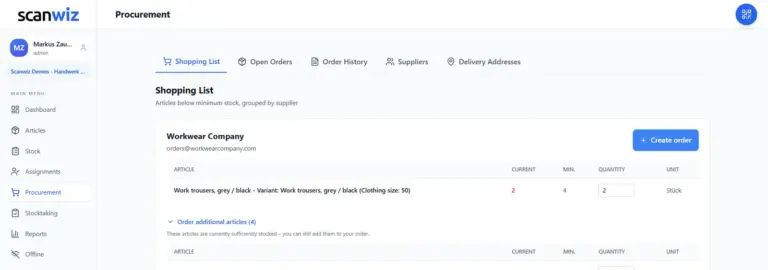
In Scanwiz, you enter the calculated reorder point as the minimum stock – per item and per location. The system does the rest:
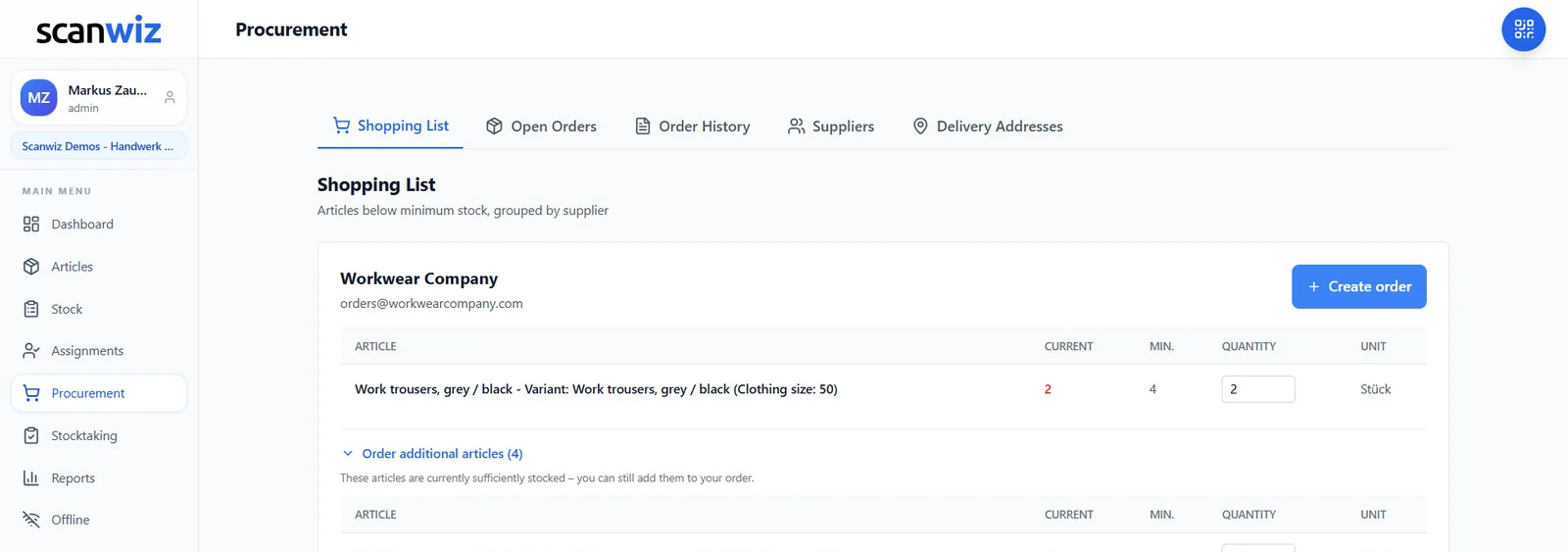
- Automatic shopping list: As soon as an item falls below its minimum stock, it appears on the shopping list – grouped by supplier.
- Order with one click: With a suggested order quantity you can adjust before sending. Order other items from the same supplier at the same time.
- Per location: Main store, satellite stores and every vehicle get their own minimum stock.
- Stock you can trust: Withdrawals are booked by scanning at the shelf – on your phone, even offline. So the reorder point actually triggers.
- Ask instead of searching: With Scanwiz AI Connect, ask in plain language, such as “Which items are below minimum stock?”.
Import your items including minimum stock levels from Excel. More on stock control on the warehouse management software page, all modules under features. More than 250 businesses use Scanwiz, rated 4.9 out of 5 stars from more than 120 reviews on Capterra, GetApp and G2.
Frequently asked questions about the reorder point
How do you calculate the reorder point?
With the formula reorder point = average daily usage × replenishment lead time + safety stock. With usage of 40 units per day, a lead time of 5 days and a safety stock of 120 units, the reorder point is 320 units.
What’s the difference between reorder point and minimum stock?
In textbooks, minimum stock usually means the buffer, i.e. the safety stock. The reorder point sits above it and is the threshold at which you reorder. In many inventory systems, though, the field for the reorder threshold is called “minimum stock” – that’s where the reorder point goes.
What is included in the replenishment lead time?
The whole time from reaching the reorder point until the goods are ready to use on the shelf: internal processing and order approval, the supplier’s lead time, transport and goods receipt and put-away.
How high should safety stock be?
It depends on how reliable the supplier and usage are and how bad a stockout would be. Two to five days of usage is usually enough to start. The max method suits critical items, the statistical method expensive items with fluctuating demand.
How often should I review the reorder point?
For key items once a quarter, for all others once a year – and whenever the supplier, lead time or usage changes noticeably, for example before a season.
Can the reorder point trigger an order automatically?
Yes, with inventory software like Scanwiz. When stock falls below the stored value, the item appears on the shopping list grouped by supplier, and the order goes out with one click. The prerequisite is that withdrawals are booked promptly.
Conclusion: the reorder point formula is easy – keeping it current makes the difference
The reorder point formula fits on one line, and with the calculator you have the value in a minute. What makes the difference are the inputs: an honest average usage, a lead time that includes ordering and putting away, and a safety stock that matches the risk. Set values per location, book withdrawals immediately and review key items once a quarter, and replenishment flags itself.
Updated October 2026.
More than 250 customers already trust Scanwiz
Replenishment that flags itself.
Set minimum stock, book withdrawals by scanning, and the shopping list fills itself. Start for free or let us show you in a personal demo how it would look in your store.



