
Asset inventory for businesses
Asset inventory software that knows where everything is.
Laptops, machines, furniture, tools and supplies in one inventory list that keeps itself up to date. Every item gets an asset tag number and a QR code. Check-out, moves, inspections and stocktaking run by scanning with a phone – instead of updating a spreadsheet at year-end.
Inventory list · Asset tags · Location · Responsibility · Inspections · Stocktaking
In short
Asset inventory management records everything a business owns and uses over a longer period – from laptops and office chairs to machines, tools and company cars. For every item it records what it is, what it cost, where it is and who is responsible for it. In Scanwiz, every item gets an asset tag number and a QR code; every check-out, move and inspection is booked by scanning and stored permanently in the item’s history. The result is an inventory list that doesn’t need updating once a year – it stays current while you work.
Mainly interested in tools or equipment in the field? Morning check-out, tools in the van, assignment to job sites – there are dedicated pages with all the details.
to equipment managementTerms explained
Inventory, stocktake, asset register – what’s what?
Four terms that are constantly mixed up. Keep them apart and you know what an asset inventory has to do – and what it doesn’t.
Inventory
Everything a business owns – from the machine to the office chair. In the accounting sense, receivables and liabilities are part of it too.
Inventory list
The register of items with asset tag, name, location and value. This is exactly the list an asset inventory system keeps – continuously, not once a year.
Stocktake
The physical count: count, check, reconcile. The stocktake is the process, the inventory is the result. Scanning instead of a clipboard makes it much faster.
Fixed asset register
The accounting view: purchase cost, useful life, depreciation. The asset inventory adds where the asset is and what condition it’s in.
Commercial law in many countries requires an inventory at least once a year – in Germany under § 240 HGB, in France under Art. L123-12 Code de commerce. Your accountant knows which rules apply to your business.
The difference
The inventory list is right exactly one day a year.
On stocktake day. After that a laptop moves, a meter goes off for calibration, a chair ends up in the basement – and none of it makes it into the spreadsheet. With Scanwiz, the list builds itself as you work.
The spreadsheet says “Room 2.14”. The laptop has been in someone’s home office since March.
Every check-out is a scan. The item shows who has it and since when.
Three versions of the list are going around – none of them current.
One inventory for everyone, with unlimited users – office, workshop and field staff.
Inspection dates live in a second list that nobody opens.
Maintenance and inspections are attached to the item and send reminders in time.
Stocktaking means: print the list, walk through every room, type it all back in.
Counting runs in the app during normal operations, even without Wi-Fi – with a final report.
People who leave return “everything”. Nobody knows exactly what that was.
The person’s profile shows every open item – with a signed hand-over receipt if you want.
Inventory list
Ten fields every inventory list needs.
Whether you start in Excel or go straight to software: with these fields you can answer any question later – from “Where is it?” to “What is it still worth?”.
Asset tag numberCore
IT-0142
Unique, never assigned twice, never reused. Printed as a QR code on the label.
NameCore
Laptop Latitude 5440
Name it the way people search for it – not the way it appears on the invoice.
CategoryCore
IT · Laptops
Few, clear categories. They drive filters, stocktake scopes and reports.
LocationCore
Site 1 › Office 2.14
Hierarchical, not free text: site, room, shelf. Then every location can be counted on its own.
ResponsibleCore
Lea Brandt, Sales
A person, a team or a project. When someone leaves, the most important column of all.
PurchaseCore
03/2026 · €1,240
Date and value. The basis for insurance, replacement planning and reconciling with accounting.
StatusCore
in use
Available, checked out, defective, retired. Retired items stay in the list with a date.
Make & serial numberRecommended
Dell · 7HX2K93
Essential for warranty claims, theft reports and identical devices.
Inspection & maintenance dateRecommended
next inspection 09/2027
For electrical equipment, ladders, machines and measuring instruments. Ideally with a reminder.
Photos & documentsRecommended
invoice.pdf, photo
Invoice, warranty card, manual, condition at check-out. Right on the item instead of in someone’s inbox.
In Scanwiz, asset tag, location, responsibility, value, status, inspection dates, photos and documents are kept right on the item – and your existing list comes in via Excel import.
Asset tag generator
Build an asset numbering scheme that still works in ten years.
The asset tag number is the backbone of any inventory. Pick the building blocks – next to them you instantly see what your numbers and labels look like. Free, no sign-up.
Careful: locations change, asset tags don’t. Once the item moves, the number is wrong. The location belongs in a separate field.
Better one digit too many: renumbering later means re-labelling everything.
Your asset tag numbers
- IT-0001
- IT-0002
- IT-0003
Your label
If found, please return
In Scanwiz you assign asset tag numbers freely or import them from your list – and print the QR labels straight from the software.
One item, its whole life
From purchase to disposal – without gaps.
Asset inventory isn’t a year-end project. It follows every item through six stages, and each one leaves an entry in its history.
-
01
Record
Create a new item or import it from Excel: name, category, value, serial number, invoice as PDF.
-
02
Label
Print a QR label from Scanwiz and stick it on. Existing barcodes and serial numbers still work.
-
03
Assign
By scan to a person, a room, a vehicle or a project. Expensive devices with a signature if you want.
-
04
Inspect & maintain
Inspection and maintenance dates sit on the item, remind you in time and file the report in the logbook.
-
05
Stocktake
Scan room by room, spot discrepancies, approve. Checked-out items are counted too.
-
06
Retire
Defective, sold or scrapped: set the status, note the reason. The history is kept.
What it looks like
Asset inventory in everyday use.
Six views from the real application – from the inventory list to assignments and stocktaking.
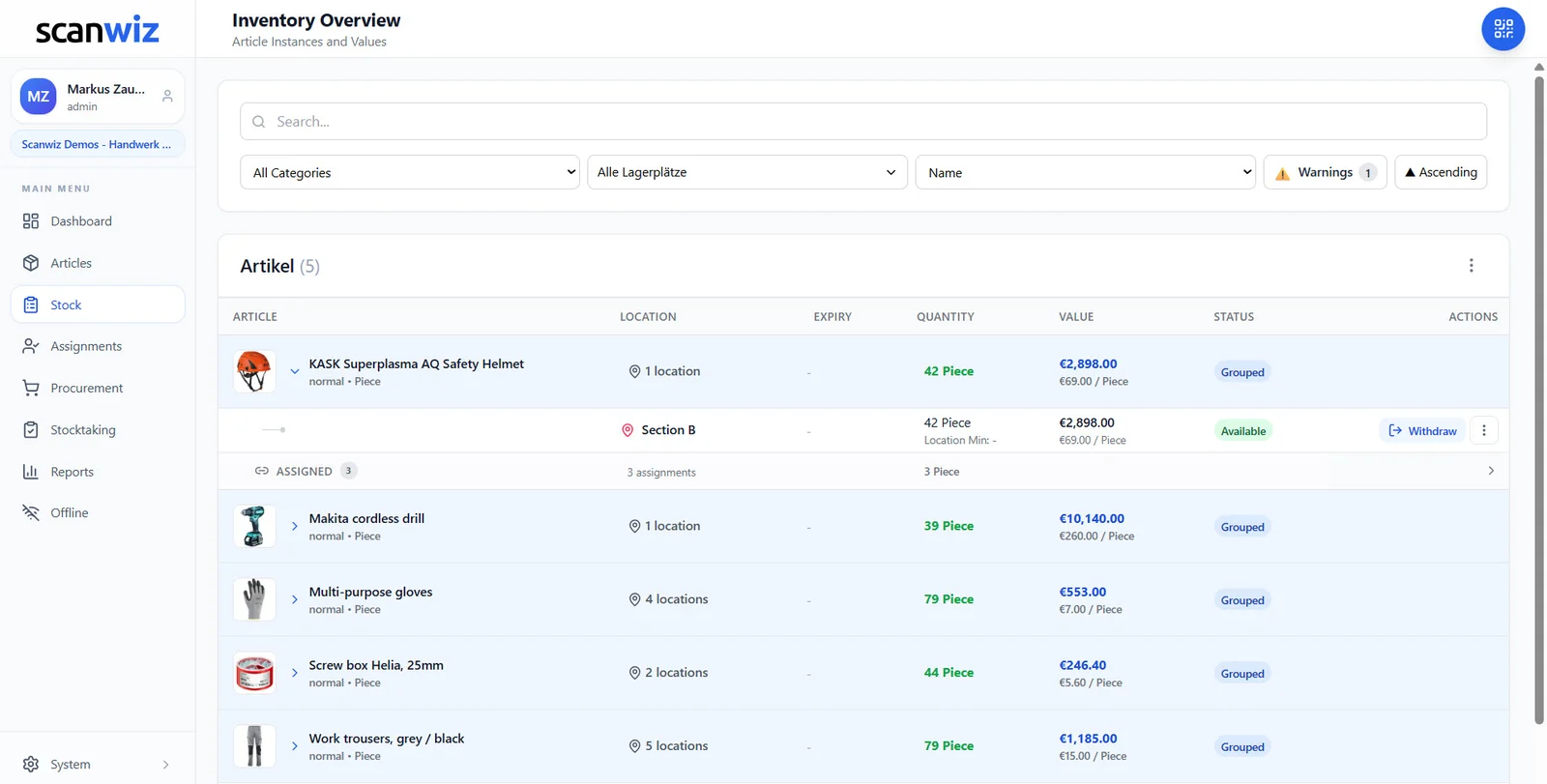
The inventory list
Everything your business owns, on one page
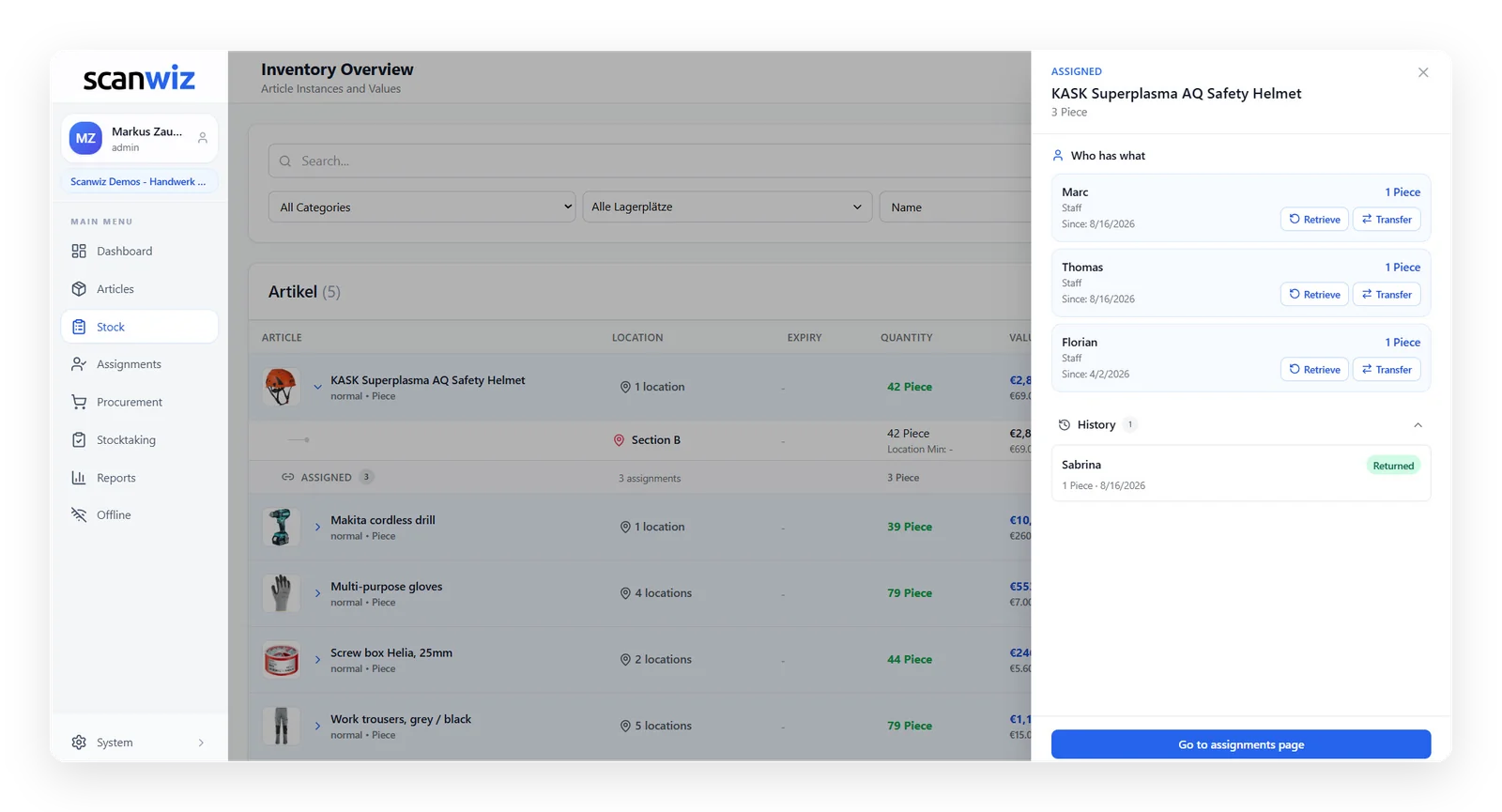
Each row shows the item with location, value and status. Expand it to see what’s on the shelf and what’s currently with whom. Filter by category or location, export to Excel – for accounting, insurance or the annual accounts.
- Individual items with asset tags and bulk stock in one list
- Value per item and in total
- Photos and documents right on the item
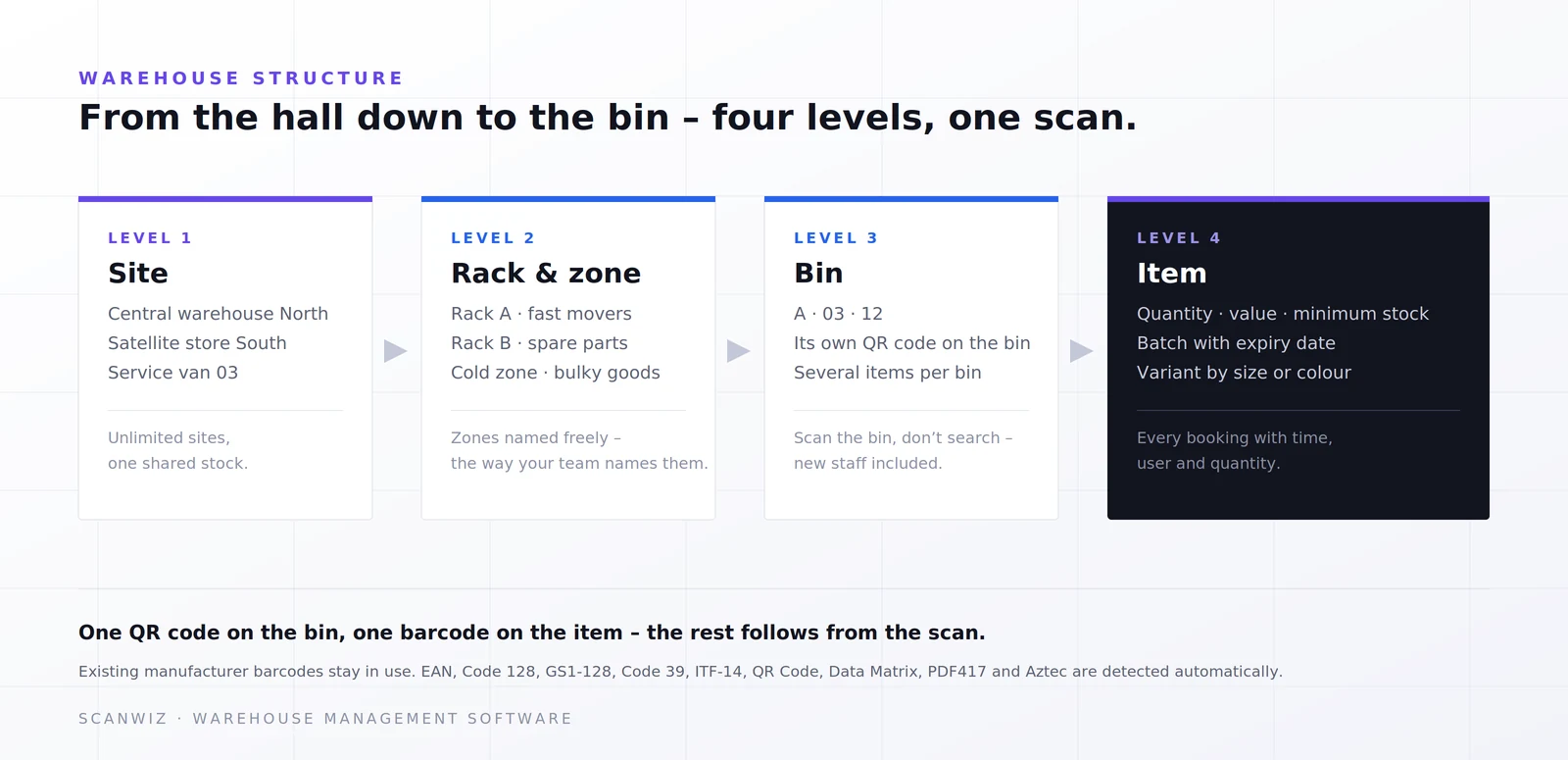
Locations
Building, room, cabinet – just like your business is organised
Map sites, floors, rooms and shelves in four levels. Every location gets a QR code. When someone moves a device, they scan the location and the item – and the inventory list is right again without anyone opening a spreadsheet.
- Multiple sites, external stores and vehicles in one structure
- Moves between rooms by scan
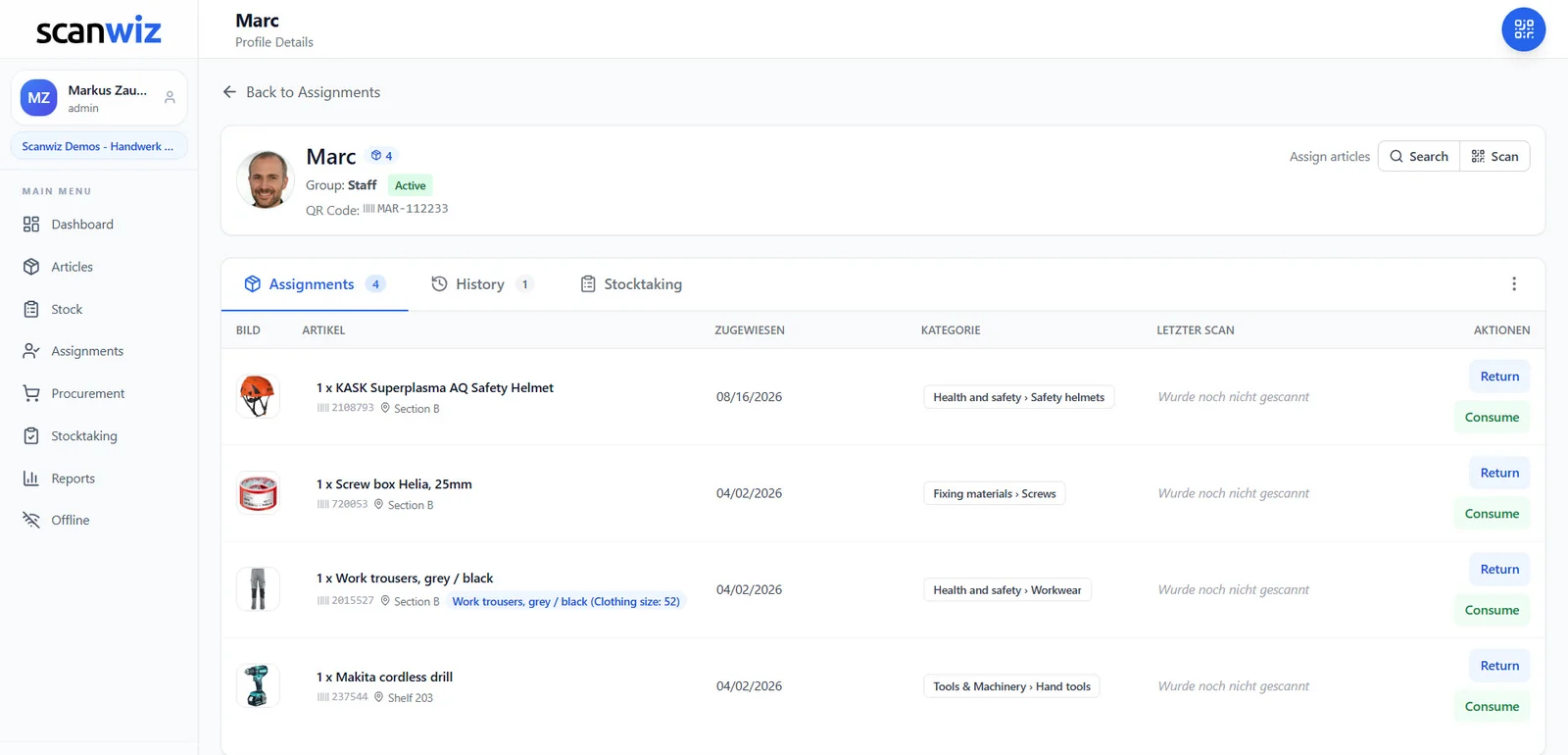
Who has what
Every laptop, every meter has a name on it
A person’s profile shows everything they’re currently using – with asset tag and check-out date. In turn, every item shows who has it and who had it before. Besides people, departments, vehicles, job sites and external companies can hold inventory too.
- Onboarding: assign equipment in one go
- Offboarding: complete list of open items
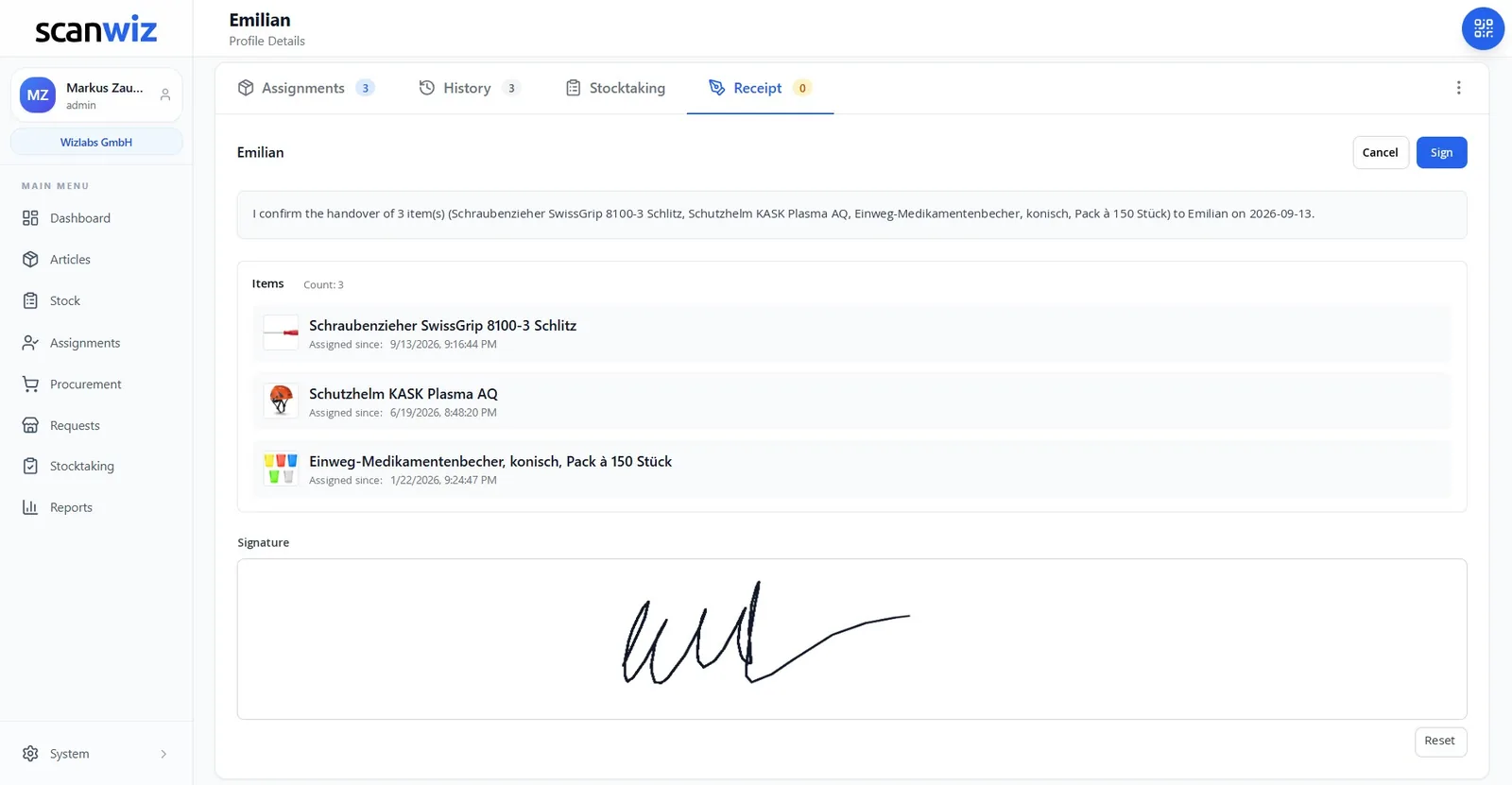
Hand-over with signature
The hand-over form is created from the assignment
Company phone, laptop and keys for the new colleague? A few clicks turn the assignment into a receipt with item list and on-screen signature. Anyone not on site confirms by email. The receipt is then stored on the profile.
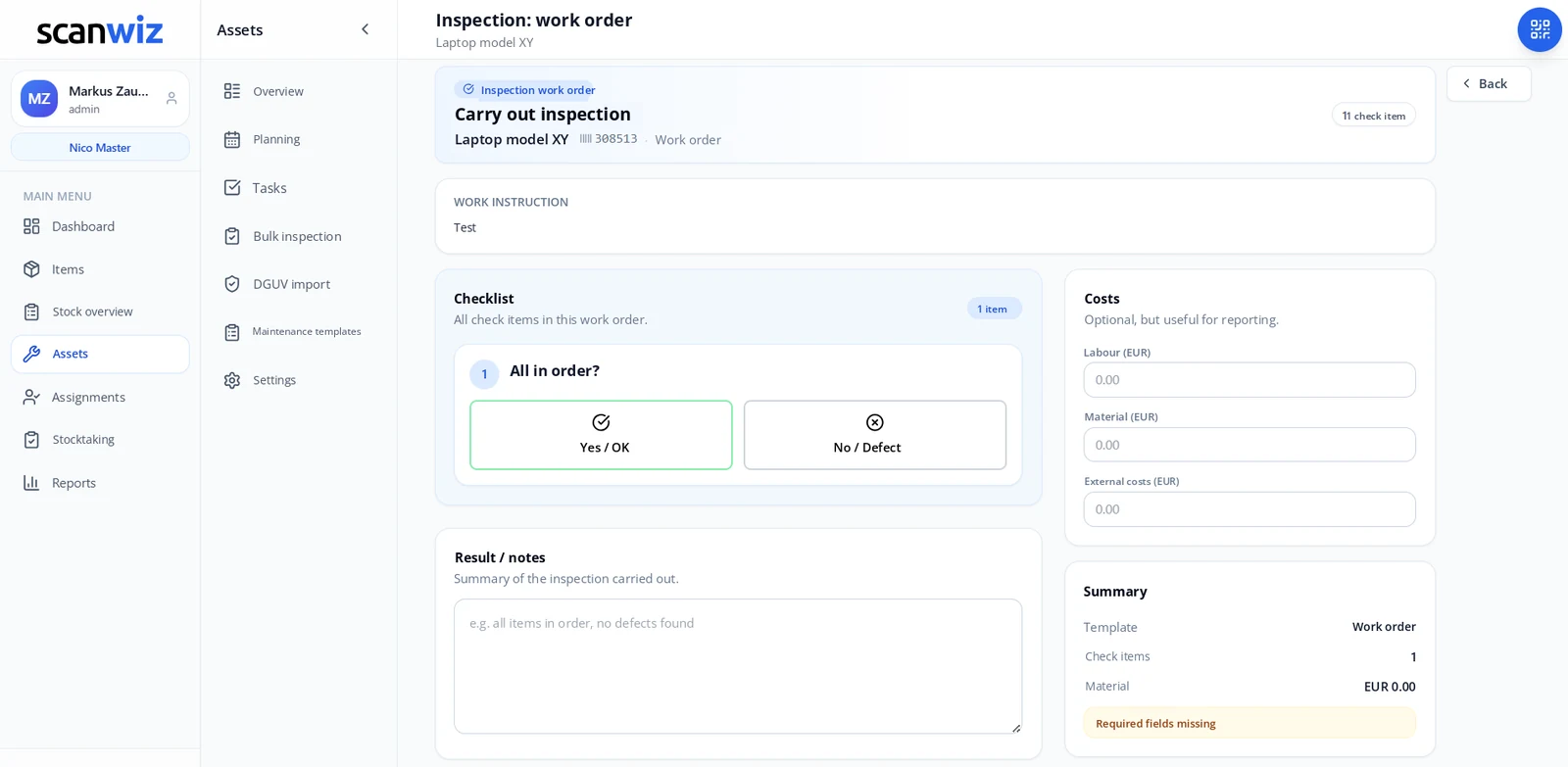
Maintenance & inspections
Inspection dates that remind you themselves
Recurring inspections and maintenance are attached to the item – with interval, reminder, checklist and a report in the logbook. Existing test data for electrical equipment can be brought in via DGUV import.
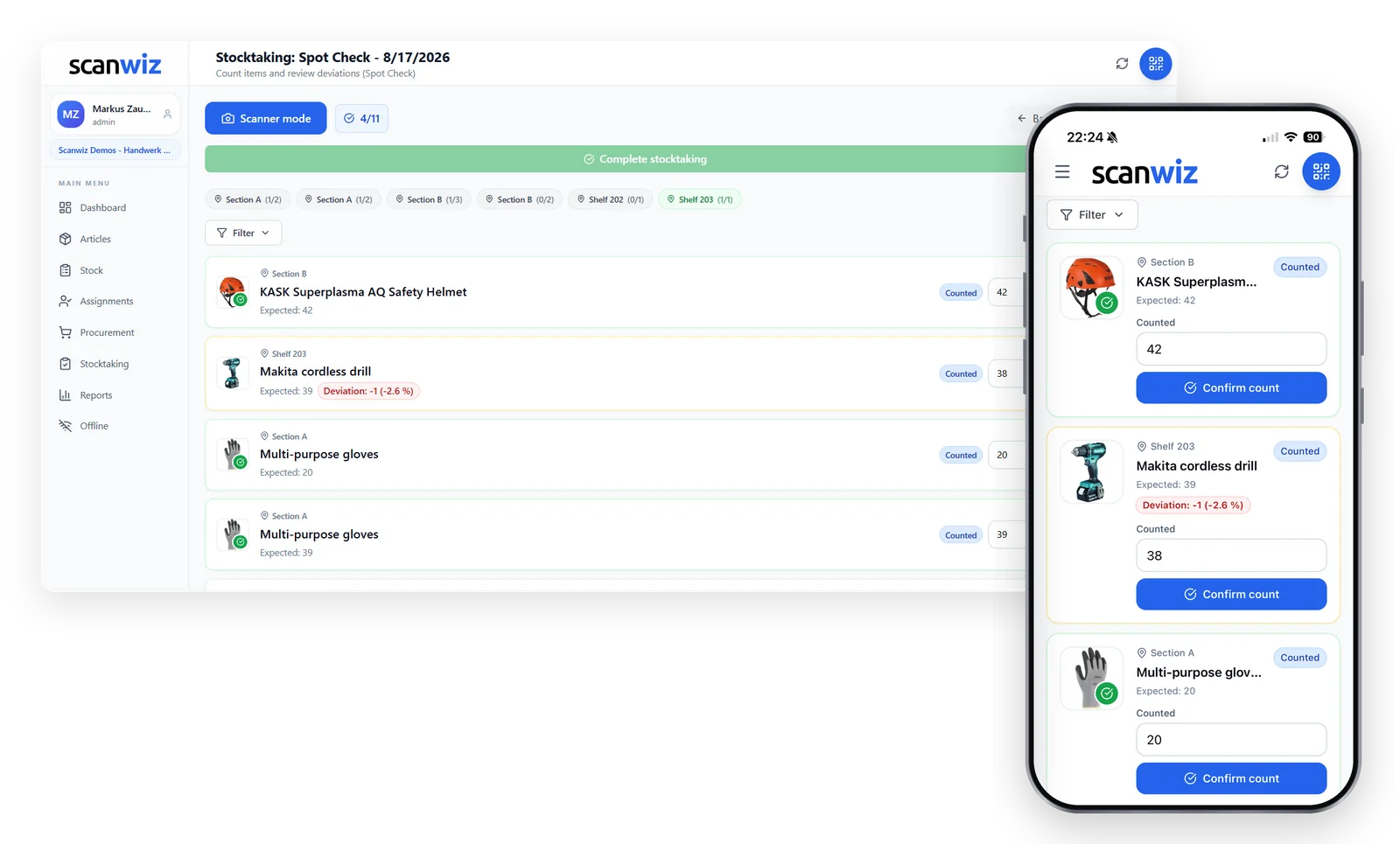
Stocktaking
Stocktaking by scan, room by room
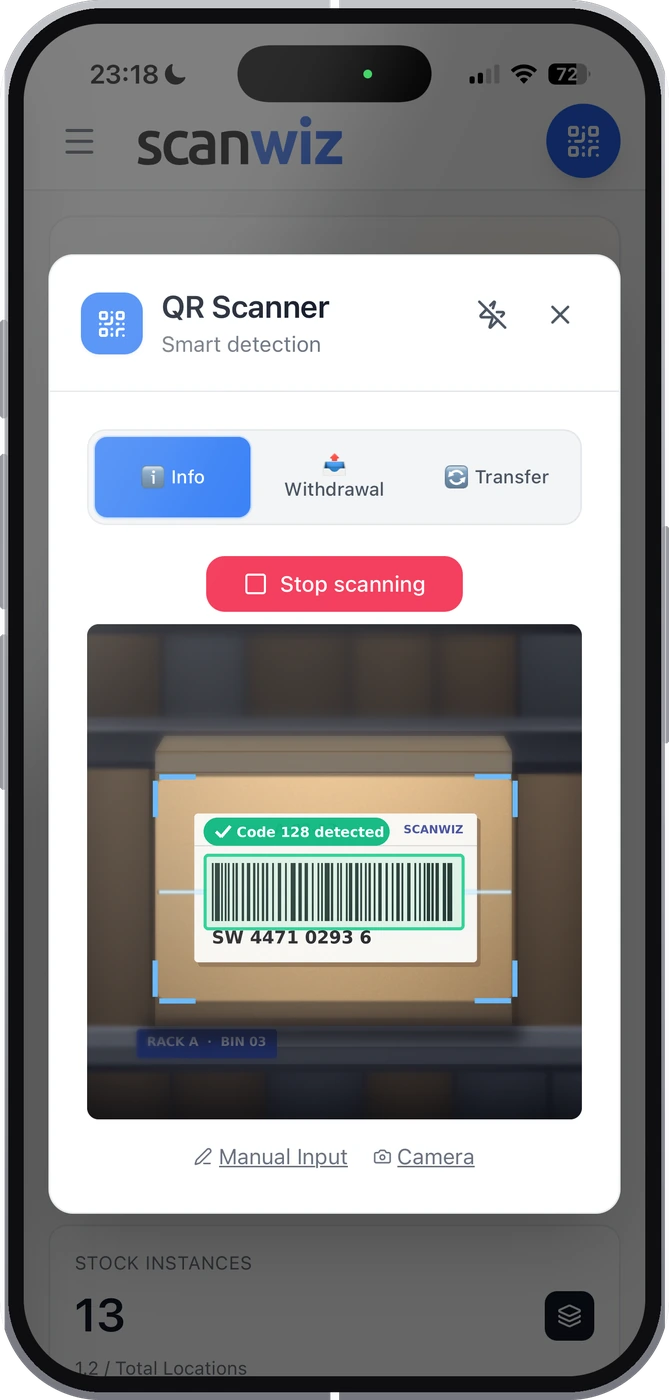
Full count, cycle count, spot check or blind count: you choose the scope and rules, your team scans on their phones. Scanwiz spots discrepancies itself, you set the tolerances. Pausing and carrying on tomorrow is built in.
- Checked-out items are counted too
- Offline mode for basements and remote sites
Getting started
Introduce asset inventory in four steps.
No IT project, no consultant. Most businesses start with the list they already have.
Import your list
Upload your Excel inventory list with categories, asset tags, values and locations.
Print labels
Print QR labels from Scanwiz and stick them on room by room. Locations get a code too.
Record assignments
Who has which laptop, which vehicle, which meter? Scan once, done.
First stocktake
One pass by scan as a clean starting point. From then on, daily scans keep the list up to date.
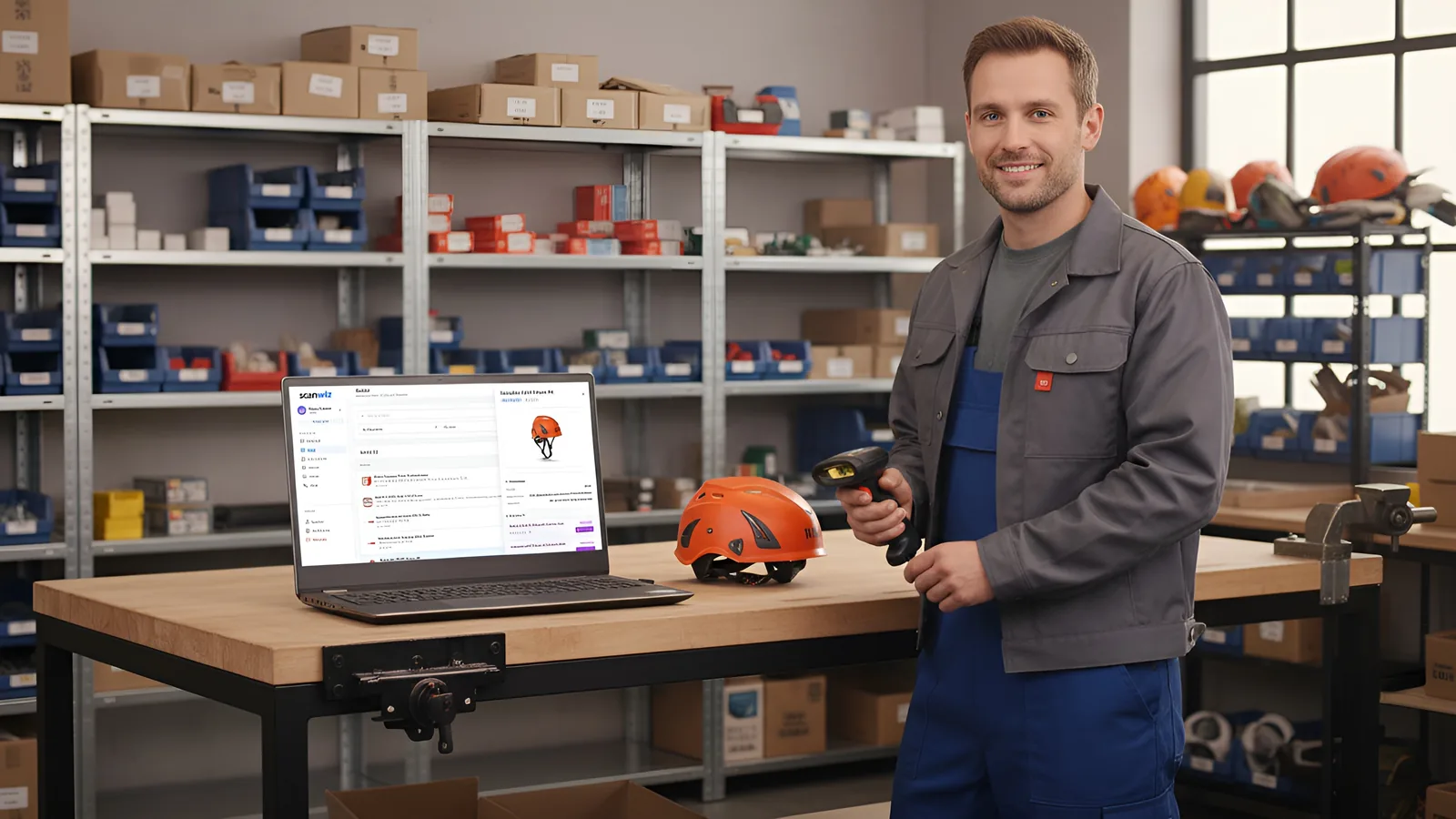
No special hardware
Your phone is the scanner
Scanning uses the camera of any smartphone or tablet in the Scanwiz app for iOS and Android. If you scan a lot at a check-out point, connect a USB or Bluetooth scanner. QR codes, EAN, Code 128 and Data Matrix are recognised.
- Unlimited users on every plan
- Interface in English, German and French
- Hosted in Germany, GDPR compliant


Who it’s for
Inventory looks different in every business.
The same asset inventory, different priorities. Here are the solutions for your industry.
Trades & industry
Machines, tools and vehicles in use – assigned to job sites and crews.
Medical practices
Medical devices with inspection dates, consumables with batch and expiry date.
Hospitality & restaurants
Kitchen equipment, fittings and inventory across several outlets and sites.
Warehouse & logistics
Storage locations, reorder points and goods receipt – assets and stock in one inventory.
Office, IT & administration
Laptops, monitors, phones and furniture assigned to employees – including a hand-over receipt.
Construction & installation
Tools in the van, equipment on site, inspection dates for power tools.
Customer voices
What businesses say after switching.
4.9 out of 5 stars from over 120 verified customer reviews.
“We have noticeably professionalised our maintenance materials management and made it far more transparent. Clean handling of variants in particular (e.g. sizes, versions and standards for PPE and dimensions for C-parts) reduces mix-ups and ensures reliable traceability every day. Continuous stock documentation has cut search times and made material flows easier to plan. Support also responds quickly and pragmatically – a real relief for the whole team.”
 Moritz WinterbachWinterbach Engineering
“Since introducing Scanwiz, we have a much better grip on materials management: stock is always traceable, withdrawals and goods receipts are documented properly, and the reports support our replenishment and deployment planning. Day to day it saves noticeable time, cuts back-and-forth between warehouse, job site and workshop, and makes processes more reliable for the whole team.”
 Sedat BernaEggersmann Bau
“Scanwiz makes managing consumables and PPE noticeably easier. With barcode scanning we record goods in and out in seconds and always keep track of stock and storage locations. The simple stocktaking that works during normal operations, without bringing everything to a halt, is especially helpful. The system runs stably and reliably – and we save noticeable time on documentation and reordering every month. A clear recommendation for trade and industrial businesses that want to keep their materials store under control.”
 Stefan KapseLaumann Zimmerei- und Bedachung
Preise
What does asset inventory software cost?
The price depends on the number of items managed – not on headcount. Users and locations are unlimited on every plan, so everyone in the business can scan without the bill growing.
- Unlimited users
- Unlimited storage locations
- Variant management
- Assignments
- Stocktaking features
- Offline mode
- Everything in Starter
- Self-checkout
- Batch management
- Purchasing & orders
- Reporting
- Personal onboarding
- Scanwiz full version
- Scanwiz AI Connect (MCP)
- Material requests
- Organisational units
- Single Sign-On
- REST API access
Try any plan free for 14 days · no credit card · cancel monthly · prices excl. VAT
Other ways to manage assets
Excel, app or ERP? Compared honestly.
With sources and data dates – including the cases where another solution suits you better.
Inventory list in Excel
When a spreadsheet is enough – and the point where it starts costing time and money.
The best apps 2026
Eleven tools from free apps to ERP – with app finder and comparison table.
Inventory ONE
Two asset and equipment solutions head to head: price, NFC, reservations.
Sortly
The well-known US inventory app vs. Scanwiz: user limits, data location, batches.
Odoo
A full ERP with an inventory app, or a specialised tool alongside – which suits you?
FAQ
Asset inventory – answered briefly.
What is asset inventory management?
Asset inventory management records everything a business owns and uses over a longer period – such as IT, furniture, machines, tools and vehicles. For each item it keeps the asset tag number, name, location, value, condition and the person responsible. Software like Scanwiz keeps this inventory list up to date continuously by scanning, instead of updating it by hand once a year.
What is the difference between an inventory and a stocktake?
The inventory is the record of all of a business’s assets and liabilities on a given date. The stocktake is the physical count used to create or check that record – counting and reconciling. In short: the stocktake is the process, the inventory is the result. More on digital counting on the stocktaking software page.
What should an inventory list include?
At least the asset tag number, name, category, location, responsible person, purchase date and value, and status. Make and serial number, inspection and maintenance dates, and photos and documents such as the invoice are also recommended. With these fields you can answer any question about an item.
How do I create good asset tag numbers?
Asset tag numbers should be unique, short and permanent. A proven approach is a category prefix plus a running number, for example IT-0142, optionally with the purchase year. Information that can change, such as location or person, does not belong in the number but in separate fields. A number that has been assigned is never reused, not even after the item is retired. Try your scheme with the asset tag generator on this page.
Do I need special hardware for asset inventory?
No. Scanning uses the camera of a normal smartphone or tablet in the Scanwiz app for iOS and Android. For check-out points with lots of scanning, USB or Bluetooth scanners can be connected. You print the QR labels straight from Scanwiz, and existing barcodes and serial numbers can still be used.
Can I import my existing inventory list from Excel?
Yes. The Excel import brings in items with categories, asset tags, values and locations from your existing list. The items are then labelled with QR codes and current assignments recorded once. You can export to Excel at any time, for example for accounting.
Does asset inventory replace the fixed asset register in accounting?
No, it complements it. Depreciation and balance-sheet values stay in your accounting software. Scanwiz answers the questions the fixed asset register can’t: where an item is, who is using it, what condition it is in and when it was last inspected. Asset tag numbers and the Excel export let you reconcile both lists. For tax questions, talk to your accountant.
Does it work without internet?
Yes. The Scanwiz app has an offline mode. Scans, transactions and stocktake counts are stored locally on the device and transferred automatically as soon as there is a connection again. Basements, storerooms and remote sites without signal are no problem.
How many people can use it?
As many as you like. Users and locations are unlimited on every Scanwiz plan; the price depends on the number of items managed. Everyone who hands out, moves or counts items can have their own login – and every transaction is linked to a person.
How much does asset inventory with Scanwiz cost?
Starter costs €45 a month for up to 500 items, Growth €145 a month for up to 2,000 items, and Business is available on request. Users are unlimited on every plan, and annual billing saves 10 percent. You can try it free for 14 days, no credit card required. Details in the pricing overview.
Where is the data stored?
Scanwiz is hosted in Germany and GDPR compliant. We provide a data processing agreement. Your data belongs to you and can be exported to Excel at any time.
Over 250 customers already rely on Scanwiz
Your inventory list – but this time it’s right.
Try Scanwiz free for 14 days with your own inventory and your whole team – no credit card. Or let us show you Scanwiz in a personal demo.
4.9 out of 5 stars from over 120 verified customer reviews



