
Glossary · Stock & replenishment
What is maximum stock?
Maximum stock is the upper limit for an item – no more than this should be in the warehouse after a delivery. Here you will learn how it is calculated, which three things limit it and why the cheapest volume price is not always the best order quantity.
In brief
Maximum stock – also called max stock – is the upper limit an item is replenished to. With the reorder point method it equals safety stock plus order quantity. It is limited by available storage space, tied-up capital and, for perishable goods, shelf life.
Maximum stock: definition
Maximum stock is the stock that should be in the warehouse right after a delivery arrives – and no more. Together with the safety stock at the bottom and the reorder point in between, it forms the corridor in which an item’s stock moves.
Keeping an eye on maximum stock prevents three problems at once: full shelves with no room left, money lying around as goods, and material that expires before it is used.
Calculating maximum stock
How you determine it depends on how you reorder:
Reorder point method – you order at the reorder point
Max = safety stock + order quantity
Periodic review – you order on fixed dates
Order quantity = max − current stock − open orders
- Max
- Here a target value: on every order date, stock is topped up to the maximum again
Maximum stock calculator
Enter safety stock and order quantity – the calculator shows the reorder point and maximum stock. In the “Order quantity (EOQ)” tab you can work out the most cost-effective order quantity. The example below is pre-filled.
The calculator needs JavaScript. Please enable JavaScript in your browser.
What limits maximum stock
Storage space
- A bin, shelf or van only holds a certain amount
- What does not fit ends up in the aisle – and cannot be found
Capital
- Every piece on the shelf is paid for but not yet used
- Holding costs rise with average stock
Shelf life
- For material with an expiry date, the remaining shelf life counts
- Maximum stock no higher than what will be used before expiry
Example: chipboard at a joinery
The workshop uses 4 boards a day, the dealer delivers 5 working days after the order, and 8 boards should be kept in reserve. The dealer offers a better price from 40 boards.
- Reorder point: 4 × 5 + 8
28 boards - Maximum stock with the volume quantity: 8 + 40
48 boards - Space in the panel rack
40 boards - Suitable order quantity: 40 − 8
32 boards
With 40 boards per order, 8 boards too many would be in the workshop after each delivery – leaning against the wall, at risk of damage. With 32 boards, everything fits in the rack. Whether the volume price is worth the lack of space is a question of numbers, not gut feeling.
4 typical mistakes with maximum stock
- Not thinking about storage space. A maximum stock that does not fit in the bin leads to overflow storage and time spent searching.
- Only looking at the volume price. A few percent discount is quickly eaten up when material sits for months.
- Ignoring shelf life. With adhesive, silicone or medicines, only keep as much as will be used before it expires.
- Forgetting open orders. With periodic review, if you do not subtract what is already on its way, you end up above maximum stock.
Keeping maximum stock under control with Scanwiz
In Scanwiz you control maximum stock through the order quantity: if an item falls below its minimum stock, it lands on the shopping list, Scanwiz suggests the quantity, and you adjust it to the space and pack size. Because storage locations can be set up down to the individual bin, you always see what is where.
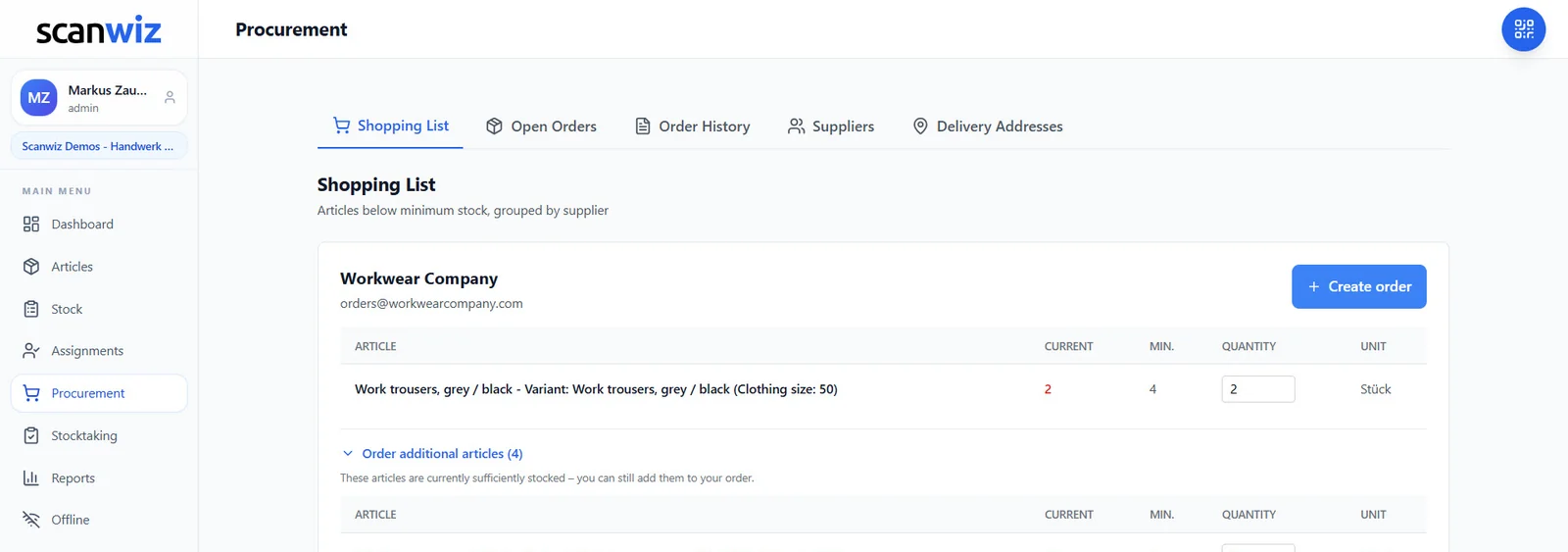
- Order suggestion per item, grouped by supplier
- Unlimited storage locations – from a shelf bin to a van
- Batches with expiry dates from the Growth plan
Frequently asked questions about maximum stock
What is maximum stock?
Maximum stock is the upper limit an item is replenished to. It equals the stock right after a delivery and, with the reorder point method, is safety stock plus order quantity.
How do you calculate maximum stock?
Safety stock plus order quantity. With 8 units of reserve and an order quantity of 32 units, maximum stock is 40 units. With periodic review, maximum stock is set in advance and the order quantity is calculated from it.
What is the difference between maximum stock and the reorder point?
The reorder point is the level at which you order. Maximum stock is the level after delivery. Essentially, the order quantity lies in between.
Can maximum stock be exceeded?
Briefly, for example during a special promotion, yes. Over the long term, too much stock ties up money and space and, for perishable goods, increases the risk that something expires.
Sources & methodology
- Scanwiz guide: Reorder point formula – maximum stock as safety stock plus order quantity.
- Worked example: Scanwiz’s own calculation with realistic figures from a joinery.
Updated November 2026 · Scanwiz editorial team
More from the glossary
Related to maximum stock.
Over 250 customers already trust Scanwiz
From the glossary to your warehouse – Scanwiz does the rest.
Minimum stock, stocktakes, inspection intervals and batches run automatically in Scanwiz as part of your daily work. Try it free for 14 days with your whole team – no credit card required. Or let us show you everything in a personal demo.


