
Glossary · Stock & replenishment
What is minimum stock?
Hardly any warehouse term is used in so many different ways. For some, minimum stock is the reserve; for others, it is the moment to order. Here you will learn what it means, why the difference matters – and which value to enter in your inventory software.
In brief
Minimum stock is the quantity of an item that should not be undercut in the warehouse. In business management it usually means the same as safety stock or buffer stock. In many inventory tools, however, it is the value at which the reorder is triggered – technically, that would be the reorder point.
Minimum stock: definition
Literally, minimum stock is the least amount that should be in the warehouse. That makes it a lower limit: if stock falls below it, something did not go to plan – consumption was higher or the delivery came too late. In textbooks and reference works, minimum stock is therefore just another word for safety stock.
In practice, a second meaning has taken hold. Many ERP and inventory tools have a “minimum stock” field that triggers an order as soon as stock falls below it. If you enter the reserve there, you order too late. That field needs the reorder point.
The two meanings compared
| Meaning | What it refers to | What happens then |
|---|---|---|
| Minimum stock as a reserve | The lower limit that should not be undercut – identical to safety stock | You order earlier, at the reorder point. Normally, minimum stock is never reached. |
| Minimum stock as a reorder trigger | The stock level at which you reorder – identical to the reorder point | If stock falls below it, you order. The reserve is included in the value. |
Rule of thumb: check what your software does with the field. If it triggers an order or an entry on the shopping list, enter the reorder point – not the reserve.
Setting minimum stock correctly
If your minimum stock triggers the order, calculate it like the reorder point:
Minimum stock as a reorder trigger
Avg. daily consumption × LT + reserve
- LT
- Lead time in days: ordering, delivery, putting away
- Reserve
- Safety stock, for example 2 to 5 days of consumption
If your minimum stock is only the reserve, determine it with one of the three methods for safety stock – from the rule of thumb to the statistical calculation.
Calculate minimum stock
The first tab of the calculator shows the reserve, the second the reorder trigger. The values from the example below are pre-filled.
The calculator needs JavaScript. Please enable JavaScript in your browser.
Example: frying oil in a restaurant
The kitchen uses an average of 1.5 canisters per opening day. The wholesaler delivers three days after the order. Two days of consumption should be kept in reserve.
- Reserve: 1.5 × 2 days
3 canisters - Consumption until delivery: 1.5 × 3 days
4.5 canisters - Reorder trigger: 4.5 + 3, rounded up
8 canisters
If the team enters “3” as minimum stock in the inventory software, the order only goes out when nothing but the reserve is left. It lasts two days, the delivery takes three – on day three, there is no oil. With “8”, the delivery arrives while the reserve is still untouched.
4 typical mistakes with minimum stock
- Entering the reserve in the order field. Then every order only goes out once the reserve has to be touched.
- Different meanings within the team. Purchasing means the order point, the warehouse means the reserve – the result is gaps and double orders.
- One value for all locations. If an item is kept in the main warehouse and in vans, each location needs its own minimum stock.
- Overlooking seasonal swings. What is enough in summer is too tight in winter – review the value regularly.
Minimum stock in Scanwiz
In Scanwiz, minimum stock triggers the reorder: if an item falls below it, it automatically lands on the shopping list, grouped by supplier. So enter your reorder point – consumption until delivery plus reserve. You can set the value per item, variant and storage location, for example separately for the main warehouse and vans.
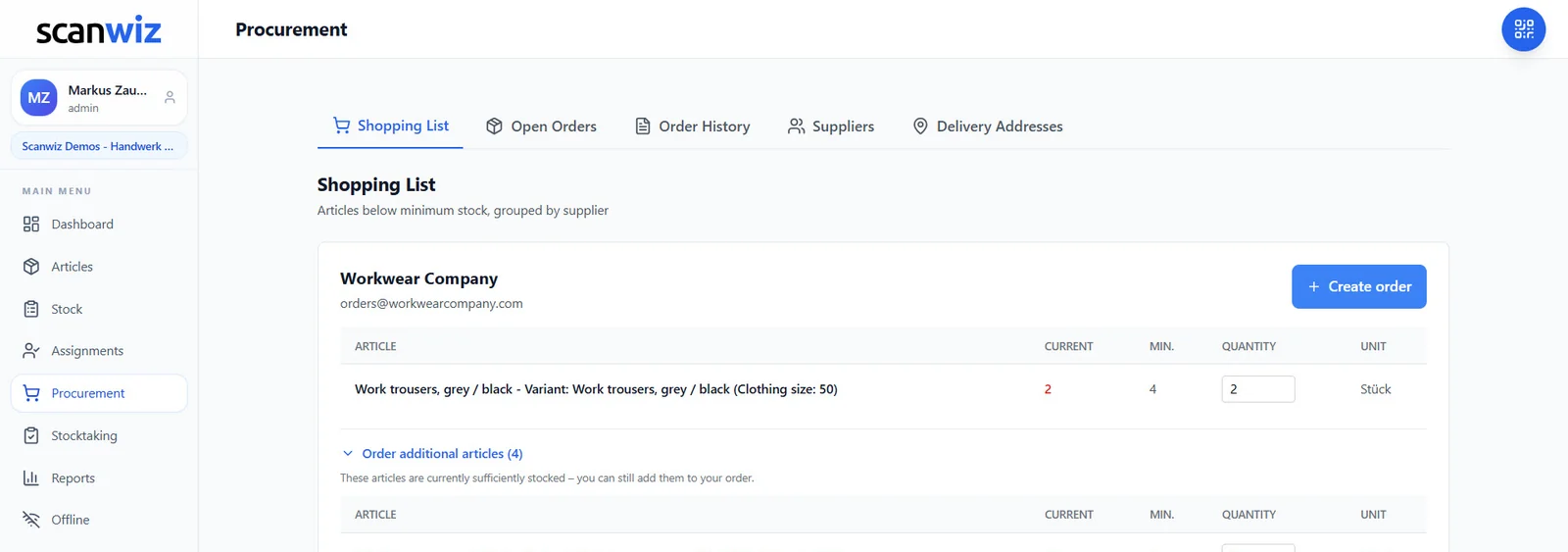
- Minimum stock per item, variant and storage location
- Automatic shopping list with order suggestions, sorted by supplier
- Withdrawals by scan – stock in the system matches the shelf
Frequently asked questions about minimum stock
What is minimum stock?
Minimum stock is the quantity of an item that should not be undercut in the warehouse. Technically, it is usually the same as safety stock. In many inventory tools, however, it is the value at which you reorder.
Is minimum stock the same as safety stock?
In the literature, yes – both refer to the reserve that should not be undercut. In inventory software, minimum stock is often the reorder trigger and then equals the reorder point.
How do I calculate minimum stock?
As a reorder trigger: average daily consumption times lead time plus reserve. As a pure reserve: for example daily consumption times buffer days, or with one of the more precise methods for safety stock.
What happens when stock falls below minimum stock?
If it is the reorder trigger, a reorder is placed. If it is the reserve, it is a warning sign: the delivery is late or consumption is higher than planned – then the reorder point should go up.
Do I need a minimum stock for every item?
For everything that is regularly used and reordered, yes. For single pieces, tools or custom-made parts it makes no sense – there, what matters is where the item is and who has it.
Sources & methodology
- Wikipedia: Safety stock – also known as buffer stock. en.wikipedia.org, accessed 10 November 2026.
- Worked example: Scanwiz’s own calculation with realistic figures from a restaurant.
Updated November 2026 · Scanwiz editorial team
More from the glossary
Related to minimum stock.
Over 250 customers already trust Scanwiz
From the glossary to your warehouse – Scanwiz does the rest.
Minimum stock, stocktakes, inspection intervals and batches run automatically in Scanwiz as part of your daily work. Try it free for 14 days with your whole team – no credit card required. Or let us show you everything in a personal demo.


